Friday, June 17, 2016

Creativity for Good

John B. Marine | 12:36 PM | | Be the first to comment!
Creativity is good; benevolent creativity is better. In light of recent tragedies and such, I feel we must use our creative energy and works to offer peaceful distractions from horrible news events. Maybe even offer hope and positivity. Incidents such as the recent mass shooting at an Orlando gay nightclub or the deaths of famous persons should be enough to get some of us creative types to make material to help make others feel better and offer peaceful distractions.

I am someone who believes in offering positive change and hope. While I do love making material to publish online, I also believe in offering material I feel will help people feel better about themselves and life. Offering peaceful and positive material is one thing I enjoy about making creative work. I know that my work will make someone feel happy and intrigued as a distraction from some of the most depressing news stories and incidents. Such works can offer something pleasant to enjoy. While certain creative works will not solve the world's problems or society's problems, at least certain creative works can help bring us all together and show solidarity. What makes creating these creative works fun is that we are able to offer distractions in the wake of different horrific incidents and moments in our lives. Especially fun and positive creative works provide some welcome comfort and something positive to think about in the wake of some of the worst tragedies or most depressing incidents.

If you are any kind of entity that produces creative material, my recommendation to you as you are reading this blog post is to offer creative works that can help ease pain and tension that we all face in day-to-day life. Let us, as creative works types, use our creativity to service for the greater good and for viable causes. Full credit to those who already use their creativity for benevolence. You don't have to be sponsored by some organization, lead some organization, or contribute to some organization to show your benevolence or contribute to charitable acts. Just offer fun and enjoyable material to help make peoples' lives better. What you can offer is based on what you believe in and what you feel you can contribute to try to make others feel better. You can simply make a song or make some kind of digital art offering positive messages or something really funny. While you are at it, you may want to be careful with some topics. Someone could take something lighthearted and take it out of context or convey a message different from what you are trying to say that is supposed to be helpful, funny, or positive. So be careful but still provide some great creative work for all to enjoy.


In other words, let us use our creativity to make this world a happier and fun place. Let us all have fun making creative works that will offer positivity and fun in this negative world and negative society. It is the least we can do to market ourselves while also making ourselves better people by offering great content for others.


My condolences go out to the various lives we've lost recently either from certain health issues or victims of violence or terrorism. I hope you enjoyed this brief blog post. Stay tuned to "John's Creative Space" for more creative works of mine and commentary in regards to creative work. Thank you for reading! Take care and be well.

"Like" me on Facebook, Follow JCS, visit my Weebly site, and/or Contact Me via E-Mail!
Subscribe to John's Blog Space (JBS) Subscribe to John's Creative Space (JCS) Subscribe to John's Race Space (JRS) Subscribe to StyleSpace (SS)
read more...

Monday, June 6, 2016

My Bandcamp Music

John B. Marine | 11:55 PM | Be the first to comment!
My music on Bandcamp is showcased here in this post. If you haven't yet heard some of the music I've produced, then allow me to present this post to you featuring the musical work I have uploaded to Bandcamp. I hope to offer more than what you're about to hear in the future. You will be able to hear a lot of the music I've made and also get an idea of what other material I may work on for possible future projects. So welcome to "John's Creative Space" and my amazing realm of creative work.

To check out all of my work on Bandcamp, please visit johnbmarine.bandcamp.com. Or you may click on this graphic below that links to my Bandcamp site:

JohnMarineDesigns JMDesigns Bandcamp
Click this to visit my Bandcamp site.


My Bandcamp Music: Introduction


These widgets will allow you to listen to my music. Here is how this post works...

This post features embedded widgets so you can listen to my music from right here on "John's Creative Space." You can go through the widget to listen to my various tracks. I am allowing you to listen to my music from right here in my blog. If you want to purchase my music, you are free to do so. I would appreciate your business if you did find my music enjoyable.


My Bandcamp Music: The Journey So Far...


Here is your chance to hear some of the music I've created. You can visit my Bandcamp site for more information on each individual song.


"Introduction."

Many of the songs featured here are mostly songs I previously made long ago. It was basically to introduce myself to the Bandcamp realm.


"Variety."

Songs I made earlier in 2016 are featured in a brief album called "Variety." Not much special here. There are two hip-hop type songs and one mellow pop song.


As of right now, that is all I have published so far.


My Bandcamp Music: Future?


If I am able to properly create some quality material, I hope to offer more albums with many more kinds of music. I not only want to produce music, but I want to produce music that I am hopeful people consume and use and enjoy.

For example, there are a number of different projects I have in mind in which I envision if I had my own TV themes for certain kinds of sports. I even envision making a set of generic themes that could be used for news programs or podcasts. I'm probably thinking of the latter since I doubt any major companies or major news networks would even use (or care) about my songs. Another project in mind is that of providing songs and sound effects that can be used as game assets. For people who usually use something like the jingles in iMovie and iLife (for all the Apple users, of course), I want to make a set of jingles that may interest you. I also have visions of on a series of songs with the theme of offering positive and inspirational songs. There are many ideas I have, many of which I Hope to bring to fruition.

I simply want to provide material that I think people will find interesting. All the while, I also hope I can profit from my work. First and foremost is to produce and provide enjoyable material made to the best of my ability.


Making great material for you- ranging from blog posts to creative works. That's what I do and hope I am doing well. You just read another post from "John's Creative Space"- the blog showcasing my various creative works. Thank you for reading! Take care and be well.
"Like" me on Facebook, Follow JCS, visit my Weebly site, and/or Contact Me via E-Mail!
Subscribe to John's Blog Space (JBS) Subscribe to John's Creative Space (JCS) Subscribe to John's Race Space (JRS) Subscribe to StyleSpace (SS)
read more...

Tuesday, May 10, 2016

My 3D Journey So Far...

John B. Marine | 9:57 PM | | | Be the first to comment!
(UPDATED: May 11, 2016)

My 3D experience so far is featured in this blog post. I still have a lot to learn as I keep trying to add models to TurboSquid (search "JohnMarineDesigns" if on TurboSquid). The five models I've created so far will be shown in this post. This is your chance to see my work and get an idea of what I hope to improve on in the future. If you want to judge my 3D work, judge fairly. I am not expecting anyone to worship me like I am the best ever at 3D or anything. So having said all of this, here is a look at the models I've created so far.

NOTE: Because all of these items are offered on TurboSquid, you can click on the images or the links below the images to take a further look at my models.


LATEST UPDATE(S)/REVISION(S)

MAY 11 2016 - typo corrected.


My 3D Journey So Far...


Here are the models I have created so far. If you want to learn more about each model, click on the images and links to each model. The models are all listed based on the order I uploaded them to TurboSquid.


Model 1: Voxel Vehicle Starter Kit.

Voxel Vehicle Starter Kit
Voxel Vehicle Starter Kit - This is the first TurboSquid item I published. It isn't a true 3D model because this originated from MagicaVoxel, and MagicaVoxel is used in the creation of voxel models.

The first item I offered on TurboSquid was to help people make their own voxel vehicle models. Due to the popularity of my voxel vehicles, I decided to offer a package to help some people get started making voxel models. I didn't want to simply offer my fine voxel model cars freely. In fact, I am still a bit undecided on whether or not to even offer my full range of voxel vehicle models or make polygon 3D models of my voxel model vehicles. I am considering the latter and have set up a few vehicles I am still developing. Speaking of polygons...


Model 2: Basic Sword.

Basic Sword
Basic Sword - This is the first true polygon model I created and offered online.

One model I created was a sword. It was purely basic, hence it being a "simple" sword. I still wanted to offer a basic product for people to enjoy. So anyone could use this sword as a prop, something to equip for players in games, or any such application. I actually took this sword and added a few more details at the hilt and on the blade itself. I actually triangulate the faces on the blade to add a little more detail. I even thought about making the hilt of the sword more fancy. However, I kept things mostly as is and moved on.


Model 3: Basic Trophy.

Basic Trophy
- This is a trophy I created in Wings3D. I made one in Blender, and I felt I made a better one in Wings3D.

Actually, I think I offered this trophy to TurboSquid before I offered my sword model. This is still a fairly good trophy model. This was actually a model I was working on then decided to make an entirely new model trophy. I made an entirely new trophy model to reflect some of my 3D skills in using Wings3D. One special skill I learned was in using the Intrude feature of Wings3D. You have to be careful using Intrude, especially when trying to use it to define certain interior details. It is best to use Intrude to properly define the interior of items. So one thing I did was make the cup part of the trophy it's own object. After making the cup part hollow, I re-attached the cup part to the rest of the trophy. I later went ahead and took four vertices to define the handle parts of my trophy. I then beveled those vertices. Afterwards, I went ahead and extruded those sections to define the handles. Many more extrusions were made until I made the handles as properly as I could. After I was all done with the cup part of the trophy, I went ahead and smoothened it for an amazing finish.


Model 4: Basic Trident.

Basic Trident
- This model of a trident is fairly basic in design.

I tried a more interesting model by creating a trident. The most important thing I learned making this model was the usage of beveled edges and edge loops to define certain parts of models I want to keep sharp. At this time, I actually got to learn using hard edges. The model was uploaded in its non-smoothened form. I don't intend for the model to be smoothened anyways. The main thing I was learning was the use of adding edge loops and beveled edges to preserve certain sharp shapes for when a model gets smoothened. You have to place those edge loops very close so that you don't get funky results when you try to smoothen the model.


Model 5: Modern Stool.

Modern Stool
- Have a seat in this modern stool! :)

I haven't made or released a model for some time. So what I did was try to create another model. My latest work is a stool. Rather than just a basic stool, I decided to make a modern kind of stool. This is a fancy sort of stool to sit in with back support and some bars for your feet to rest on. I needed to put some edge loops around the loop where the feet can be rested on to preserve a decent shape. Without proper placement of edge loops at key parts of the model, you end up with some funky results when you try to smoothen the model. This was perhaps a key lesson I learned in trying to make models. It will be a trial-and-error process trying to make proper models and trying to maintain a good amount of the geometry.


Just about all of these models were created using materials only. All of these five items to TurboSquid, except the first one, were modeled using Wings3D.


The Next Steps?


I am trying to develop vehicles and characters. There hasn't been anything I am proud enough to share with you all at this moment, though.

Everyone has a certain talent level and a certain level of devotion towards making certain material. Some can make spectacular models that are the work of weeks, months, and even years. Some feel they can make even the simplest models in just the course of one day or a few days. I don't feel I am experienced enough to make models of impressive quality. That is why I will mostly stick to low-polygon and even medium-polygon models. Even if I make hyper-realistic models, I am not expected to have the sort of quality that could get me recognized by major companies or major design studios. I don't have the skills or the patience to make some of the most amazing 3D models out there. Maybe eventually I will reach superstar status making 3D models, but that time is definitely not now for me at this point. I am not selling myself short- I know what I am capable of and what I am producing. I am just not at the level of 3D experience and talent that would qualify me as a professional or a powerhouse at 3D. The work I produce is on a level where I feel I am most capable.

As far as offering my work to others, I feel people will pick up my work and find many ways to utilize my content. A lot of the items I've modeled are nothing really special, but I am pleased if people see my work and decide to use it for various media projects or games. So please feel free to help establish my work and my presence.


Special Request!


You can find all of my work on TurboSquid, including any future models I upload to TurboSquid, by clicking here: JohnMarineDesigns on TurboSquid. Please help support me and my work any way you can. I thank all of you who support my work regardless.


My 3D experience is growing. My skills are improving. All I can hope for is to reach an impressive level of work. Only you can help me get there. I want to thank you for visiting my blog and reading this post. Thank you for reading! Take care and be well.

"Like" me on Facebook, Follow JCS, visit my Weebly site, and/or Contact Me via E-Mail!
Subscribe to John's Blog Space (JBS) Subscribe to John's Creative Space (JCS) Subscribe to John's Race Space (JRS) Subscribe to StyleSpace (SS)
read more...

Thursday, May 5, 2016

Pricing Your Work

John B. Marine | 8:30 PM | | Be the first to comment!
We all want to profit for our work. When selling your creative work, how much should you charge? The price of your work and the WORTH of your work are two different things. While I am no money expert, I'll offer my own opinions on this issue. Take my advice in this post more like a bit of guidance rather than any definitive solution.


Pricing Your Work


I thought about this issue as I interacted with the TurboSquid community. A few members were wondering about pricing work that they offered on TurboSquid. A visit to TurboSquid will give you a look at a vast variety of models and textures offered for sale. Through the many categories, you will see items offered from mostly hobbyist and amateur publishers. At the same time, you will note more advanced and more professional models. Prices for offered items range from free to some more expensive offerings. There is no right or wrong price for any sold material of yours. You do have to consider a number of variables when trying to decide how much to charge for your work.

Let's consider a few things. I will be using a good amount of analogies to explain some of my points, so be ready.


Price vs. Worth.

You may charge a certain price for your work (or offer it for free), but how much is something WORTH? Do you feel your work should be taken more seriously than some people probably would take it? Do you feel you made something that isn't completely random and could really help market yourself? Every work has a price (even if free), but how much it is WORTH is what matters most.

Think about auctions, for example- like automobile auctions. Why do some cars sell for more than a lot of others? People see the worth in some cars thanks in part to the attention to detail and even the rarity of certain automobiles. A car that is rusted over, not cleaned up, and maybe has some emission issues won't sell as well. The analogies provided in this paragraph denote the importance of worth with work. You can price something any amount you want, but its worth is what matters most. It helps to price material based on how much you think it is worth ranging from the effort you put into making it and how you think people should perceive it.

People will be willing to pay money for material based on how much they feel it is worth.


How Much to Charge?

I am no Economics expert or any tax professional, but I always found it best to charge fairly and realistically if selling work. If a 3D model you created was done with amazing detail and professionalism, offering it for free wouldn't be a smart idea. It would be great to offer high-quality material for free so people won't have to pay money for amazing quality work. However, you are your own business, and the work you produce is your portfolio. You should be able to (literally) cash in on an opportunity to expose yourself and promote yourself as an individual and as a business. If you take yourself seriously and stand behind your work, you should be able to charge whatever you want for your work. Just make sure to be reasonable and fair.

Here is something I thought of in preparing this post: why do lemonade stands in neighborhoods charge money? I may be going off-topic, but there is a point I want to stress here. Someone who offers lemonade is offering lemonade because the seller(s) is/are confident people in need of some liquid refreshment will want to drink something like lemonade. It would be great to offer lemonade for free. While it would be helpful and beneficial to do so, it won't make too much sense business-wise. After all- you are offering a product and a service. While offering free lemonade would help cure the thirst of people in the neighborhood, free will help boost your marketability because you offer something where no one has to pay. However, offering something for free could provide a situation where you what you produce or offer can't meet the high demand. What if people think your lemonade is the best in the neighborhood and that other lemonade stands just don't stack up compared to yours? You worked hard to provide a service, and obviously, you provided and incredible service and an incredible product. Would you be better served being compensated for your work (even if you're the "pay it forward" type)? Free is great, but if you are trying to promote yourself and market yourself to others and feel like your work means at least something to others, it would be a fair practice to charge an appropriate amount of money for your work for the sake of loyalty.

The point of the previous paragraph is that providing something like your creative work for sale helps gain revenue and even provides a sufficient business model. You find people willing to pay for your more quality content and are willing to use and utilize your material. This can range from digital art to music and more. Charging fairly and offering quality material are major factors in helping build yourself as an entity.

If you feel you have to make material that should provide some revenue, safest way to start is to charge something like $1 USD (or whatever your currency approximates to $1 USD) at the lowest. At least a price this low for your work will help determine your truly loyal audience. Pricing this low won't please people who want things for free, but at least you are showing a bit of professionalism and offer a feeling of taking business responsibility. Think about it. You pay about $1 USD for music on iTunes or Google Play. You wish you could download music for free (especially the latest material), but you have to consider that music is a business, and the people who produce such content have lives of their own and need the financial support to make ends meet and to simply live life. Financial support is not relied on, but it helps to know people can profit proper from their work. So paying a certain amount for creative works can help such causes. Just properly price your material based on effort and worth to others.


Is the Price Right?

As I mentioned earlier, there is no right or wrong answer about pricing work. I would advise to fairly price material based on the quality you put into your work and how much you feel it should be treated among a general audience. Don't price an amateur-level item at a professional-quality price. Professional quality means professional money. Consumers shopping for high-end goods aren't going to buy basic items from a mainstream department store. Especially if you are part of services that cater to both everyday people and professionals alike (like TurboSquid or Bandcamp), consider the range of products offered and their quality. People will shop at high-end stores for high-end goods. The high-end crowd want to find products befitting of such stature. So to see something not at the standards of professional quality will immediately be turned down for those wanting high-end goods. Best practice is to offer material to cater to certain audiences. People don't want to feel like they are getting ripped off or are spending more money than they really should for something.


Don't Sell Yourself Short!

Don't sell yourself short. Don't price something at affordable levels just to get more people. Even offering material for free would be like selling yourself short. As a producer of creative works, you are your own business. Value your own content and the effort you put into making it possible. If you feel your work is of high quality and begging of a high-quality price if offered for sale, don't offer high quality for a low price. Most high quality material is offered for high prices simply because it is material worthy of best-of-the-best quality. Every now and then you may find something priced fairly modest yet still provides amazing quality. How often does THIS happen, though? You have a chance to promote yourself and offer material better than what most others produce. Why not assert yourself and price your material competitively and realistically? Do you want people to take you seriously? Price your material accordingly, but seriously avoid selling yourself short.


Avoiding Greed.

We all want to profit from our work. However, you don't want to be greedy. Don't charging unnecessarily over your work. Don't charge for things that should be free or could be priced much lower. Taking yourself seriously is nothing wrong. Only thing is, don't feel like your very existence is on getting as much monetary value from your customers. Also consider this- who wants to do business with someone who cares more about making money than offering quality material to the greater public-at-large? People may refuse to check out your material if you are greedy.

Seek opportunities to financially profit from your work, but don't be totally fixated on getting every last bit of currency from customers or clients.


Pricing Your Work: My Reasoning


Allow me to offer my own reasoning on material I have offered online to others.

Some of the material I've offered online are offered at prices that I feel were appropriate for the effort I put into my work and how much I feel it is worth. Everything I produce is something I feel is of some kind of value. I feel like I am disrespecting myself if I offer material that I feel lacks any value. I blog for free and don't have any sponsors or anybody paying me to post certain things. When it comes to things like 3D models, music, or eBooks on the other hand; I feel that while free is great for my general audience, I feel I must offer some of my material for certain prices both for loyalty and for the sake of seeking monetary opportunities. My main focus is in offering material to others because I love to be able to make something people will enjoy. I am not focused on making money, though it would be nice to financially profit for my work. First and foremost with my creative work is to make something people will hopefully enjoy.

I enjoy what I do, and the level of professionalism I have is adequate without being excessive.


Pricing Your Work: My Reasoning on My Published Content.

I do not consider myself a good writer, so I didn't try to offer my eBooks at any ridiculous prices. I priced my eBooks based on the content provided and how much I feel it is worth to people who ultimately get to consume my literary work. Since posting my first eBooks, I priced them accordingly since I feel there is value to my material that I think offering for free wouldn't exactly merit its worth all that much.

I uploaded music to my Bandcamp page and offered them for sale at a certain price. Free would be great, but I feel those who really enjoyed my music will hopefully pay to show their support of me and my work. Bandcamp allows you to sell songs for certain prices and albums for other prices. If someone purchases an album, you can sweeten the offer by providing some special content as part of the package.

Because I am greatly a novice at 3D modeling, I don't go crazy with prices for my 3D models on TurboSquid unless I felt my skills warrant certain items to be certain prices. So I am not going to price my models to any serious degree. I may offer some of my work at higher prices especially if these are more original creations done with a level of detail much different from anything generic I've created. Because something is very original, I feel I am disrespecting my own work if I priced it low. My most original works would be offered on a premium level. So a premium-designed model of something purely original of mine would sell for much more than most of my other offerings. I value my own work and the level of importance and quality in my work. I am not going to make something not really special or unique sell for high prices. Basic items sell for basic prices. I'll charge more if I feel my work is of decent enough quality.


This at least covers my own philosophy in regards to pricing creative work.


Speaking of Creative Work...


Feel free to support me with my work! Visit the following links to check out my material:

my Weebly site (which includes various store material)
my Bandcamp
my TurboSquid work

Please help support my work any way you can. I would appreciate the support.


This isn't definitive advice, but it is advice nonetheless. I hope you gained some insight here. That concludes this blog post. Thank you for reading! Take care and be well.

"Like" me on Facebook, Follow JCS, visit my Weebly site, and/or Contact Me via E-Mail!
Subscribe to John's Blog Space (JBS) Subscribe to John's Creative Space (JCS) Subscribe to John's Race Space (JRS) Subscribe to StyleSpace (SS)
read more...

Friday, April 22, 2016

Basic Trophy

John B. Marine | 8:12 PM | | Be the first to comment!
(UPDATED: April 23, 2016)

Using Wings3D, I made another model. This model is another trophy. I feel I need to make more models to build a portfolio and show evolution in my 3D modeling. So I will release a number of models to help that cause. This latest creation is the first true 3D model I've published on TurboSquid. Before I continue...


About the Label: "3D Modeling"

Items featured in this label include various 3D models I have created. These may consist of items I am offering for download and/or sale.

...now let's continue on.


LATEST UPDATE(S)/REVISION(S):

APR 23 2016 - edited link


Basic Trophy


Here is a look at my latest creation:

Basic Trophy JohnMarineDesigns
^ (click to visit my TurboSquid page featuring this item)

The model was then given individual materials based on colors. The whole trophy model began with a cylinder. I then broke up the cylinder base and the cup part. I intruded the top of the cup to form the hollow out the interior to form the inside of the cup. The cup part was re-joined with the stem up the trophy. To try to produce the handles of the cup, I first cut the complete model in half. Two vertices from the cup part were beveled followed by a combination of extrusions and lifts through Wings3D. Once I got towards completion, I bridged the two faces to complete the model. Afterwards, I simply mirrored the whole trophy to give you this fine model. Only the cup part of this model was smoothened on this model. It was smoothened twice for its clean appearance.

You can use my model in case you want a trophy to use as a prop. I have not tested it with game engines, because I did not intend this model to be used with any game engines. Of course, you can always convert this model to be used in games if you so choose.

This model will be among many I will try to offer to build a portfolio of content with. So if all goes well, you will see a variety of items I will be willing to offer on TurboSquid. My models can be used for applications ranging from games to media projects. Feel free to support me in all of my efforts. And of course... thank you for your support if you choose to do so.


John Marine on TurboSquid

To search for more of my work on TurboSquid, please visit: JohnMarineDesigns on TurboSquid.


I feel it is important to offer a variety of content that I think people will enjoy and use. Be sure to stay with my online material for more content. Thank you for reading! Take care and be well.

"Like" me on Facebook, Follow JCS, visit my Weebly site, and/or Contact Me via E-Mail!
Subscribe to John's Blog Space (JBS) Subscribe to John's Creative Space (JCS) Subscribe to John's Race Space (JRS) Subscribe to StyleSpace (SS)
read more...

Tuesday, April 12, 2016

Wings3D

John B. Marine | 7:30 PM | | | Be the first to comment!
Wings3D is a free 3D modeling program. In trying to learn this program, it is a bit harder than SketchUp, but much easier than Blender. Wings3D was inspired by the Nendo and Mirai modelers. Anyone wanting to make models would be hard-pressed to find an easier program to use. This program can be a bit on the tedious side to efficiently create models. However, when you really get to understand how the program works and what you can really do to make models, Wings3D is truly effective as a modeler. I am sticking to low-to-moderate detail models. When I get more experienced, I will try making more detailed models. I really need to take advantage of these skills to make models I eventually want to offer for download and sale. So as of this post, here is the one true model I consider as a start-to-finish model using Wings3D:

Wings3D model
This basic sword is the first real model I made from start to finish with Wings3D.

Again... this isn't much, but it is a start considering how inexperienced I am with 3D models. Remember it took me almost 20 years to say I created a 3D model of any kind (excluding voxel models) I was proud to create from start to finish. I still have a lot to learn in making 3D models.


Notes on Using Wings3D.

Here are a few notes I want to share on modeling with Wings3D.

• I mentioned that the workflow with Wings3D can be a bit tedious. The most important advice I can give is that when selecting elements of your geometry, make sure to de-select everything when you are done making the modifications you are making. So many times have I made unwanted modifications to the geometry of my models because I forgot to de-select parts of my edits. For example, I've extruded faces of other faces of my models in places where I didn't want the extrusions to take place at. It does get tedious remembering to de-select, select, right-click, pick an option, and execute.

• The proprietary format for Wings3D models is the *.wings file system. However, you can export your models to a number of different formats. These models you export can be used in a variety of different programs that allow for various edits (such as Blender). Three formats I have had success with are 3DS, DAE, and OBJ. 3DS offers the most direct results. DAE offers great results, but [at least in Blender] the model is rotated the wrong way, and I also have to re-size the object for it to be visible. So I don't recommend Wings3D for exporting to DAE. Exporting to OBJ yields great results, but I noticed the models are smoothened. If you prefer your models in flat shading, I wouldn't export to OBJ using Wings3D.

• You can render your models using plugins for POVRay and Kerkythea. Both do a great job. I am using POVRay because it is faster. Kerkythea offers beautiful renders, but rendering can take longer (sometimes MUCH longer) than POVRay renders.

• If you are rendering and note your models look gray, I learned a reason why- you didn't specify materials to your models. Wings3D has a window where you can add colors from a palette to your models. Those colors don't stand with the model unless you specify them. If you have already colored your model using the palette, there is a way to take those colors and make them materials for the model. Select all of the model and its colors and right-click on "Vertex Attributes." From there, click on "Colors to Materials." You are now able to edit the materials as you wish. From there, you can adjust the different settings to make more impressive renders.

• Try as you might, you can't create curves or use any bezier curves. So you will have to get accustomed to using hard-edged models and models with hard edges.

• You can UV Map objects in Wings3D. It isn't too difficult to try to properly mark seams for UV mapping.

• If you want to export certain images, like UV maps or screenshots, you must click on the item from the Outline window and click on "Make External." Save the images to your computer, and you can use those images to share online or to make edits.

• Wings3D is an amazing modeling program, but I wouldn't really recommend it for extravagant models. There are no options for animation. Simply use Wings3D to create models and export to common formats for other programs. Then use other programs to be able to animate your objects or rig them. So for example, make a human character model in Wings3D, then use Blender to add an armature to the model for rigging.


Those are only a few things I want to get to you in helping you play around with Wings3D.


Final Thoughts.

I mentioned Wings3D as being harder than SketchUp but easier than Blender. That is the truth to be honest. SketchUp was basically designed for inexperienced modelers (like myself) to make models easily and have a fairly simple suite to work with. Wings3D is a step up from SketchUp with a handful of other options to help make more detailed models. You can use your exported models from Wings3D in a number of different programs, such as Blender or Unity3D. I would recommend 3DS as the kind of file to export from Wings3D based on my own experience so far. The only real negatives to Wings3D are the inability to make some simple geometry and nothing in terms of making circles or curved objects.


For More Information...

You can download Wings3D from www.wings3d.com. Remember- Wings3D is FREE and open-source! You can use Wings3D for both personal projects and commercial projects. So if you want to make models and offer them for sale, you can use Wings3D for that.


Special Request!


I mentioned that I am looking to make a better effort to make many more 3D models for download and/or sale. If you want to view my work, I will be working with TurboSquid. I will try to offer models there for you to check out and use. So please support my work through TurboSquid by searching for my models here: JohnMarineDesigns on TurboSquid

I will add graphics to this blog for you to visit my TurboSquid site for models I have offered for download and/or sale.


I hope I have helped expose you to Wings3D and maybe encouraged you to use this program. Thank you for reading! Take care and be well.

"Like" me on Facebook, Follow JCS, visit my Weebly site, and/or Contact Me via E-Mail!
Subscribe to John's Blog Space (JBS) Subscribe to John's Creative Space (JCS) Subscribe to John's Race Space (JRS) Subscribe to StyleSpace (SS)
read more...

Tuesday, March 15, 2016

My First SketchUp Model!

John B. Marine | 7:34 PM | | | Be the first to comment!
I completed my first SketchUp model! I made my latest 3D model based on my 3D skill and on how much I've learned so far trying to make models with SketchUp. This post is my opportunity to share with you my latest creation and second-ever 3D model I completed. So without further hesitation, take a look at my latest creation:

SketchUp Car
^ Here is my first model I created in SketchUp- a car.

I began creating this model by tracing the side profile of a Citroen C2 VTR 1.6. Then after that, I extruded the body and envisioned making the rest of the car. I used only a basic side silhouette to envision making the rest of the car. For the most part, I went with the strategy of modeling the half of the car. So I modeled the left side of the car to begin. Afterwards, I copied my entire creation and then tried to piece together the car. To say the least, the process of piecing together the car is a MUCH easier process in SketchUp than in Blender. All I had to do afterwards was flip the car along the red axis. Only other modification I made was modeling a muffler on the right side of the car from the back. Another simple process was to combine the geometry. By simply marking up all of the faces I wanted to have join the main body of the car, I just simply used the Intersect Faces option to apply the geometry of my muffler to the car. I could then easily erase some of the extra geometry to reduce unnecessary polygons.

This car was sort of a tricky one to me. My emphasis was mostly on low polygons, but I wanted to make the car a bit detailed without going overboard. It was all entirely made through materials. No textures of any kind were used, but I did use a few textures early on just to learn SketchUp. The final model didn't have any textures. I created this car within the course of one day. I actually worked on it all of this past Monday and then put on finishing touches this Tuesday. So this was a car that actually probably took maybe a total of 3-5 hours when it could have been made in one or two hours. There are no overly insane details I made with this model.

I hope to offer this model on TurboSquid, but no plans right now have been made to actually offer it. I actually want to test my creation before wanting to offering it online.


So do you like my work? Let me know what you think by commenting. Thank you for reading! Take care and be well.

"Like" me on Facebook, Follow JCS, visit my Weebly site, and/or Contact Me via E-Mail!
Subscribe to John's Blog Space (JBS) Subscribe to John's Creative Space (JCS) Subscribe to John's Race Space (JRS) Subscribe to StyleSpace (SS)
read more...

Monday, March 14, 2016

SketchUp

John B. Marine | 6:56 PM | | | Be the first to comment!
"3D for Everyone"- so says SketchUp. Aside from my learning of Blender, I tried SketchUp. SketchUp is a 3D modeling program which many know Google had for a while until it was sold to a Colorado company called Trimble. When I did research on SketchUp and what to get, I was ultimately convinced to try to get [Google] SketchUp 8 Free. Part of the reason was to be able to commercially offer my creations. The reason why was because I felt confident enough I can model in SketchUp to where I can produce quality material. To my fine fans of "John's Creative Space," I offer this blog post regarding my experience with SketchUp so far.


SketchUp Thoughts


SketchUp
^ This picture is a demonstration of me trying to learn SketchUp. I took a pixel art car and practiced making shapes. Maybe something will come from this?

For the most part, SketchUp is VERY easy to learn. Let's just say that SketchUp in making 3D models is as easy as voxel modeling with MagicaVoxel. There is almost the same level of confidence in making quality material once you really get accustomed to everything. Truth be told, Blender is much more powerful with many more features. SketchUp is just very easy to model with. As long as you know what you are trying to build, you don't have to do too much to quickly and efficiently make models.

I tried last night to make a fictional car in SketchUp based solely on a pixel art car I downloaded a long time ago. I probably should have modeled half of the car (which is a great tactic for modeling a lot of objects), but I was very pleased at how I went from taking a basic silhouette of a car and doing the many different extrusions and such to model a machine properly. Getting down a lot of the mere basics was enough to get me excited. I'm serious- when you can confidently make something using SketchUp, you begin to really feel like you can create something quickly and effectively.

A thing I like best about SketchUp is how nicely you can snap onto edges and vertices to make items without the geometry going out of whack. This allows you to model items with a good degree of precision. One thing to take advantage of are the materials. The materials include items like solid colors, texture patterns, and even translucent colors- good for glass faces of models. For making various vehicles, you are basically looking at just putting together a bunch of faces and then applying some translucent textures to the glass bits of some vehicles. Extremely basic models can take only a few minutes to complete with SketchUp.

If you want to expand upon your experience, SketchUp allows for plugins and other items to help add more features. This will allow you a lot more power in making items through SketchUp. One such example of a plugin for SketchUp is SketchyPhysics, which allows you to provide realistic physics to models to bring life to them. SketchyPhysics can be essential in things like animating cars or any other vehicles.


SketchUp vs. Blender.

There are so many more features and so much more detail in Blender than SketchUp, so this is a no-contest in that front. However, SketchUp is MUCH easier to learn and has much less of a learning curve than Blender. The free version of SketchUp (called SketchUp Make these days) only allows you to export in DAE and KMZ. You can save files in SketchUp's native SKP format. Blender allows for the importing of DAE format models. When I tried uploading one DAE model I downloaded that was made in SketchUp, parts of the model appeared missing. When I uploaded a DAE of a file I fooled around with on SketchUp into Blender, it appeared nearly perfectly. However, a lot of the elements meant to be translucent from SketchUp didn't appear transparent when imported into Blender. So I had to make the translucent materials transparent through Blender. The work otherwise went well.

What you could do as a workflow is to model in SketchUp followed by refining your model with Blender. You can export from the free SketchUp versions in the DAE format- which works with Blender. The creations should come in properly through Blender unless the model is overly complex. Depending on the model, it will properly be broken up into a number of different elements when you upload to Blender. You may also have to rearrange the origin of items in Blender if you didn't line them up too well in SketchUp.


SketchUp Plans?


Do I have any plans or projects set up for SketchUp? Read this section for plans I have in using SketchUp...

I am actually considering taking my voxel model cars from MagicaVoxel and try to make more proper 3D versions of them through SketchUp. In addition, I am also considering making exclusive models of machines I haven't created or finished in MagicaVoxel. So you might see some material I've never created before. One thing I am undecided on is making the vehicles white. The reason why I am undecided on that is because I want the user to be able to color any of my machines in any color(s) one so chooses. I mostly intend on making base model machines without any real attention to textures. My machines can benefit from real texture use, but I'll leave it mostly up to the ones who ultimately get to use my work.

Nothing has been decided yet in regards to making characters. While it is possible to make characters, I haven't been purely convinced on that front. SketchUp seems more tailored towards the modeling of non-organic entities. It is still possible you can create characters of various kinds in SketchUp. However, I am still investigating and researching in wanting to come up with characters.

Also possible is the creation of simple gaming assets through SketchUp. A few basic items I have in mind will suffice for the small-time independent/indie game studio or developer.


In other words, I have multiple plans. What I actually come up with and what I feel I can provide and showcase will vary.


SketchUp: Final Thoughts


The ease of use and relatively low learning curve makes SketchUp a real boon for modelers ranging from hobbyists to professionals. With little patience, it is possible to create even basic material. More adept types can try to make more advanced creations. No matter which way you go, you will be met with a program that seems very bare bones to many people, but very detailed without being overwhelmingly detailed. You can easily make your very first true 3D model with this program and be confident enough to make many more with SketchUp if you have never made any true 3D models before. Give SketchUp a chance and model away!


For More Information...

I will provide the link to today's SketchUp, though I mentioned I am using a previous model of SketchUp. So visit www.sketchup.com to learn more about SketchUp and to download or buy the program.


Anything interesting I come up with will be shared across social media and here in my creative works blog. It has been a great pleasure to share this post with you. Be sure to Subscribe and Follow if you enjoyed my work. Agree or disagree at will about my material. Thank you for reading! Take care and be well.

"Like" me on Facebook, Follow JCS, visit my Weebly site, and/or Contact Me via E-Mail!
Subscribe to John's Blog Space (JBS) Subscribe to John's Creative Space (JCS) Subscribe to John's Race Space (JRS) Subscribe to StyleSpace (SS)
read more...

Sunday, March 6, 2016

My First 3D Model!

John B. Marine | 6:01 PM | | | Be the first to comment!
I never made a true 3D model until now. From start to finish, I made my first-ever 3D model of any kind outside of voxels. I made my first model using Blender 3D and rendering in the Cycles Renderer. I felt so accomplished. As someone who recently offered a product on TurboSquid, I feel I need to step my 3D game up and think about other things to offer in addition to my original models. I will probably never create anything completely professional and advanced, but my first polygon 3D model I completed from start to finish is merely a start towards hopefully making many more 3D models of many different things.

About the Label: Blender

All posts under the "Blender" label include work I have done using the free, open-source 3D modeling program Blender. To learn more about Blender, visit: www.blender.org.


My First 3D Model!


So what did I design as my first true 3D model? Take a look:

my first 3D model
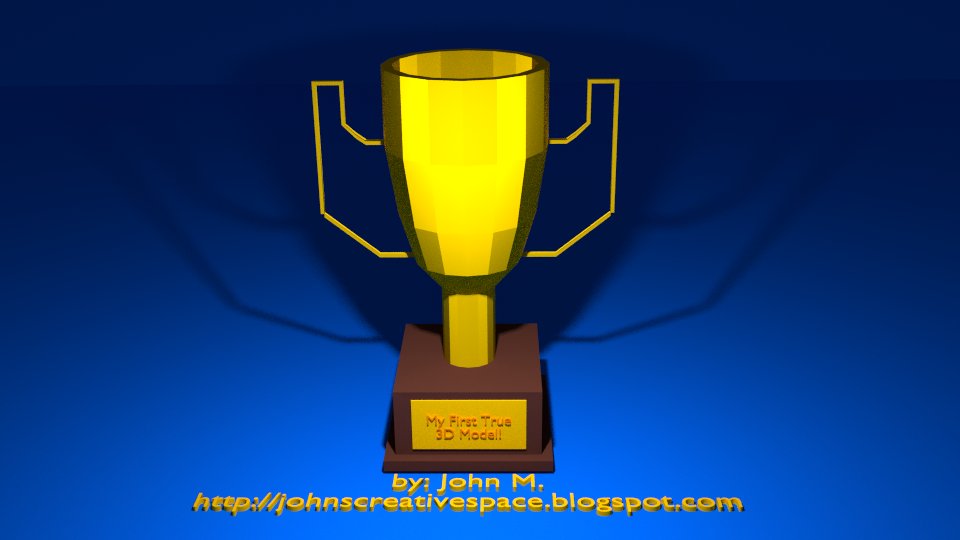
^ This trophy I made serves as the first-ever true 3D model I created from start to finish. This model was made completely from polygons. No voxels or conversions were used in the creation of this model.

That's right. I made a trophy. It was supposed to be practice in using Blender's Boolean Modifier. I also utilized using the Mirror Modifier to make some of the process easier. The base of the trophy was designed from a single cube followed by extruding. The cup part of the trophy stemmed from a cylinder. Through loop cuts and extrusions, I was able to create the cup part through the cylinder. Later, I started to make a couple more loop cuts followed by extrusions from vertices and edges. After being done with the modeling process, I then went ahead and tried to make a render using the Cycles Renderer as opposed to the Blender Render. I later added another text field to simply put my own mark on my first-ever true polygon model. The end result of all of this is the picture I just shown you.

NOTE: I tried to use the Subdivision Modifier, but since I wasn't happy with the rendered result, I decided to leave the model in its raw form.


Biggest Challenges.

Maybe my biggest challenge in making a real 3D model is simply trying to complete it. It becomes too easy trying to envision how you want to complete the model and how to actually complete the entire model. That was one of my greatest challenges trying to make some models. I feel sometimes like I do so well trying to develop the model, then lose the confidence to complete the model as well as feel like I messed up somewhere to where recovery is impossible. I could probably try to better learn using Blender and actually take advantage of the many powerful tools and features the program provides.


What I Learned From Making My First Model.

When you make your first of something and feel good about it, it motivates you to make more things. Speaking as a blogger, you can tell I became a lot more confident in my blogging work over the years. I usually do not release anything until I feel I am completely proud and confident I made something as best as I could. I can definitely say I enjoyed my first true effort to make a proper 3D model. While I may still make voxel art, I at least feel great knowing I can make polygon 3D models outside of my regular voxel art.

Outside of making my first 3D model, I also can use this experience to learn how to better use Blender and even broaden my skills making 3D models. I feel I have a whole lot to learn. This first experience can only motivate me to do better when I want to make more 3D models.

Prior to making this model, I can say it has been probably somewhere in the range of 15-20 years to where I tried to work with 3D programs to try to make 3D models, coming up short all the time or lacking the patience and confidence to complete models. So making this model was a great relief to me after trying a number of times to make a true 3D model.


Future Plans.

I don't think I have the confidence and patience to make professional and detailed 3D models. So to me, I think I may exclusively work with low polygon models. Trying to maximize detail and depth with as few polygons as possible is what I want to do. To be honest, I'd love to try to make 3D models to serve as assets for games and media projects. So you may see some items I can possibly offer online to help you folks out with your media work.

Of course, be sure to stay tuned to my blogs to see a lot of my work and to find out what assets I may offer to you all.


Don't Forget... I'm on TurboSquid!


I mentioned being part of TurboSquid in this post. To see all of my work on TurboSquid work, please visit this link:

JohnMarineDesigns on TurboSquid

Please look around and thank you for your support! Please be sure to support my work any way you can. I would appreciate your business and involvement.


I am so pleased to offer this post to you all to showcase my work. After all, this blog is all about me showcasing my creative works. I hope you enjoyed your time here. If you have not yet subscribed or followed my work, I would appreciate it if you did follow my blog(s) in any capacity. Thank you for reading! Take care and be well.

"Like" me on Facebook, Follow JCS, visit my Weebly site, and/or Contact Me via E-Mail!
Subscribe to John's Blog Space (JBS) Subscribe to John's Creative Space (JCS) Subscribe to John's Race Space (JRS) Subscribe to StyleSpace (SS)
read more...

Thursday, March 3, 2016

Voxel Vehicle Starter Kit

John B. Marine | 1:27 AM | | | | Be the first to comment!
(UPDATED: April 23, 2016)

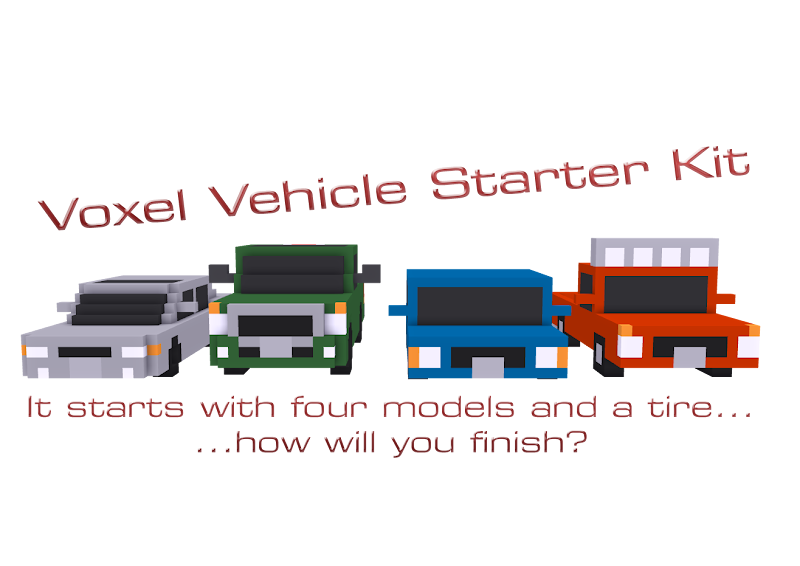
My first offering of voxel cars is with a package that went live on TurboSquid recently. I created a "Starter Kit" featuring four cars I designed myself including one tire model for games and media projects. I offered this to get my work exposed as well as get people started in their projects using some fine voxel models. While this package does not include any machines I've created previously, I do offer my own designs to help people get started and get a feel for my artistic style.

Here is a look at my work:

my first TurboSquid product
^ learn more here: Voxel Vehicle Starter Pack - I have finally offered my own voxel car designs to others.

Because this was my first TurboSquid product and because I want this to be a gateway to making more quality material, I am offering this for free. Each of the vehicles I have created are my own designs amd feature versions both with static wheels and with no wheels. The versions with no wheels can be used in programs like Blender in the creation of games and media projects. Since the no wheel versions (obviously) don't have wheels, I have included a tire that can be added to models. The tire model I created features a tire with an attached eight-spoke wheel all made of voxels. Just re-size the tires to fit into the wheel arches. It may look awkward with the rest of the vehicle, but you are at least fitting a nice set of wheels on the car. Of course, you could always make your own tires and wheels and affix them to the car in programs like Blender or something. You can set up the vehicle to have a basic rig setup or try more advanced rigs with suspension setups. No matter what, I have given a unique start to help fuel the dreams of those who love cars with my voxel vehicles.

You're welcome, world. :) For more information on this package, please visit: Voxel Vehicle Starter Pack (TurboSquid). Credit me if you use my work in your projects. Please?

To see more of my work, visit: JohnMarineDesigns on TurboSquid


LATEST UPDATE(S)/REVISION(S):

APR 23 2016 - edited a link, extra edits


If you loved this package, I hope to offer more material to you all in the future. If you liked this blog and/or this blog post, I hope to offer more blog material to you all. Thank you for reading! Take care and be well.
"Like" me on Facebook, Follow JCS, visit my Weebly site, and/or Contact Me via E-Mail!
Subscribe to John's Blog Space (JBS) Subscribe to John's Creative Space (JCS) Subscribe to John's Race Space (JRS) Subscribe to StyleSpace (SS)
read more...
JohnMarineDesigns on TurboSquid

Would you like to donate to support my creative work? If so, please show your support using this PayPal item:
I am now on Patreon! Support my creative work on Patreon today at: www.patreon.com/johnbmarine!
 
Copyright © 2015 John's Creative Space • All Rights Reserved.
Template Design by BTDesigner • Powered by Blogger
