Showing posts with label Advice and Commentary. Show all posts

Wednesday, May 22, 2024

College Car Concept

John B. Marine | 1:19 AM | | | Be the first to comment!
Earlier in May 2024, I saw a live stream of Formula SAE competition at Michigan International Speedway. I was somewhat inspired to make some concept or project to set up based on seeing these college formula cars. Additionally, I thought about a second concept similar to Baja SAE, but that is for another time. Allow me to share with you my concept.


About the Label: Breakdowns

Blog posts under the label of "Breakdowns" involves an explanation of individual projects to help you understand certain works of mine. As many elements of it as possible are brought into greater detail. Breakdown posts can include stories, artwork, audio, and more.


College Car Concept: The Car


Collegiate motorsports is not a concept that has been visited much in virtual racing. There have been two primary examples. "Live for Speed" is a game that features the MRT5, a formula race car inspired by a car developed by McGill University in Canada. There are also a handful of mods featuring a Formula Student car developed by the University of Carlos III Madrid, the MAD Formula Team.

There are no real wheel-to-wheel racing series involving colleges and universities. What comes very close, however, is the Purdue Grand Prix. The Purdue Grand Prix is a go-kart race held on a go-kart track meant to raise scholarship funds for graduating students at Purdue University in West Lafayette, Indiana, USA. If you get to see any videos on the Purdue Grand Prix, take a look. It gives you an idea of colleges taking on the challenge of motorsports.

As nearly anyone would know, motorsports are expensive and surely dangerous. No one wants to see their prized racing machines become a heap of scrap metal after a crash or some other unfortunate incident. Thankfully my idea is a fantasy deal whereas this is more a spec car rather than colleges building them up from scratch. Also, getting into any sort of racing series usually does not require a college degree. It is not like American football or basketball where you need a certain amount of time in college prior to joining professional leagues. Part of the beauty of fantasy involves imagining things that defy logic and are sometimes too good to be true.

In reality, however, these collegiate motorsports competitions are held by mostly engineering students at college and universities; and the competitions themselves do not usually involve wheel-to-wheel racing. The goal of these colleges and universities is to build a formula car for a fictional company. This becomes a journey of about a year and a half to build, develop, present, and actually race these machines in a number of different events. Students of these programs usually go on to receive Engineering degrees and work mostly in the automobile industry.

This idea basically is about taking the college sports style route and work flow and adapting it to motorsports. So to get started in explaining this project, let me talk about the car.
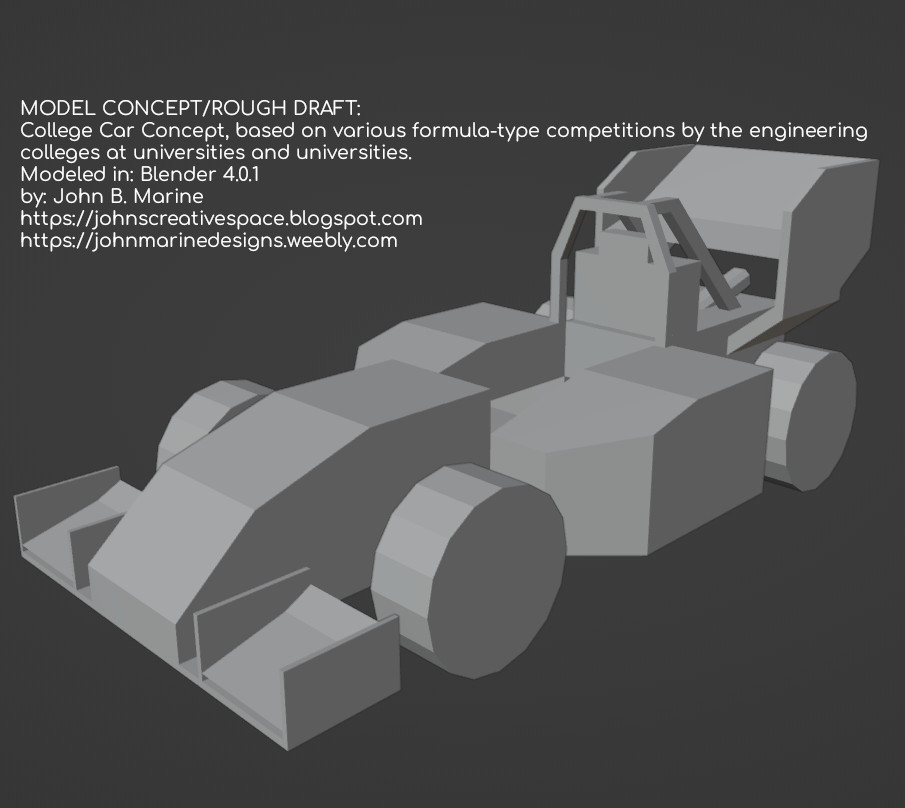

The Competition Car.

Here is a breakdown of what I created as a rough draft. This is a rough draft or concept of what I developed:


college car concept
^ from: (my X/Twitter) - This is a rough draft of a formula race car I developed based on what colleges make.

For me personally, this is my best-ever attempt at 3D modeling a formula race car. This concept car is an interpretation of a formula-type race car that a university or college would develop. I did not know what to name it, so I named it as the "College Car Concept." Such cars have a restriction of having engines no greater than 710cc displacement. A lot of these cars are mostly powered by supersport/middleweight motorcycle engines. Such engines have roughly 600cc displacement. A few others use a 450cc dirt motorcycle engine. Once, Western Washington University developed a 554cc V8 engine for their Formula SAE car in 2001. It is one of the wildest FSAE cars ever developed.

I decided to get wild with this idea. How wild? Try these cars being fitted with superbike engines! So this concept could possibly have superbike performance. Normally, one of these Formula cars will usually race on tracks like go-kart tracks. A car with a superbike engine would be too much for some go-kart tracks. This would defeat the purpose of these superbike-powered cars on a go-kart track or most autocross courses. This would be a superbike-powered car racing on longer and more proper courses if this car was powered by a superbike engine. Now if you need some examples, I have seen videos of superbike-powered race cars take on hillclimb events in Europe, so that is a bit of perspective.


The Competition Car Specifications.

I have no idea about the rules and regulations of Formula SAE or Formula Student. In fact, there is supposedly a rule book in Formula SAE with over 100 pages. This car was built as a loose interpretation of modern formula cars by colleges and universities.

There are actually a lot of options for the player in regards to the college car:

CHASSIS AND ROLL CAGE: While the car featured is a winged car, lower-powered versions can have no aerodynamic enhancements to it. The options would be having no wings and then being to choose a winged car. Usually, it is up to the colleges themselves to develop a car to either take advantage of aerodynamics or not. It all depends on if you want your car to generate downforce or not.

ENGINE: The college car could be fitted with a host of engines. I figured the "starter" or "beginner" spec would be a measly 125cc engine, like with a go-kart faster than rental karts. Another option is a 250cc engine that superkarts have. There are also 250cc dirt bike engines. If you fancy a dirt bike engine, you could choose either a 250cc dirt bike engine or a 450cc dirt bike engine. The primary class of engine is a 600cc engine, such as with supersport/middleweight motorcycles. If I could think of a unique flow to it, the superlative class of the College Concept Car is a 1000cc superbike-type engine.

Besides motorcycle or kart engines, I kind of thought of possibly engines by Japanese kei cars. I thought of an Inline-3 or Inline-4 engine for this car. However, I think they would be a bit too big for my College Car Concept.

TIRES: Hoosier Tires supplements the tires for Formula SAE cars. The tires are proper racing-spec tires. These tires developed by Hoosier are 16 inches in diameter. I initially thought of high-performance street tires for my College Concept Car. They probably wouldn't grip as well as competition tires, but it might keep some costs down. I would be thinking any number of tire makers who make racing tires would provide more options to the player. Such tires can cost between $200 USD to $300 USD for each tire. So take the price of one tire and multiply it by four for a complete set.

SUSPENSION AND HANDLING: I am not certain how collegiate formula cars are controlled suspension-wise. I think active suspension and/or semi-active suspension are allowed. Other than that, I haven't thought about suspension settings much.

Because these formula cars race mostly on kart tracks and on autocross, the cars are set for snappy steering and kart-like handling. These formula cars, though, have better grip than racing karts with the bigger tires.

TRANSMISSION: The transmission is likely set up more towards taking on shorter courses. Therefore, cars would be set up with short gears for acceleration.

This gives you some insight on the specs of this car.


The Competition Car: Performance.

This car can basically be thought of as a formula-style go-kart but with a bigger engine and more snappy performance. If you watch a lot of Formula SAE and Formula Student videos of these cars in action, you can get an idea of how they perform. The more dream scenario would be if the cars were fitted with superbike engines, bigger and more grippy tires, and a few other enhancements greater than what regulations in Formula SAE and Formula Student.


Now let me explain the concept a bit more. But first...


The Competition Car: Other Ideas?

I actually have other ideas outside of a collegiate formula car for some college motorsports concepts. I have ideas even for something like Legends Cars and even an idea for sportscar prototype racing similar to the Sports Racer categories of SCCA Racing. I may come back to "John's Creative Space" with ideas of other styles of collegiate racing. Stay tuned!


College Car Concept: The Concept


I was thinking of a concept in which a specially-designed, turn-key, customer race car that various colleges can use. The idea is of college students still in college enjoy some racing and racing for their beloved schools. So the idea here was to make a game concept or simulation concept of colleges racing against each other. While I do know a lot of my own American colleges and universities, I also thought of American schools vs. non-American schools.

For inspiration, I looked up the kart classes of Automobilista 1. This game has six classes of karting- rental kart, race-spec rental karts, 125cc direct karts, 125cc bodywork karts, 125cc shifter karts, and superkarts (250cc). The superkarts are powerful enough to run on full-length circuits. The other kart styles, however, are more akin to what a lot of these college formula cars could race on. Some of these college formula cars are even raced on kart circuits for testing and hot laps.

So anyone looking for a more authentic-type experience with this level of formula cars can have them on proper go-kart tracks. They would be too slow for a lot of bigger size tracks. I am thinking even superbike-engine college formula cars may still not be enough for a lot of full-length tracks. However, don't get too excited about something like college formula cars racing on tracks like Spa-Francorchamps, Circuit de la Sarthe (24 Hours of Le Mans course), the Nürburgring 24-hour course, or the Snaefell Mountain Circuit (Isle of Man TT).


Now you have an idea about this college formula car I have thought of. If I continue to develop it better, I may offer something like this for sale if/when it is complete. Or I may just pass this along for free and take some donations for anyone who really appreciates my work.


I am glad you could join me for my breakdown of this concept I thought of. You are always welcome to share your thoughts about my material. My only suggestion is to use proper comments and not spam or hate. Subscribe/Follow my blog(s) in any capacity if you love my work. Share my blog post(s) with others if you enjoy my work. Support me further by connecting with me on social media; and if you are inclined, feel free to donate to me (donations are voluntary but would be appreciated). Thank you for reading! Take care and be well.

Visit my JohnMarineDesigns Weebly site, subscribe to My Blog(s), and/or Follow on Bloglovin! Let's connect:
Contact Me via E-Mail Contact Me via Discord

(donations are voluntary)
Visit and Subscribe to My Blogs...
Subscribe to John's Blog Space (JBS) Subscribe to John's Creative Space (JCS) Subscribe to John's Race Space (JRS) Subscribe to StyleSpace (SS) Subscribe to John's Life Space (JLS)
Get Social With Me!
Facebook (Friends) Facebook (Fans) Twitter YouTube
Pinterest LinkedIn (professionals only) Discord ???
Support My Creative Works!
JMDesigns John on Envato
Patreon Soundcloud Bandcamp
Twitch OpenGameArt TurboSquid
read more...

Friday, November 18, 2022

John Joins Payhip!

John B. Marine | 2:12 PM | Be the first to comment!
I joined Payhip on November 15, 2022 under my "JohnMarineDesigns" handle! The intent is to sell my creative works on a proper store. I want this to be an outlet for which to get direct financial support from my audience. As I do have some other places where I have uploaded my creative content, I feel the best way to get things across is through a proper store rather than a real third-party service (like Envato). This blog post discusses most of the reasoning behind me wanting to set up this store.


John Joins Payhip!


I decided to join Payhip recently. But...


Why Payhip?

On Facebook, I announced that I might consider joining Gumroad for which to sell my creative content. I was mostly convinced... except for how poorly organized content can be. You have a sidebar on Gumroad stores that trims down the available categories of resources in Gumroad for a Gumroad store. However, I was ultimately convinced about Payhip.

I went with Payhip because it seemed better organized and with some better options towards sales and content. Since I mostly produce digital content, that is what I have gone with for my store mostly. I even went ahead and included things I uploaded to other sites and have them available on my own Payhip store. One such thing is the Breakout Block Pack that is on OpenGameArt. When Voxel Art Shop was discontinued, I added my pack to Payhip. I also edited the links to my Breakout Block Pack on OpenGameArt so people could find my paid package online.

Another reason why I joined Payhip was because there are no monthly fees to set up and maintain your store. I don't make my own money outside of blogging, so having some sort of way to have some income would be great. Neither Payhip nor Gumroad have monthly fees, so either service would have worked for me.

Items offered on Payhip from me are offered either for free or for a fee. My free content will be provided on a name-your-price basis. I am hoping someone can pay whatever they like for some of my content that they will offer a bit more as a tip. Some of my paid content will be name-your-price outside of paying the original price for my content.


My Payhip So Far.

Payhip for now has a lot of the past content I have developed and offered for sale or download. Before coming up with this blog post, I uploaded all of my old models that I sold on Turbosquid. I will later look at selling my eBooks and music to my Payhip in the future. I may still sell any future content on other sites, but I want to try to build up my Payhip store all the while. I will add links to my blogs and a lot of my different social media profiles for interested parties.


Want to Visit My Payhip?

If you would like to visit my Payhip store, you are invited to follow the link below:

payhip.com/JohnMarineDesigns

Happy shopping! :)


I hope you get to support my work directly through Payhip if it so interests you. If you enjoy my work, please Subscribe/Follow my blog(s) in any capacity if you love my work and want to support me any way you can. Share my blog post(s) with others if you enjoy my work. Thank you for reading! Take care and be well.

Visit my JohnMarineDesigns Weebly site, subscribe to My Blog(s), and/or Follow on Bloglovin! Let's connect:
Contact Me via E-Mail Contact Me via Discord Donate to Me (voluntary)
Visit and Subscribe to My Blogs...
Subscribe to John's Blog Space (JBS) Subscribe to John's Creative Space (JCS) Subscribe to John's Race Space (JRS) Subscribe to StyleSpace (SS) Subscribe to John's Life Space (JLS)
Get Social With Me!
Facebook (Friends) Facebook (Fans) Twitter YouTube
Pinterest LinkedIn (professionals only) TikTok Discord
Support My Creative Works!
JMDesigns JMDesigns on Payhip John on Envato
Patreon Soundcloud Bandcamp
Twitch OpenGameArt TurboSquid
read more...

Tuesday, October 11, 2022

Air Fryer Grilled Cheese Sandwich

John B. Marine | 9:47 PM | | Be the first to comment!
A grilled cheese sandwich is nothing food-wise. However, it isn't a bad meal to start off with in using your air fryer. It is just two pieces of toasted bread with a slice of cheese in the middle. To introduce my first food-themed blog post to "John's Creative Space," I will share how to make a grilled cheese sandwich from the air fryer. Hopefully my blog post will give you a little interest in using an air fryer. Let's get it!


Air Fryer Grilled Cheese Sandwich


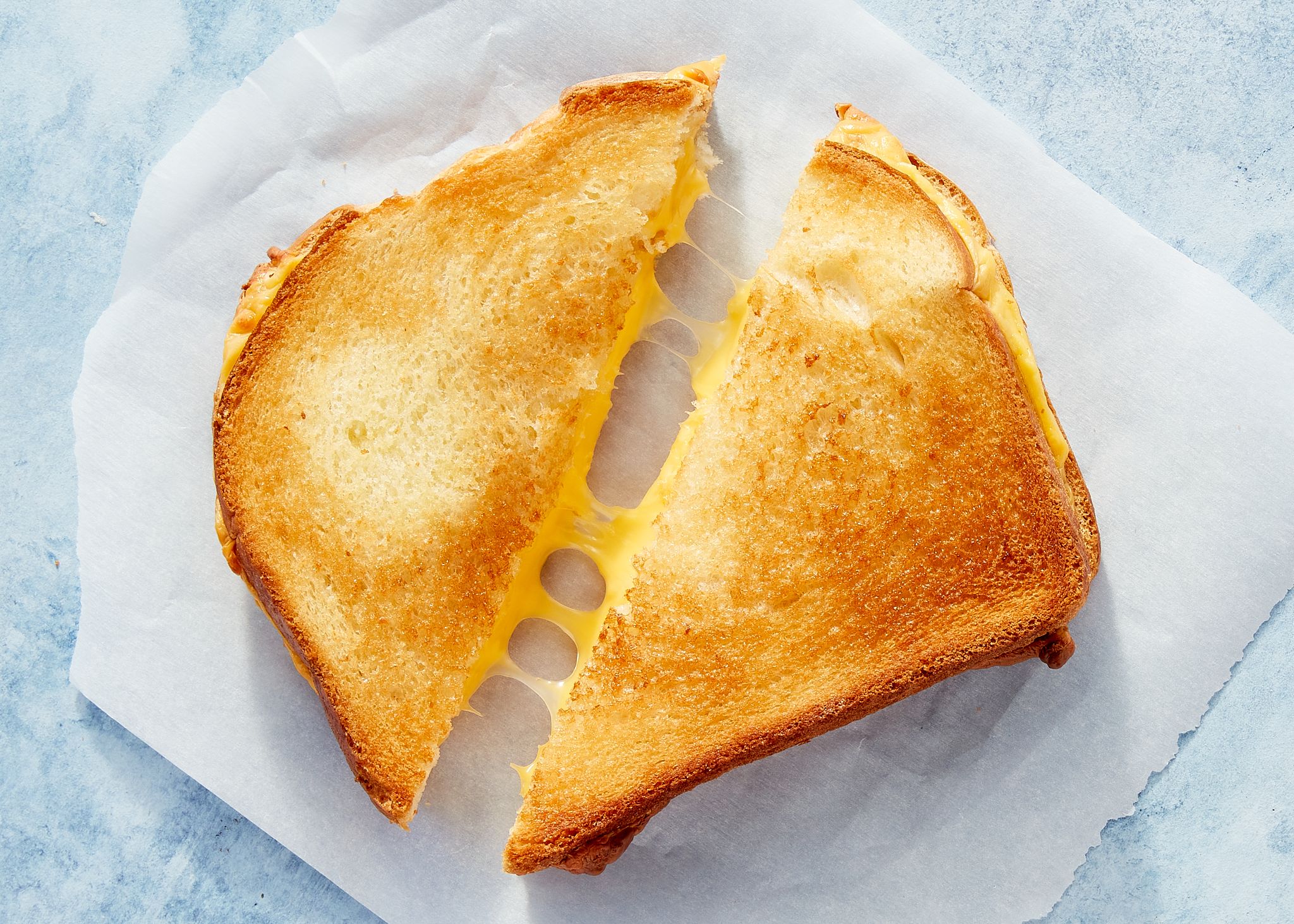
Let me offer up a grilled cheese image for you to set the mood...

air fryer grilled cheese
^ from: delish.com - A grilled cheese is simple but is very tasty.

If you are fairly new to using an air fryer, it is best to start slow. So my first food/drink/cooking post on "John's Creative Space" involves a grilled cheese sandwich. I need to give you some back story before I share the cooking instructions.

I actually started to make a grilled cheese sandwich in a toaster oven before I tried making one in an air fryer. I followed instructions to an online video and applied them to the air fryer. I made two grilled cheese sandwiches in the toaster oven; one of them had bits of cocktail shrimp I chopped up. When I flipped over the sandwich that had the chopped cocktail shrimp, I had trouble flipping it over, and it came out wilted. It was still tasty.

I had used my PowerXL Air Fryer to make another grilled cheese sandwich. What I loved about the air fryer was that I could open the air fryer basket while it was cooking, and the air fryer would stop until I put the basket back into the air fryer. I also had to learn how to flip over the cooked food for meals that require flipping over or shaking the contents of the air fryer. One thing I learned about the air fryer is that it doesn't take long to toast bread. So some air fryer meals involving bread can be completed sooner than you think. As I became more experienced with the air fryer, I began being more fond of air frying food instead of microwaving them.

Now that you have some back story, let me get to the main point of this blog post. I am going to explain the main method followed by an improvised method.


Air Fryer Grilled Cheese Sandwich - Plain.

When making a grilled cheese sandwich from the air fryer, the key is to try to get the bread nicely toasted. A good way to add some flavor to the bread is to either spread mayonnaise on the bread or butter on the bread. I used butter in my cooking. Follow my lead.

INGREDIENTS NEEDED:
  • • two pieces of bread
  • • butter or mayonnaise
  • • a slice of cheese (your choice of flavor)
  • • (OPTIONAL) either aluminum foil or air liner paper - to make cleanup easy
  • • (RECOMMENDED) a spatula for flipping


INSTRUCTIONS:
1.) It is recommended to put in aluminum foil or air fryer liner paper for easier cleanup. So put in aluminum foil or air fryer liner paper in the inside of the air fryer basket. A lot of people suggest you pre-heat the air fryer. This recipe does NOT involve pre-heating the air fryer.

2.) The first part of this can be a bit sloppy as you prepare the bread to be toasted in the air fryer. Spread mayonnaise or butter on both sides of the bread- the bottom side and the top side. You are going to do this for both slices of bread. Place the bottom side of the bread into the air fryer basket.

2.) On the bottom bread slice in the air fryer basket, place a slice of cheese on top of it. Again- it is your call as to what flavor cheese slice you use. I used American cheese for mine.

3.) Place the top bread slice on top of the bottom side in the air fryer.

4.) Bread toasts fairly quick in an air fryer. Depending on your air fryer, your cooking times may be different from mine. This was one of my very first air frying attempts, so I went with a high temperature to cook at. I cooked my grilled cheese sandwich at 400°F for eight minutes, flipping halfway. At the halfway mark, open the air fryer basket. The air fryer will stop until you put it back in. While it is out, flip over the grilled cheese sandwich with a spatula. Once you flip it over, put the air fryer basket back into the air fryer to finish cooking. Be careful not to wilt the sandwich or make a mess trying to flip over the sandwich.

5.) Once the air fryer is done cooking the grilled cheese sandwich, lift it out of the air fryer basket using a spatula. Place it onto a plate or a paper plate and enjoy!


You can cut the sandwich in half with a knife or break it down the middle with your hands. You can sense the cheese strings if you pull the sandwich apart. The sandwich will be a cheesy delight for you to eat.


Air Fryer Grilled Cheese Sandwich - Tuned: Grilled Cheese Shrimp Sandwich.

Now let's improvise the grilled cheese sandwich recipe. You are applying the same method to making a grilled cheese sandwich, but you are also adding pieces of chopped meat to make it a more interesting grilled cheese sandwich. My first air fryer grilled cheese sandwich had pieces of chopped cocktail shrimp to it. You may also add something like chopped grilled chicken or maybe some small pieces of beef. However, to keep things simple, I will add cocktail shrimp to the recipe. I am adding this recipe to prove you can get creative with your meals. So enjoy this one!

INGREDIENTS NEEDED:
  • • two pieces of bread
  • • butter or mayonnaise
  • • a slice of cheese (your choice of flavor)
  • • cooked cocktail shrimp, preferably from a cocktail shrimp ring bought from a grocery store
  • • (OPTIONAL) your choice of seasoning for the cocktail shrimp
  • • (OPTIONAL) either aluminum foil or air liner paper - to make cleanup easy
  • • (RECOMMENDED) a spatula for flipping


INSTRUCTIONS:
1.) It is recommended to put in aluminum foil or air fryer liner paper for easier cleanup. So put in aluminum foil or air fryer liner paper in the inside of the air fryer basket. A lot of people suggest you pre-heat the air fryer. This recipe does NOT involve pre-heating the air fryer. Since this recipe involves cooked cocktail shrimp, it is best you refrigerate your cocktail shrimp and not freeze it. If the cocktail shrimp you are using is frozen, you will need to thaw it.

2.) The first part of this can be a bit sloppy as you prepare the bread to be toasted in the air fryer. Spread mayonnaise or butter on both sides of the bread- the bottom side and the top side. You are going to do this for both slices of bread. Place the bottom side of the bread into the air fryer basket.

3.) On the bottom bread slice in the air fryer basket, place a slice of cheese on top of it. Again- it is your call as to what flavor cheese slice you use. I used American cheese for mine.

4.) Take out some pieces of the cooked cocktail shrimp (I used four) and remove the tails of the cocktail shrimp. Then proceed to chop up the cocktail shrimp into pieces. Spread the chopped pieces of the cocktail shrimp on top of the cheese. If you want to season the shrimp, now is the time to do it. You can use any sort of seasoning you choose. Among seasoning options- salt, black pepper, lemon pepper, garlic powder, paprika, or whatever seasoning you prefer if you want to season the shrimp.

5.) Place the top bread slice on top of the bottom side and the shrimp in the air fryer.

6.) Bread toasts fairly quick in an air fryer. Depending on your air fryer, your cooking times may be different from mine. This was one of my very first air frying attempts, so I went with a high temperature to cook at. I cooked my grilled cheese sandwich at 400°F for eight minutes, flipping halfway. At the halfway mark, open the air fryer basket. The air fryer will stop until you put it back in. While it is out, flip over the grilled cheese sandwich with a spatula. Once you flip it over, put the air fryer basket back into the air fryer to finish cooking. Be careful not to wilt the sandwich or make a mess trying to flip over the sandwich.

7.) Once the air fryer is done cooking the grilled cheese sandwich, lift it out of the air fryer basket using a spatula. Place it onto a plate or a paper plate and enjoy!


Remember that this sandwich is the same as with the previous one but with cocktail shrimp. What you will get is not only the taste of the grilled cheese sandwich, but you also will be tasting shrimp with a cheese taste (and any seasoning you may have applied). Using store-bought material may seem cheap, but this is a simple way to level up a basic grilled cheese sandwich. This was meant to be a basic meal to prepare with a few advanced parts.


Other Considerations/Advanced Techniques.

If you become more advanced using the air fryer, you can try putting in something like grilled chicken pieces, beef crumbles, bacon bits, or anything like that to add to the grilled cheese sandwich instead of cooked cocktail shrimp. You may also want to try adding mixed vegetables if you are inclined. You be the cook- customize to your heart's delight!


This is my first cooking post on "John's Creative Space." I will learn from this and try to come up with more complete and comprehensive posts in the future when I discuss food recipes. I will end this post for now. If you enjoy my work, please Subscribe/Follow my blog(s) in any capacity if you love my work and want to support me any way you can. Share my blog post(s) with others if you enjoy my work. Thank you for reading! Take care and be well.

Visit my JohnMarineDesigns Weebly site, subscribe to My Blog(s), and/or Follow on Bloglovin! Let's connect:
Contact Me via E-Mail Contact Me via Discord Donate to Me (voluntary)
Visit and Subscribe to My Blogs...
Subscribe to John's Blog Space (JBS) Subscribe to John's Creative Space (JCS) Subscribe to John's Race Space (JRS) Subscribe to StyleSpace (SS) Subscribe to John's Life Space (JLS)
Get Social With Me!
Facebook (Friends) Facebook (Fans) Twitter YouTube
Pinterest LinkedIn (professionals only) TikTok Discord
Support My Creative Works!
JMDesigns JMDesigns on Payhip John on Envato
Patreon Soundcloud Bandcamp
Twitch OpenGameArt TurboSquid
read more...

Wednesday, January 5, 2022

Food on John's Creative Space

John B. Marine | 3:41 PM | | Be the first to comment!
"John's Creative Space" now has a new creative outlet- food! I had a long thought process on where to share my latest interests in being a cook. I have decided to breathe some extra life into JCS by discussing food I have prepared. So in the future, you will seeing me discuss meals I have prepared and how I prepared them. I feel this will be an opportunity to talk about food as another outlet of my creative energy.

When I do prepare posts regarding food, I must stress to you that I am NOT an experienced cook. I basically just started becoming better and more creative at preparing food. So don't take any of my cooking topics to be of the highest quality. Even I am still learning the ropes. Most of what I have been preparing is not only in the microwave, but I also have been learning to use my air fryer and my toaster oven air fryer. I may even give some of you all some inspiration and motivation to use your air fryer. I can only hope.


About the Label: Food/Drink/Cooking

Topics listed under this category pertain to preparing food and drinks. These can be recipes, gadgetry, and things of that nature.


Anyhow, that concludes my brief blog post announcing the discussion of food among my creative material. I hope you enjoy your time here! Be sure to Follow/Subscribe in some capacity if you enjoy my work. Your support is vastly appreciated.Thank you for reading! Take care and be well.

Visit my JohnMarineDesigns Weebly site, subscribe to My Blog(s), and/or Follow on Bloglovin! Let's connect:
Contact Me via E-Mail Contact Me via Discord Donate to Me (voluntary)
Visit and Subscribe to My Blogs...
Subscribe to John's Blog Space (JBS) Subscribe to John's Creative Space (JCS) Subscribe to John's Race Space (JRS) Subscribe to StyleSpace (SS) Subscribe to John's Life Space (JLS)
Get Social With Me!
Facebook (Friends) Facebook (Fans) Twitter YouTube
Pinterest LinkedIn (professionals only) TikTok Discord
Support My Creative Works!
JMDesigns JMDesigns on Payhip John on Envato
Patreon Soundcloud Bandcamp
Twitch OpenGameArt TurboSquid
read more...

Saturday, September 19, 2020

Voxel Buildings

John B. Marine | 8:11 AM | | | | | Be the first to comment!
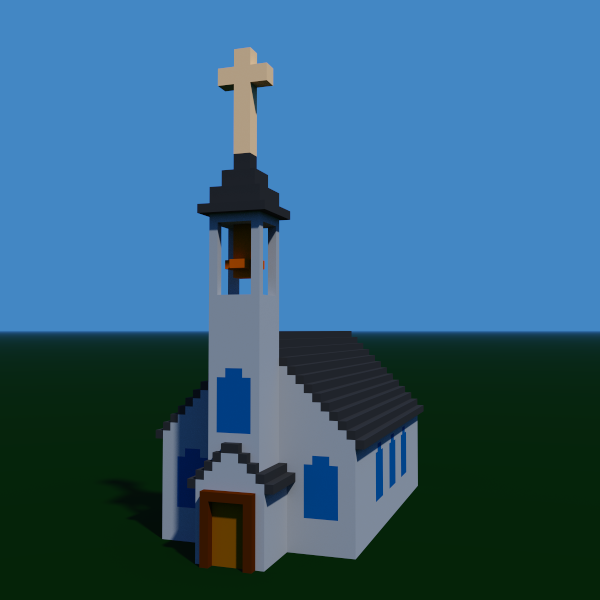
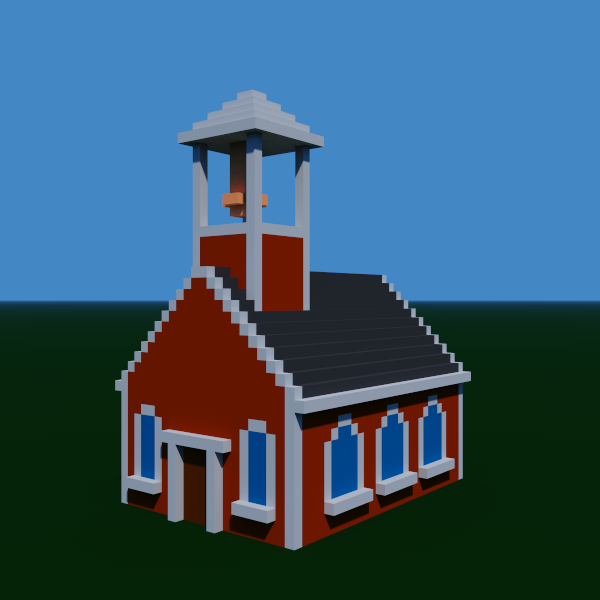
I returned to voxel modeling to try out MagicaVoxel 099.6. This newer version 099.6 ushers in a new level of development as it has enhanced facilities for modeling and rendering. Most notably, voxel models in MagicaVoxel can now go up to 256³, rather than being resticted to 126³ in dimensions. So more complicated models in one piece can be developed or viewed. This is great mostly for massive models or complex worlds. With these things in mind, I want to share with you two models I created and what I may intend using these for. Check these out...


voxel buildnig church house
^ from: (JohnMarineDesigns) - My model of a vintage church house modeled and rendered in MagicaVoxel.

voxel building school house
^ from: (JohnMarineDesigns) - This is a vintage school house I modeled and rendered in MagicaVoxel.

What do I intend on making these models for? Well, I have had ideas of using them for possible game assets or some media projects. I was kind of thinking of making a classic-style SimCity deal where you build a city from the ground up with the voxel building models I am trying to create. Also, I was considering the voxels being used for voxel-style 3D RPGs. The problem with that is that I am mostly fixated on more modern style structures. Therefore, I am not as adept designing Medieval-type structures or worlds. The two models I created will still get things rolling as far as designing voxel buildings. I also want to make this easy by having consistent dimensions to piece together spaces in equal grid amounts. I may also decide to just let everything be set up freestyle, letting the developer add the voxel models as he/she/they see fit in their voxel worlds.


I'm glad you got a chance to view my creative works blog! This is my first blog post since the new changes Blgoger/Blogspot blog posts are made. Thank you for reading! Take care and be well.

Visit my official website at johnbmarine.com, subscribe to My Blog(s), and/or Follow on Bloglovin!
Subscribe to John's Blog Space (JBS) Subscribe to John's Creative Space (JCS) Subscribe to John's Race Space (JRS) Subscribe to StyleSpace (SS) Subscribe to John's Life Space (JLS)
Support My Creative Works!
JMDesigns Patreon Soundcloud Bandcamp Twitch OpenGameArt TurboSquid
Get Social With Me!
Facebook (Friends) Facebook (Fans) Twitter YouTube Instagram Pinterest LinkedIn (professionals only)
Questions or Comments? Contact Me (serious inquiries only)...
Contact Me via E-Mail
read more...

Saturday, February 29, 2020

3D Modeling Detail

John B. Marine | 8:45 PM | | Be the first to comment!
A tactic of 3D modeling is to focus on how much to model for whatever application(s) in mind. Some go with high-polygon modeling and then dumb it down for low-polygon modeling. Some begin with low-polygon modeling and then increase the details. Which method is better? Well, it depends on how detailed you want your work to be and for what application(s) you plan on distributing your 3D models to. Through my modeling work, I have mostly focused on low-polygon modeling. I don't have the patience to try to flesh out low-polygon modeling. Some people do an amazing job taking basic rough shapes and then turning them into amazing 3D models. The different methods used to develop detailed models varies from different modelers.

I haven't yet designed anything spectacular, but I do hope to build 3D models from rough shapes to detailed modeling masterpieces.


This was a very brief post but with sufficient detail. Here is my discussion question for you:

What is your method of 3D modeling as far as detail is concerned?

Thank you for reading! Take care and be well.

Visit my official website at johnbmarine.com, subscribe to My Blog(s), and/or Follow on Bloglovin!
Subscribe to John's Blog Space (JBS) Subscribe to John's Creative Space (JCS) Subscribe to John's Race Space (JRS) Subscribe to StyleSpace (SS) Subscribe to John's Life Space (JLS)
Support My Creative Works!
JMDesigns Patreon Soundcloud Bandcamp Twitch OpenGameArt TurboSquid
Get Social With Me!
Facebook (Friends) Facebook (Fans) Twitter YouTube Instagram Pinterest LinkedIn (professionals only)
Questions or Comments? Contact Me (serious inquiries only)...
Contact Me via E-Mail


read more...

Wednesday, February 12, 2020

Does Blender Get the Respect it Deserves?

John B. Marine | 8:31 AM | | | | Be the first to comment!
(UPDATE: February 13, 2020)

#Blender3D is a free and open source program for 3D modeling. Everything from videos to intricate 3D models can be produced with Blender. Game developers even use Blender for assets and even complete games. However, Blender does get a bad rap from some people for a number of reasons. Even still, what you can accomplish in Blender goes far beyond what most other 3D modeling software can do. So I decided to blog about Blender and show some respect for it. Does Blender get the proper respect? I will explain why you should care (or maybe not) in this blog post here on "John's Creative Space!"


Before I Begin...

This is my first JCS blog post of 2020. Happy new year!


LATEST UPDATE(S)/REVISION(S):

FEB 13 2020 - added some extra details


Does Blender Get the Respect it Deserves?


Allow me to discuss Blender to you all.

Blender 3D logo
^ from: (Pinterest) - The Blender logo. Does Blender get the respect it deserves? I explain in this blog post.

Blender's history dates back to 1994, and its initial release dates back to 1998. What you can accomplish in Blender for development of media is astonishing. Many people look up to programs like 3D Studio Max as the gold standard of 3D modeling. It is a top-tier industry standard in regards to 3D modeling. Blender, however, is sometimes criticized for a number of reasons. People say the interface and UI are not very charming. Blender also has a seemingly steep learning curve. As someone who has not had much success making proper 3D models, even I am more comfortable using a program like Wings3D (which is also free) for 3D modeling. Maybe even another reason people discredit Blender is because it is free and open-source, usually meaning that free programs don't have the same level of quality compared to the top-level programs. When you finally learn and master Blender, you can do almost as much as you can with the more popular 3D programs like 3D Studio Max, Maya, Cinema 4D, and more. Blender makes you able to make impressive material without needing to stick to a payment schedule or subscription like most of today's 3D modeling powerhouse programs. You can use certain renders outside of Blender's own render engine to produce your images. These include the likes of the Cycles Renderer and the Eevee (not to be confused with the Pokémon Eevee) engine. While you can make 3D models, you can even do simple video editing as well as create entire videos and films with Blender. A popular example of a Blender film is the 2008-released film "Big Buck Bunny." Blender is free and always will be free unless someone buys Blender and cheapen the Blender experience entirely.

It took me over 20 years to make a 3D model I could be proud of when I made my first true Blender creation back circa 2016. My 3D skills are still subpar, but I have tried especially recently to learn Blender and utilize it. A handful of YouTube videos on Blender have helped me to develop my 3D modeling skills in Blender. I slowly tried to develop and practice using Blender techniques to produce 3D models. I still have a lot to learn, but I feel I can do a lot to try to master using this program.

One reason I have tried to learn Blender better is because I am offering my material for sale through sites like Turbosquid and Envato's 3D Ocean. Surely the latter is one of the different programs you can share as being the program you made models in. As of the time of this initial blog post (February 12, 2020), these are the accepted programs for which you share as being what 3D model was made in:

--- 3DOcean Accepted 3D Modeling Programs ---
• 3D Coat
• 3D Studio Max
• Autocad
• Blender
• Cinema 4D
• Lightwave
• Maya
• Moda
• SoftImage
• Vue
• ZBrush

You can still use whatever programs you like to 3D model in, but that is pretty much a list of top-level 3D modeling programs for you to sell your models on sites like 3DOcean. Blender even has a suite where people can sell their Blender 3D creations on called Blender Market.

One must also consider using Blender for more popular applications. For one, there is the crowd of using Blender for virtual reality and augmented reality. VR/AR has its own specifications and considerations when modeling. Blender can be a good enough program to use for VR or AR if you know what you're doing.


Blender for Gaming and Game Development.

Blender was made in C++ and Python. If you have skill in using Python, you can make simple games in Blender using Python code. Blender has had its Blender Game Engine (BGE) serve as the gaming base for those who develop games using Blender. Of late, however, Blender has dropped support of the Blender Game Engine. A program that maintains the appeal of the former BGE is a program called UPBGE. UPBGE stands for "Uchronia Project Blender Game Engine." Many of the features that made BGE an excellent suite for gaming and game development can be had with the UPBGE package.

While Blender could be used to develop games, some people ranging from hobbyists to various independent (indie) developers make assets in Blender to be used in programs like Unity3D and Unreal Engine. People who compete in game jams use programs like Blender for simple modeling of 3D models. Such people even do as great of a job with modeling 3D assets in Blender as almost anyone could with popular paid 3D modeling software.

Blender can also be used for programs like Armory3D. Armory3D is a 3D framework that integrates into Blender. So using a combination of Armory3D and Blender can work perfectly fine in the development of 3D games. So everything from a casual game project to a AAA-quality game could be made with a combination of Blender and Armory3D. You can use a number of other 3D frameworks and interfaces to use in game development with Blender, but Armory3D is a popular option.


Blender for Web Development.

Did you know you can build 3D websites with Blender? People use programs like Blender to build things such as 3D stores and various configurators of products. You could see 3D material with Blender with items ranging from fashion goods to even building your own car. I am mostly positive this suite for Blender mostly pertains to front end development and not much about front end and back end web development. There are people who model through Blender for website development to packages such as WebGL, Blend4Web, and Verge 3D.

Even I have thought of practicing making a 3D environment people can use to navigate for material I've created. Though, I haven't made anything cool enough to warrant any sort of attention. Stay tuned to "John's Creative Space" if I do develop some kind of 3D online environment for you to explore.


Blender for Video Production.

Let's face facts. Blender will NOT replace or substitute programs like After Effects, Premiere Pro, or Vegas. A lot of the videos and video effects you can make in most popular video programs can be done in Blender. If you were to try to upload your creations to video sites like Envato's Videohive, you can't say you created the video material in Blender. So you may need to find some other programs for which to produce videos with. I haven't had too much video experience with Blender, so I will leave my discussion there.


Since I mentioned Blender in a number of lights, does this program get the respect it deserves? Here are my final thoughts...


Does Blender Get the Respect it Deserves? - Final Thoughts


Just because something is free doesn't mean it lacks the quality of more established programs. Really, Blender has become its own established program throughout its development. Some people don't want to commit to a subscription service just to use a high-quality 3D modeling program. Those who don't want to do so have limited options for which to 3D model with. Therefore, Blender and its free nature is a boon to the 3D modeling community. Just because not many people look to Blender for quality 3D modeling doesn't mean there is no reason to use Blender. The interface may be tough, the learning curve may be steep; but once you master using Blender and learn many techniques to model with Blender, it becomes apparent this program is just as good... if not better... than most of the top-level, *industry standard* 3D modeling programs. You can always make Blender better if you develop scripts and add-ons to enhance the capabilities of Blender. Just because Blender is free doesn't mean it lacks the quality and polish of other top-level 3D modeling software. You can always make sacrifices if you feel Blender is somehow not good enough to meet your standards of 3D modeling.

So if you are on the fence about Blender, give it a chance and try to learn to use Blender. Try to master using Blender even if you are more comfortable using other 3D modeling software. Blender actually deserves more credit than most people give it. At least... to me.


For More Information...

Learn more about Blender by going to www.blender.org. Find more 3D resources I've curated by visiting my Creative Resources page.


Those are my own thoughts on Blender. Let me know what you think...

Do you think Blender gets the respect it deserves?

Be sure to Subscribe/Follow my blog(s) to keep up with my latest material. Visit my other blog posts to see more of my work and more of my thoughts on a variety of issues. Thank you for reading! Take care and be well.

Visit my official website at johnbmarine.com, subscribe to My Blog(s), and/or Follow on Bloglovin!
Subscribe to John's Blog Space (JBS) Subscribe to John's Creative Space (JCS) Subscribe to John's Race Space (JRS) Subscribe to StyleSpace (SS) Subscribe to John's Life Space (JLS)
Support My Creative Works!
JMDesigns Patreon Soundcloud Bandcamp Twitch OpenGameArt TurboSquid
Get Social With Me!
Facebook (Friends) Facebook (Fans) Twitter YouTube Instagram Pinterest LinkedIn (professionals only)
Questions or Comments? Contact Me (serious inquiries only)...
Contact Me via E-Mail


read more...

Thursday, October 10, 2019

Basic Voxel Vehicle Pack

John B. Marine | 6:58 AM | | | | | Be the first to comment!
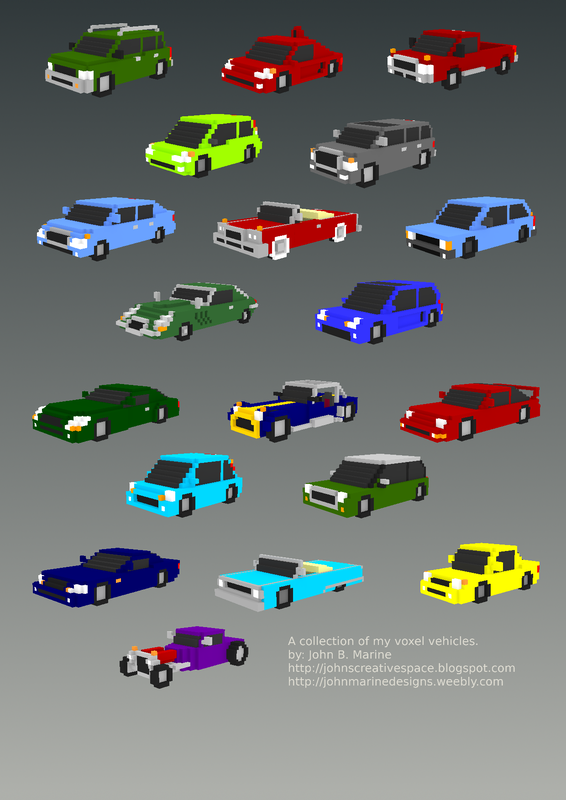
After several years putting it off and in not deciding what to do, I recently have FINALLY offered my voxel vehicles to the Internet public! This blog post describes what all I have done with these voxel vehicles I created. You will be able to purchase my voxel vehicles towards the end of this post. So stick around for more information!


My Basic Voxel Vehicle Pack


This is an opportunity for me to share with you my voxel vehicles. More information is included in this post, so read on if you are interested in my voxel vehicles.


What You Should Know.

My voxel vehicle creations were as of 2014 producing them with MagicaVoxel. I shared my voxel models across social media showcasing my work. I long planned to use my voxel models to develop a racing game. That game, however, never materialized. So the models I created have basically remained on my PC to never be available to the public. Despite a good amount of demand by some people who reached out to me, I was never fully ready to share my voxel models. That is until I finally decided in September 2019 to consider joing Envato. On October 1, I joined Envato. My first upload to any Envato product was made on October 7. My package was approved to 3DOcean for my voxel vehicle pack. Therefore, I am pleased to announce that my voxel vehicle pack is LIVE!

In my original upload to 3DOcean, I decided to keep the vehicles as static models. I had planned for some time to make the voxel models ready for animation. That will probably come in either an update or as a separate package. To keep polygon counts low, I filled up the invisible portions of the voxel models with voxels. Most of my models originally came with visible interiors if you remove the glass windshields and doors. Everything is low-polygon for the sake of game development. That was the original intent of my models.

The reworked voxel vehicles can be imported into programs like Blender or in game engines like Godot Game Engine. If you want to further use models for various applications, you are on your own to take my models and import them into other programs. So you will need to use a program like Blender to export my models into Unity3D if you want to use Unity with my voxel vehicle models. The Basic Voxel Vehicle Pack is available in three different formats: COLLADA DAE, OBJ, and the native MagicaVoxel VOX. Use the native VOX to freely edit the voxel models in their raw form.


Want to Get My Voxel Vehicles?

My voxel vehicle pack is available on Envato's 3DOcean. Purchase the Regular License if you want to feature my voxel vehicles in a free game or in certain media projects. Purchase an Extended License if you plan on using my voxel vehicle models in a paid game. Click on the image or link below to get started:

basic voxel vehicle pack
^ Click on the image or click on the following link to buy my voxel vehicle pack: Basic Voxel Vehicle Pack (Envato, 3DOcean)!

If you use my voxel vehicles in any project (personal or commercial), please let me know! I want to see how you plan on utilizing my voxel models. Please help support me and my work any way you can. Purchasing this package is one such way of showing your support... if you don't mind. I would appreciate your support.


That is all for this post! I hope you found it interesting. Thank you for reading! Take care and be well.

Visit my official website at johnbmarine.com, subscribe to My Blog(s), and/or Follow on Bloglovin!
Subscribe to John's Blog Space (JBS) Subscribe to John's Creative Space (JCS) Subscribe to John's Race Space (JRS) Subscribe to StyleSpace (SS) Subscribe to John's Life Space (JLS)
Support My Creative Works!
JMDesigns Patreon Soundcloud Bandcamp Twitch OpenGameArt TurboSquid
Get Social With Me!
Facebook (Friends) Facebook (Fans) Twitter YouTube Instagram Pinterest LinkedIn (professionals only)
Questions or Comments? Contact Me (serious inquiries only)...
Contact Me via E-Mail


read more...
JohnMarineDesigns on TurboSquid

Would you like to donate to support my creative work? If so, please show your support using this PayPal item:
I am now on Patreon! Support my creative work on Patreon today at: www.patreon.com/johnbmarine!
 
Copyright © 2015 John's Creative Space • All Rights Reserved.
Template Design by BTDesigner • Powered by Blogger