Showing posts with label Projects. Show all posts

Saturday, November 12, 2022

Voxel Character Evo Project

John B. Marine | 1:35 PM | | | | Be the first to comment!
For years, I have contemplated what to do with my voxel model characters. I felt it wouldn't really be enough just to have voxels in the raw. So for this blog post, I will discuss my plans with my voxel models. You have an idea of what it is by the blog post name, but you don't know about my full plans until you take a look at this full post. Read on to find out about my plans!


Voxel Character Evo Project


About as far back as 2014, I developed a series of voxel model characters. I spent the better part of about a month to develop five different sets of voxel characters. I made a total of 43 characters including a handful of extra characters. I therefore made about 50-60 characters total. The base 43 characters, though, are what I am primarily focused on in trying to breathe new life into my voxel model collection.

Wait- what "new life?" Well, I have a bunch of static voxels. You can only do so much with a set of static models. I decided to re-do my voxel models through a combination of Magicavoxel and Blender. What I intend to do is take my voxel models and break them up for animation. This will allow for people to either rig the models themselves or look to a service like Mixamo for animation.

It is that simple, right? Well, no. I feel my voxel characters will have to be extensively modified and enhanced to make them better for animation. That is where the "Evo" part comes in for my models. "Evo" is short for "evolution." Whereas most people will immediately think of Minecraft or something for pixel-perfect or blocky voxel models, I need to make these voxel characters different but still retain a small semblance of voxel roots while not being hyper-realistic.


Project Inspiration.

A YouTube channel that has made animations of voxel-type characters has been one of my influences to work on my old voxel models. Even better, I saw a YouTube video that gave me some ideas on how to model voxels made in Magicavoxel. The channel in question with all the different 3D animated films is Zaminmation. Zamination is famous for their 3D animations based on "Minecraft" and the "Five Nights at Freddy's" series videos among others.


The Evolution Process.

A key in the evolution process of re-working these voxel models is in understanding the newer possibilities working with models in a unique way. Part of that involves considering things like how to enhance the models. I want to make the voxel models to be sort of textured. The way I seen my exports from Magicavoxel in PLY format, I could take the individual faces and maybe replace them with some textures I could make in a different program. Maybe I could re-do these voxels and take them beyond their voxel form without going overboard. Basically, I want these voxel models to be much more than voxel models.

Let me sort of explain the process in Magicavoxel...

• separate the feet, lower legs, upper legs, torso (including neck, just moving it), upper arm, lower arm, hands, and head
• separate accessories and certain long hair pieces
• add some extra voxels to the lower legs, the upper legs, the lower legs, and some of the torso
• move all parts of the body backwards except for the lower legs and the feet
• move the neck, head, upper arms, and lower arms forward
• clean up any painting errors

At best, this process can take about 10-15 minutes for each voxel model in Magicavoxel. It can take hours to do the whole process with about 43 of my voxel models. The point of the Magicavoxel work is to prep the modified model to be modified further in Blender for refinement and animation.


Once I start making certain things available, I will share my process and maybe some sample animation tests from Blender. So stay tuned for that! For now, though, here is a picture preview of what I am doing with my voxel character models:

voxel character evo project
^ Here is a preview of what I am working on towards enhancing my voxel character models.


If you enjoy my work, please Subscribe/Follow my blog(s) in any capacity if you love my work and want to support me any way you can. Share my blog post(s) with others if you enjoy my work. Thank you for reading! Take care and be well.

Visit my JohnMarineDesigns Weebly site, subscribe to My Blog(s), and/or Follow on Bloglovin! Let's connect:
Contact Me via E-Mail Contact Me via Discord Donate to Me (voluntary)
Visit and Subscribe to My Blogs...
Subscribe to John's Blog Space (JBS) Subscribe to John's Creative Space (JCS) Subscribe to John's Race Space (JRS) Subscribe to StyleSpace (SS) Subscribe to John's Life Space (JLS)
Get Social With Me!
Facebook (Friends) Facebook (Fans) Twitter YouTube
Pinterest LinkedIn (professionals only) TikTok Discord
Support My Creative Works!
JMDesigns JMDesigns on Payhip John on Envato
Patreon Soundcloud Bandcamp
Twitch OpenGameArt TurboSquid
read more...

Monday, June 13, 2022

New Life to Old Track Concepts

John B. Marine | 4:49 PM | | | Be the first to comment!
It was always a creative dream of mine to develop race tracks for games. While nothing has truly materialized into in-game works, I recently have taken hold of past projects for non-racing games. It was not possible for me to take levels from older games and give them modern 3D life. So therefore, I had to take my old concepts and then refine them. As someone who is into simulation-type racing games, I wanted to get into the style of thinking realistically about my older race track designs. This blog post will not announce any future plans or upcoming designs to share. It will, though, give you some early insight as to what I am working on as well as why now I am thinking of releasing some of my designs. So feel free to take a look at what I have to discuss here on "John's Creative Space!"


New Life to Old Track Concepts


I have been using Blender to try to 3D model. Let me explain something about past courses I made that I want to revive and bring to a modern world.


The Backstory of my Older Courses.

A number of older race courses I designed for games were mostly for a non-racing game. What game am I discussing here? Duke Nukem 3D. Since circa 1999, as I was learning more and more about motorsports, I wanted to take a concept of racing into my work. I would mostly set up bot multiplayer matches in Duke Nukem 3D (called DukeMatches). The only "racing" was that it was me going around the tracks defeating as many of the bots as possible. There were also competitions to try to score the most points during the course of a race. Races were limited to score counts or time. There were also pit stops for which to try to avoid being defeated. Since I was the only intelligent being against bots, I utilized pit stops to stay in the race.


Time is of the Essence.

On the basis of time, I have always been a fan of GT/Sportscar/Endurance racing. So I looked into a way to implement a sort of system to where time would change every so often. What I ended up coming up with is an animated sky that simulates time changes. To set the time distance apart, I had to make the time between frames rather long. I made two sets of animated skies- clear and cloudy. I also developed one set of skies for a 24-hour setting and then an "all-night" setting, which lasts from early evening of Day 1 to sunrise of Day 2. The cloudy sky animations were meant to simulate endurances either for cloudy days or for rainy (and even snowy) days. Because the animations would be a bit tough to follow, I set up timing gauges to let me know how much time is left in one phase of the day before going to the next.


Believable Race Tracks.

I was not very good at designing believable tracks, so a lot of my 3D modeling in Duke Nukem 3D was fairly basic. I did not utilize proper-looking curves in 3D modeling. A lot of the corners were mostly fake true curves. I had a lot of sharp corners also. The reason why tracks seemed so long was because I wanted the tracks to remain deathmatch-style courses. So to try to get away, blocking bits were used in trying to prevent the player to go out of bounds or to try to evade attackers.


Why NOW Trying to Update Past Concepts?

I felt a lot of my past race tracks designs deserve to be used for more modern applications and games. Also, I have had a tough time trying to play Duke Nukem 3D, my all-time favorite game, on a modern Windows 10 system. Rather than let old memories rot and die, I felt it was time to make my old concepts come alive in more modern forms. I also needed some practice to improve my 3D modeling skills.


I feel this is an opportunity to work closer towards one of my many different creative goals. It is just sad it has taken THIS long to realize this goal.


The Challenges Ahead


I now will share some of the things I am learning and hope to accomplish in providing these old concept tracks from Duke Nukem 3D. Please note that I am using a combination of Blender 3D, Unity3D's Skycar, and Edy's Vehicle Physics Pro (Community Edition).


The 3D Modeling.

All courses start with just the main road or roads. So when they are tested on, the challenge is to try to keep the car on the road and not fall forever if I drive off the main road. I am therefore careful driving my courses because of this situation.


The Realism Factor.

Many of the courses I created had a bunch of elements playfully added in. These even included a bunch of foolish-looking models and effects in levels. Essentially- eye candy. Because I have simulation racing games in mind, I have to think about how to make certain past ideas flow better in a proper sim racing game. It required me even to modify configurations to make them more believable. For one thing, some of my past courses had incredibly unrealistic elevation changes that would not even be completely possible in even the most decent simulation racing games.

One thing I want you to realize is that this not exactly a legacy project, but rather modernizing old concepts while not veering too far off course from previous styles. I had to lengthen old courses as well as add extra sections for multiple layouts. This was to provide much more usability and offer a handful more options for any player.

Another thing I was thinking about was trying to make tracks of a realistic scale. When I learned of unit scale in Blender, it opened my eyes to making my small-scale designs more realistic. What I did was put my measurements in Metric and used Meters. I found that using a unit scale of about 100.000000 was enough to make the roads wide enough and the overall map not feel so small without needing to scale up or down.

While this was great, I was still unsure as to how to properly measure my courses. One method I took was to make edge loops around sectors of my tracks. I would measure the distance from the start of one sector to the end of that sector. There are three sectors to courses I design. I would later take the sum of each distance and add them together to learn how long the courses are. However, most of the results I got seemed unrealistic. I felt my courses would have to be much longer than some of the unrealistic scale numbers I got. Basically, I felt like tracks long enough to host FIA Formula 1 or World Endurance Championship races were about as long as go-kart tracks from my measurements. For the most part, the tracks had the proper width and length of what I want to accomplish.

Though not a critical factor, I also found it important to try to set up each course in terms of the time of day. This was great in trying to make realistic conditions. However, it made some environments tough to drive in, especially courses meant to be done at night or with not as much sunlight. The VPP cars also had very weak lighting systems. You basically need to make your own spot lights on the car to illuminate the way. Either that, or add lighting around your course.


The Driving Aspect.

I needed a decent way to test my designs, so what I did was use the Vehicle Physics Pro asset for Unity. The provided asset for Unity for racing and driving is good for prototyping, but I needed a realistic solution for my simulation-type racing tracks. So I was fortunate enough to pick up the Vehicle Physics Pro asset (the Community/Free one).

Because I am using on-road racing, I am not using a model for off-road racing. The VPP asset from Edy features a sports coupe for on-road racing/driving and a pickup track tuned for off-road racing/driving. The default settings for the sport coupe are more than enough for performance driving, though the car seems pretty slow often times. The sport coupe's default settings max out the torque at about 220 Nm of torque (or about 162.32 lb. feet of torque). Granted this Unity asset doesn't drive like Gran Turismo, it is still a great way to get an idea of my courses in a simulation driving environment.


The Racing Aspect.

To test the tracks of mine in a performance environment, I set the car close to the Start/Finish line and then set up a stopwatch. I used a Clock application on one of my old smartphones to time one lap around the course. If my car flown off the track and falls forever, the run ends. I've done that multiple times. Sometimes, I had to re-do my sessions because the stopwatch function would not stop when I requested it to. I only tested in the normal direction of tracks.

Here is a progression in the tests I run:

• Hotlap - from a standing start, complete one lap around the course. These one-lap tests take place on each offered layout of each course.

• Two-Lap Sessions - from a standing start, complete two laps around a course. There are different two-lap tests for different variations of a track.

• Three-Lap Challenge - from a standing start, complete three laps around a course. A three-lap test is the default for a lot of races, so this is a test of a course in a basic sprint race.


One thing to keep in mind is that there are no AI drivers to contend against in these sessions. The purpose is to get a realistic driving sample for each course. With more experience and confidence, I may also pull longer tests- such as five-lap tests ("Grand Prix") and ten-lap tests ("Endurance").


A look at what you can expect is coming up, so visit the next section.


What You Can Expect Here


Any created track of mine that I complete will be made available across a number of 3D modeling stores online. I possibly will allow for my creations to be used in commercial racing/driving games, but reselling or selling modified versions of my courses will be disallowed or may require permission. This is a chance to finally share some of my most personal works with the world and make them available to the masses.


In Case You're Wondering...

If you are wondering about the vehicle controller I am using for my racing/driving tracks, I am using Edy's Vechicle Physics Pro (Community Edition), which you can find here: Vehicle Physics Pro - Community Edition | Physics | Unity Asset Store.


Again- I have nothing at present to share, but I will highlight more of my works in the future. So be sure to stay with "John's Creative Space" for more details. Thanks for visiting! If you enjoy my work, please Subscribe/Follow my blog(s) in any capacity if you love my work and want to support me any way you can. Share my blog post(s) with others if you enjoy my work. Thank you for reading! Take care and be well.

Visit my official website at johnbmarine.com, subscribe to My Blog(s), and/or Follow on Bloglovin!
Subscribe to John's Blog Space (JBS) Subscribe to John's Creative Space (JCS) Subscribe to John's Race Space (JRS) Subscribe to StyleSpace (SS) Subscribe to John's Life Space (JLS)
Support My Creative Works!
JMDesigns Patreon Soundcloud Bandcamp Twitch OpenGameArt TurboSquid
Get Social With Me!
Facebook (Friends) Facebook (Fans) Twitter YouTube Pinterest LinkedIn (professionals only) TikTok
Questions or Comments? Contact Me (serious inquiries only)...
Contact Me via E-Mail
read more...

Wednesday, March 27, 2019

Project Griselda

John B. Marine | 9:47 AM | | Be the first to comment!
"Project Griselda" is the development code name for my recent interest in web development. Having been a long-time blogger, I feel intrigued to develop my own websites. I even thought of general development of UX and UI. For the uninitiated, UX stands for "user experience," and UI stands for "user interface." This blog post simply announces my plans of website-related work under the code name "Project Griselda."


Project Griselda: Basic Thoughts.

I have been blogging for more than 10 years, and I have noticed at times how certain websites are structured. Some of these elements came to fruition as I examined the source of web pages. Never before have I actually thought about how simple making a basic website could be. That is until I recently have had interest in website design. After making some simple HTML files through self-teaching with W3schools, I found out it could be possible I could create my own websites if I really dedicated myself to creating quality material. So in an effort to try to master website design, I needed to put up another development project. And in so... welcome to "Project Griselda!"


Project Griselda: What Does This Mean For You?

I can not guarantee I can come up with websites and designs of impeccable quality, but I can do my best in making enticing material I am sure people will pick up on and lovingly use. I also need to learn to develop sites that can be viewed properly on mobile devices. Various websites these days offer responsive websites. Responsive templates allow for sites to be viewed properly across computers and mobile devices alike. I will need to test out things more on my tablet PC and my smartphone.

I could use a combination of programs for which to develop designs for websites. Most of what I have are free programs. I use GIMP as my basic photo editor. I use Inkscape for not only vector graphics but also certain intricate designs. There is Notepad++ I have used for developing HTML pages, but someone online directed me to a program called Bluefish Editor. I may therefore use a combination of Notepad++ and Bluefish Editor.


Project Griselda: What Does the Future Hold?

Here is where I may make some interesting announcements.

I love my Weebly site, but I am having thoughts about making my own custom website. It is possible I may create my own website to link to my blogs as well as developing a proper site for which to sell my digital offerings. So I may use Project Griselda to develop my own website. I don't want to abandon or retire from Weebly just yet, but it is possible I COULD abandon my Weebly site and just operate from a custom website. After years using Blogger/Blogspot, I have thought a little bit about starting my first site (not blog) under Wordpress. On the hosting front, I have considered the popular option of BlueHost. Another popular option is HostGator (which I didn't know is headquartered here in Houston!).

--- A Special Note... ---
If I do create my own website and launch it, I will need your financial help to keep it active because I don't make much money through my online work. Having monthly hosting fees and such will drain my online funds. So I will have to ask you donate to me if you enjoy my work. Or, I may have some of those costs offset if I make proper sales of any creative works. That would mean I have to produce more digital content for sale to better be able to reap in financial benefits. How long I can make this ride work depends on my determination and your dedication. Let's work together to make magic happen!


Now you know about "Project Griselda" and what it entails! By the way... if you want to learn how to build your own websites (or even learn HTML for your blog), I recommend w3schools. You can learn more about HTML by visiting www.w3schools.com. This may sound like an advertisement, but I am not sponsored by them. I am just speaking on personal experience.


I have shared my mind, and you came along to gauge my thoughts. I am pleased for you to come here and check out my latest post. Thank you for reading! Take care and be well.

Subscribe to My Blog(s), and/or Follow on Bloglovin!
Subscribe to John's Blog Space (JBS) Subscribe to John's Creative Space (JCS) Subscribe to John's Race Space (JRS) Subscribe to StyleSpace (SS) Subscribe to John's Life Space (JLS)
Support My Creative Works!
JMDesigns Patreon Soundcloud Bandcamp Twitch OpenGameArt TurboSquid
Get Social With Me!
Facebook (Friends) Facebook (Fans) Twitter YouTube Instagram Google+ LinkedIn (professionals only)
Questions or Comments? Contact Me (serious inquiries only)...
Contact Me via E-Mail


read more...

Monday, March 11, 2019

Project Heloise

John B. Marine | 5:16 PM | | | | Be the first to comment!
Project Heloise is my code name for a new interest I have grown in creative work. The emphasis behind Project Heloise is in 2D animation with drawn and vector characters. The intent is to create 2D characters in animation ranging from animations to material that could be used in games and various media projects. I will explain further about this project as this post goes along.


Project Heloise


Allow me to further explain Project Heloise and what I hope to accomplish from it.


Project Heloise: The Concept.

"Project Heloise" was created as I was researching about 2D character sheets. These are usually large images compiled in Adobe's PSD format. The images are on a transparent base and are layered. In addition to these layers, these character sheets may even have proper pivot points for animation purposes. A majority of these character images are mostly designed for games and other media purposes. A lot of these character packs are offered in Adobe formats, EPS, and transparent PNGs. The advantage to these layered character sheets usually allows for smooth animation through modular creation of characters.

These character sheets are put together by game developers and other media artists. Among the game developer types, programs such as Unity3D, Unreal Engine, Godot, Construct 2, and GameMaker Studio are among a few used in the game development of these 2D characters. A number of programs even offer support for gaming outside of proper game engines. Some of these programs in 2D animation include Adobe Illustrator (formerly Adobe Flash), Adobe After Effects, Spine, Spriter Pro, Synfig, and DragonBones Pro among others. Other such programs can utilize these character sheets for non-gaming purposes. If you are adept enough, you can even use the all-purpose media program Blender 3D for your 2D animation needs.

When it comes to vector graphics, this is mostly done using Adobe Photoshop, or a popular free alternative- Inkscape. The advantage of vector graphics is that vector graphics allow you to freely re-size any such images without losing quality. Vector graphics are all based on mathematical coordinates. So you can make vectors as small or as large as need be for any media with no loss in quality when scaling down or scaling up. This makes the creation of material easier for when you rasterize images to be used in various programs.

Media projects outside of gaming usually involve animated short films. Some of these works include basic films, promotional videos for companies, educational or eLearning programs, and more. A lot of people usually look to certain websites that offer or sell already-made assets for 2D animation for those who can't make their own material or want something from established creators. Many different vendors even offer free 2D assets to be used in different media projects, which can cut some costs along with trying to find decent voice talent. These media projects with these 2D assets can be used in media ranging from simple presentations (such as Powerpoint) to any popular video formats (such as MP4 or MOV).


Project Héloise: My Ideas.

So where I tie into this? Lately, I have been thinking about trying to create 2D characters for some media projects as well as offer certain characters for sale. This began with wanting to try creating 2D characters that are animated and have animations to them. There was an attempt I made with Blender a few years ago where I quickly pieced together a simple 2D image that had layered body parts. While it was nothing special, it did give me some practice in trying to develop a 2D character that could be animated.

One time for the PC fighting game engine M.U.G.E.N., I developed a character out of vectors in Inkscape. I then converted the vector creation through Fighter Factory and imported my creation into the game. Again- nothing special. Most of the character was just a funky array of quadrilaterals that barely resembled an average human.

In my continued evolution and learning, it has now come to a point where I want to try vector graphics again and also try to make characters again. I want to develop 2D characters that I hope can be utilized in many different applications. I want to base some of my creations on past characters I have created. Besides that, I even wanted to try to give some life to some of my own created series. As an example, think of Sonic the Hedgehog as the simple car accessory in the SEGA racing game, "Rad Mobile," before Sonic eventually got his own game and eventually become one of the most successful gaming franchises of all time. I may just create some 2D characters based on my own creations for the simple use in media projects and games before possibly making something more serious.

Some of the early project ideas may involve game development or even use for media projects. Some media projects of mine may involve creating characters to jazz up websites and be used as individual avatars. You may even see those characters in my "John's Creative Space" blog or even on JohnMarineDesigns!


Project Heloise: Character Making and Animation Techniques.

I have to learn a lot to improve basic techniques on creating characters. For one thing, I have to learn to create lip syncing animations. Creating real characters that can talk takes some skill to act out some of the individual sounds. Originally, I just thought of simple mouth movement with nothing real serious. On the other hand, I have always been one to at least consider details even if I do not intend on being overly detailed. So it goes both ways to make basic animations for speaking.

Equally as important to animation as mouth movements are facial expressions. I want to get down blinking eyes, eye movements, and things like that. These are also as detailed and important in the basic creation of characters. The only way this doesn't matter is if I create characters that don't have any animations for the eyes or if I give them opaque glasses or something.

Most of all in character creation is in making the bodies and limbs themselves. A lot of people generate their modular creation of characters through sketches. They then go into programs like Inkscape to develop basic vector shapes. These vectors can consist of many different individual vector shapes all grouped together to make one layer that can be used in 2D animation. The possibilities are endless if one knows how to create quality 2D vector creations. In getting back into Inkscape, I have a lot to learn or re-learn to develop quality 2D characters through vectors.

I don't have the finances for an Adobe subscription, so it is unlikely I will develop anything that can be used for Adobe Illustrator or Adobe After Effects. As of March 11, 2019; I am looking at either Spine or Spriter Pro for 2D characters for game development. I also have programs like OpenToonz and DragonBones Pro for 2D game development and some basic 2D animation in general. I have Godot Game Engine for implementing 2D characters into game development. And of course, I have Blender. This sounds like a lot, but I have a lot on my mind and a lot to my disposal in trying to make these dreams reality.


Project Heloise: What You Can Expect.

You can expect that I will try to offer various creations for your liking if you are into 2D media work. I will simply offer my name to the many other developers of such content by providing my own uniquely styled work to the masses. For a lot of my own original characters, I want to make things special. I can offer a creation of mine, but I may also add an eBook of some kind for each character just for authenticity's sake. I want to make it seem like you are downloading something of quality and want to provide as complete of an experience as I can. The eBook may probably be in PDF format or something.

Even as I offer such assets to the masses, I will try to improve my techniques in creating characters. I really want this to take off like a lot of my other work. Your encouragement and interest both mean a lot to me during this time.


Now you know about some of my future plans. If you have any suggestions in me trying to come up with these 2D characters and such, be sure to contact me with hints and tips so I can improve my techniques. Thank you for reading! Take care and be well.

Subscribe to My Blog(s), and/or Follow on Bloglovin!
Subscribe to John's Blog Space (JBS) Subscribe to John's Creative Space (JCS) Subscribe to John's Race Space (JRS) Subscribe to StyleSpace (SS) Subscribe to John's Life Space (JLS)
Support My Creative Works!
JMDesigns Patreon Soundcloud Bandcamp Twitch OpenGameArt TurboSquid
Get Social With Me!
Facebook (Friends) Facebook (Fans) Twitter YouTube Instagram Google+ LinkedIn (professionals only)
Questions or Comments? Contact Me (serious inquiries only)...
Contact Me via E-Mail


read more...

Thursday, December 27, 2018

My 3D Plans

John B. Marine | 2:05 PM | | | Be the first to comment!
I have recently gotten back into 3D modeling. Part of the plan is to get back into trying to make characters and vehicles. For the most part, I am trying to make stuff to hopefully offer online for sale. The recent motivation to return to 3D modeling is to practice newer modeling techniques. I look at a bunch of models on different sites offering 3D models. I try to study the geometry of models as well as learn certain techniques on how to make such models. While I still use Wings3D for modeling, I have tried to incorporate Blender into my modeling so I can better implement them into projects.

Since you are reading this blog post, I figured I'd make a few announcements.


My Voxel Characters.

While I have not officially thought of what to do next, I am considering offering my voxel characters either as static models or make some "evolved" voxel models in case people want to try making rigged "evolved" models in case people want to make some animated characters.


3D Plans.

I have some plans to make some 3D characters. What I kind of want to do is offer a lot of my original characters for you to download. Some of my original creations may even be complimented with blog posts to introduce you to each one. Of course, I also will try to add material to my Weebly site (JohnMarineDesigns).


3D Locations.

I want to make locations that could be implemented into games. I am looking at a lot of older 3D racing games because of my skill. The original plan was to use material into Sports Car GT, then go to rFactor, and maybe even find Assetto Corsa. I also thought of trying to make locations for Rigs of Rods and BeamNG.Drive as well. Blender and Godot Game Engine are also test beds for any would-be location creations.


If all goes well, I will be sure to offer more material to you all to enjoy. I want to be able to flex my creativity even further. Perhaps even flex it more if I start getting on a roll creating content.


Special Request!


If you want to see what past 3D models I've created, you can look up my work on Turbosquid here: JohnMarineDesigns on Turbosquid. Alternatively, you can visit my JMDesigns store at JMDesigns store: 3D Models See more of my 3D work on my Weebly page by going to my 3D modeling portfolio on JMDesigns.

In addition to Turbosquid, I am considering joining CGTrader as well to market my 3D work.


I have not really anything to share at this point, so I will end my post here. Thank you for reading! Take care and be well.

Subscribe to My Blog(s), and/or Follow on Bloglovin!
Subscribe to John's Blog Space (JBS) Subscribe to John's Creative Space (JCS) Subscribe to John's Race Space (JRS) Subscribe to StyleSpace (SS) Subscribe to John's Life Space (JLS)
Support My Creative Works!
JMDesigns Patreon Soundcloud Bandcamp Twitch OpenGameArt TurboSquid
Get Social With Me!
Facebook (Friends) Facebook (Fans) Twitter YouTube Instagram Google+ LinkedIn (professionals only)
Questions or Comments? Contact Me (serious inquiries only)...
Contact Me via E-Mail


read more...

Saturday, November 24, 2018

Project Rhiannon Update 2

John B. Marine | 7:31 PM | | | | Be the first to comment!
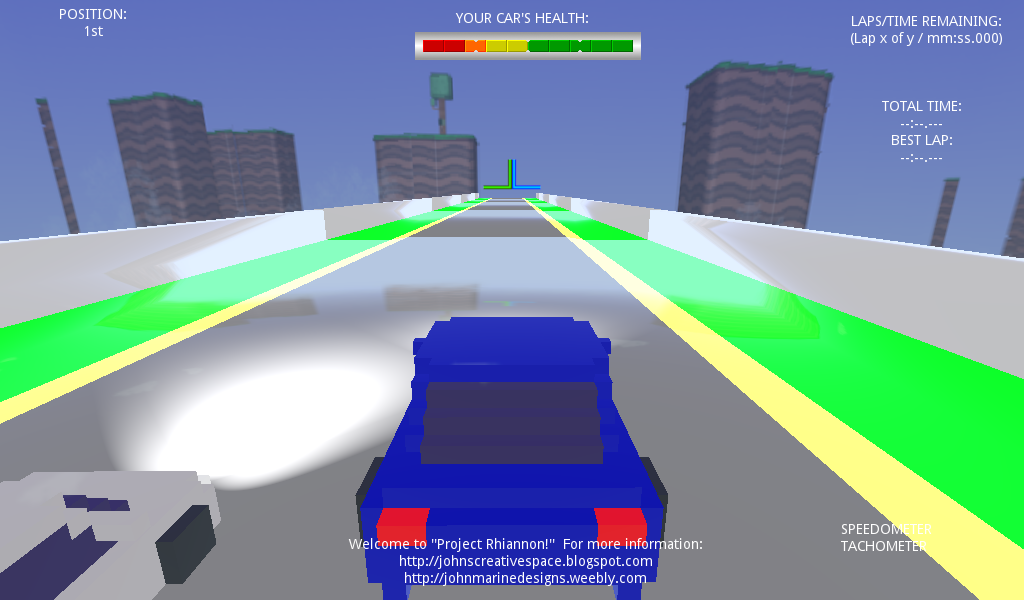
My Godot racing project, Project Rhiannon, lives on! I recently went from trying to make modular voxel land to making polygon land. This was inspired by Gran Turismo 5's Course Maker feature. Seven environments make up GT5's collection of environments. To practice designing levels, I did some box modeling in Wings3D. I tried to closely follow some of the design nature of custom tracks in Gran Turismo 5 in trying to design modular assets for a race track. What I practiced mostly was simple modeling of such a course, rather than build a proper course. Here is a look at what I've come up with:

Project Rhiannon game development
^ Instead of voxel land, I tried polygon tracks. I haven't yet found out how not to make things extremely shiny in Godot.

For some reason, I wanted to make some kind of non-tarmac course initially. I then decided to build an entire tarmac course in Wings3D and then scale it greatly in Godot to be used. I did not include a pit road, so this track isn't COMPLETELY practical. I wanted to make the road have subdivisions and loop cuts to allow for the possibility of making individual elevation changes to pieces of the track geometry. I am also learning that you do not have to model objects into the main model themselves. You build the track first followed by adding whatever objects you like. This can even help in the case where not rendering objects can help in the frame rate department as well as in reducing draw calls.

I still have a lot to learn, but I feel I can possibly make a proper track that I can eventually implement into racing games. It is a slow process that will eventually pay off into something amazing.


Driving Model.

While I am still using my voxel model cars for my test car, I am slowly wanting to develop my own proper 3D vehicles to use as my testing vehicles. I still have somewhat of a "to do" list to enhance my driving model. The driving model in Godot does not really allow for meticulous driving models. That is, unless you are incredibly adept at coding/logic for a proper model. The basics of the Godot Game Engine for vehicles are the commands of engine force (acceleration), brake (braking), and steering. I was looking to try to find some alternative methods to utilize these features. Everyone who has designed their own driving model through Godot GDScript has made his/her/their own spin on the vehicle model. These methods have been expressed in various games, and no one model is perfect. A driving model is only as perfect as the one(s) who deem it as perfect.

Engine Force
I allowed for more interesting acceleration by dividing the vehicle's Engine Force by a number less than 1. What would happen in this instance is that the car gets off from its starting position and go fast- almost like a drag racer. What I want to do is set a base speed that increases incrementally. So I want to properly simulate going from a standing start to properly accelerating away. I also want to develop a speedometer to know just how fast I am going as well as a tachometer to simulate the RPM range.

Braking
However, I have been struggling a bit to properly slow down the vehicle. The brakes work fine with my models. What I want to do is make the braking power more efficient. If I wanted to be more advanced, I would want to simulate brake balance. So a car with strong front brake balance could have some understeer dialed in. A car with strong rear brake balance can induce some oversteer. Too much either way can upset a vehicle's handling behavior.

Steering
Steering can be a bit slow. When I decided to meddle with the steering values, the vehicle may not even turn or only turn so slowly. Once I reached a numerical value that gives me some semblance of control, I basically left it alone and not chance ruining the steering angles.


I still need to get around these issues in trying to develop a driving model I can be proud of.


Extra Insight.

I mentioned Gran Turismo 5 and its Course Maker. Gran Turismo 5 allows you to construct race tracks purely on a set number of parameters and features. The environments differ. While you do not have meticulous control of each environment, your track is given a set number of variables you can control. There are seven locations you can choose from in Gran Turismo 5:

• Toscana (Tarmac)
• Eifel (Circuit)
• Mt. Aso (Tarmac)
• Liège (Gravel)
• Alaska (Snow)
• Eifel (Kart)
• Tokyo Bay (Kart)

The tarmac environments are primarily designed to be run by almost any kind of car. The dirt environment of Liège is meant for gravel rally racing. The snow of Alaska is meant for racing on snow and ice. The kart environments are short courses suited mostly for go-karts. Each environment includes a number of different features unique to that environment. For example, the Toscana environment features mostly a stroll along the Italian countryside in beautiful Toscana, complete with Italian Cypress trees. It also has fireworks going off at night.

If you have actually played with Gran Turismo 5, though, you know many of the environments appear very sparse. Almost like incomplete terrains. That is kind of like what my environment deal is like at present. Implementing some of my work will require some extra geometry edits as well as triangle tesselation. I do feel good about designing a practical course that could be implemented into games or certain other projects.

What I did was study how the roads for the environments were set up. I looked at differences in elevation, the placement of the road, grass, barriers, and things like that. Go back to the Toscana tarmac example for instance. You have a mostly wide road that has little edges on the side close to the rail fances. Down the way are usually either bushes or trees. These object placements do not have to be uniform all the way around the track, but you can put certain features in to make the environment a bit more entertaining and lively. I hope to learn from these in building my courses from scratch. Maybe if I learn certain algorithms to design procedural locations, I could create locations without having to do everything by hand.


Now you know a little more about my development of racing/driving games of late. I have yet to find a winning balance.


Now you have an update about my racing/driving game development. Thank you for reading! Take care and be well.

Subscribe to My Blog(s), and/or Follow on Bloglovin!
Subscribe to John's Blog Space (JBS) Subscribe to John's Creative Space (JCS) Subscribe to John's Race Space (JRS) Subscribe to StyleSpace (SS) Subscribe to John's Life Space (JLS)
Support My Creative Works!
JMDesigns Patreon Soundcloud Bandcamp Twitch OpenGameArt TurboSquid
Get Social With Me!
Facebook (Friends) Facebook (Fans) Twitter YouTube Instagram Google+ LinkedIn (professionals only)
Questions or Comments? Contact Me (serious inquiries only)...
Contact Me via E-Mail


read more...

Friday, August 3, 2018

Project Rhiannon Update 1

John B. Marine | 3:07 PM | | Be the first to comment!
"Project Rhiannon" is my Godot Game Engine racing/driving project. I figured for this blog post, I will update you on how I have been doing with Project Rhiannon. I do not have any pictures to share right now of my work. However, I will tell you of certain elements of my project so far.


Project Rhiannon: Update 1


If you want to know more about "Project Rhiannon," please read Project Rhiannon.


Updates (as of August 3, 2018).

Project Rhiannon is my very first 3D type project of any kind through Godot Game Engine. I have developed Project Rhiannon to take advantage of certain vehicle models I have created. I have taken inspiration from other racing games and projects to try to develop something I think will lead to me creating my first true game.

After going around online, I have learned how to properly set up my vehicles in Godot. I learned more importantly how to set up the camera for vehicles. I found a camera setting I really liked and will use it for my viewing of cars in action. You actually don't need to have any kind of vehicle set up for rigging to be programmed in Godot. All you need are definitions for the Vehicle Body (VehicleBody) and the Vehicle Wheels (VehicleWheel). You then need to set up Collisions and Camera (with script) so you can complete your vehicle.

I used a static body voxel model as my way of learning Godot's vehicle dynamics. The interesting thing is that as long as you set up the VehicleBody and VehicleWheel locations and settings, you can make almost any vehicle controllable. I am not going for any all-out realism in attempting my first racing game project. One such aspect of realism involves wheels that turn. So in my project, the wheels are static. The vehicle still turns, though. I may consider in the future to make my cars ready for animation and enhance the array of options I have towards animating cars.

To develop a driving model for my machine, I had to try to adapt my driving model from other Godot projects. I made a simple driving model based on a Godot 3D project called "Truck Town." Truck Town is a driving model that features this hilly location as you try to drive around it. It comes with three models you can drive- a basic mini van, a semi truck with a trailer, and a tow truck with a vehicle chained to it. The main point was to learn to script a vehicle for movement. Once I learned how to properly script a vehicle, what was next was to enhance this model to something I am more comfortable with and can use to make 3D racing games with. I actually had to use a combination of Truck Town and a certain vehicle project from one Godot programmer.

The driving model is nowhere near perfect. On top of that, I am not planning on making some hardcore driving sim. A lot of the issues were mostly ironed out. The car tends to get jittery when stopping. Also, there are times when the vehicle model would do hard braking when I let go of the throttle. It also would have the tendency to spin out 180° when I let go of the throttle or

The scene I set up for Project Rhiannon is a simple plane that the car drives around on. While I have a basic plane for a driving surface, I also have a voxel model that I used as a tile for a race track. I don't think I have properly set up that voxel model tile, so the car runs through it when the car should be trying to either hit or drive onto it. I feel I will have a lot more special plans for my work once I successfully develop a race track. I want to make sure there is actual gravity involved.


A New Voxel Vehicle Plan?

I had initially planned to offer my voxel vehicles made in MagicaVoxel available for download and/or sale. However, as I became intrigued by setting up my static model voxel vehicles through Godot, I figured this could be an opportunity to create a full-fledged game. So what I might do is take my voxel vehicle creations and give them plenty of life by coming up with a variety of options. What has to happen is that I give each vehicle its own sort of identity and performance characteristics. In other words, I want my compact cars to perform differently from my trucks. What I will have to do is look up a variety of car specifications to develop material telling of their performance.

To get an idea of my voxel vehicle model creations, take a look at this post:


Future Goals of "Project Rhiannon."

Here are various other plans I hope to accomplish as part of Project Rhiannon. They all represent a number of issues I want to correct or want to start:

• correct issues with handling model
• develop a race track
• set up waypoints/checkpoints for the race track
• set up a race system
• create racing AI (artificial intelligence)

These are among many goals to accomplish. Actually, I begun working on trying to make some kind of track, but not too much progress has been made on that front. I am still testing out options and trying to find something I can work with. I do think I am getting better here. Just still a long way from something really complete.


I will keep you all posted on any updates. Thank you for reading! Take care and be well.

Subscribe to My Blog(s), and/or Follow on Bloglovin!
Subscribe to John's Blog Space (JBS) Subscribe to John's Creative Space (JCS) Subscribe to John's Race Space (JRS) Subscribe to StyleSpace (SS) Subscribe to John's Life Space (JLS)
Support My Creative Works!
JMDesigns Patreon Soundcloud Bandcamp Twitch OpenGameArt TurboSquid
Get Social With Me!
Facebook (Friends) Facebook (Fans) Twitter YouTube Instagram Google+ LinkedIn (professionals only)
Questions or Comments? Contact Me (serious inquiries only)...
Contact Me via E-Mail


read more...

Wednesday, July 18, 2018

Project Rhiannon

John B. Marine | 12:39 AM | | | Be the first to comment!
My first #GodotEngine 3D project is what I am calling "Project Rhiannon." Project Rhiannon is a racing game project inspired by the 2011 independent/indie game "3D Pixel Racing." I am inspired to "build a better mouse trap" with Project Rhihannon. There were faults that prevented 3D Pixel Racing from being better than what it could have been. To this point, I managed to try to learn using 3D in Godot Game Engine by coming up with my own racing game project.

I am using a lot of studying of "3D Pixel Racing" as well as the 3D Platformer template to help me conceptualize building a proper prototype from "Project Rhiannon." Important in the creation of Project Rhiannon is that of building a 3D world along with a proper vehicle setup. This project was to be a 2D-style racing game in the mold of several Mode 7 games on the Super Nintendo. I chose this method first because I wasn't comfortable with 3D and using 3D in Godot. Over time, I felt my project would be better served in a proper 3D space. Considering my love affair with voxels, I wanted to make a proper 3D racing game utilizing those voxel models.

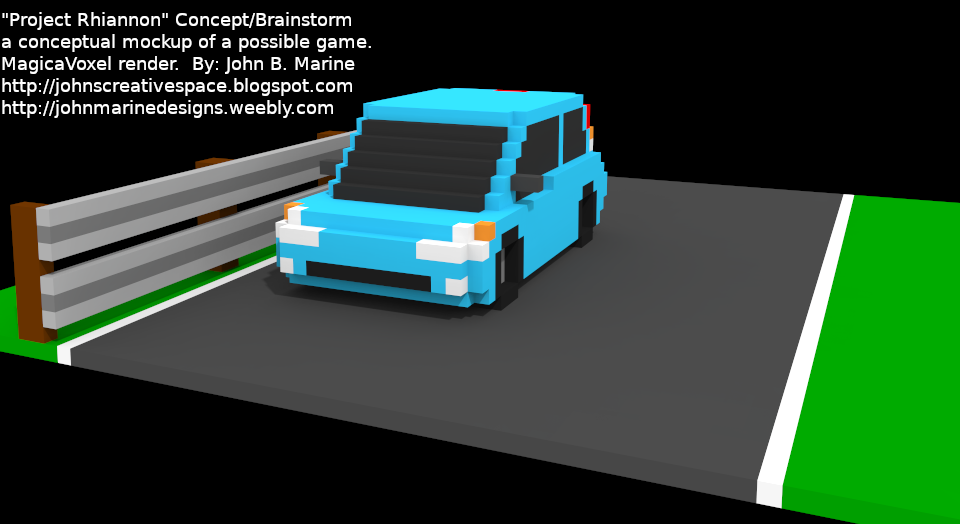
While I have not come up with a proper prototype, I did take some of my past assets to build a conceptual idea for a racing game. I may plan to design exclusive vehicles and such just for this game should I develop it. I will keep you posted if I do come up with any interesting material for any racing project using voxels. Here is a picture of what I have conceptualized in the meanwhile:

Project Rhiannon
^ This is a concept of Project Rhiannon using one of my past voxel vehicles made in MagicaVoxel.

So now you know about Project Rhiannon! :) I'll keep you posted if I come up with something cool! To see my other Godot material and projects, visit my link on my Weebly site here: My Game Devlopment Portfolio.


Thank you for reading! Take care and be well.

Subscribe to My Blog(s), and/or Follow on Bloglovin!
Subscribe to John's Blog Space (JBS) Subscribe to John's Creative Space (JCS) Subscribe to John's Race Space (JRS) Subscribe to StyleSpace (SS) Subscribe to John's Life Space (JLS)
Support My Creative Works!
JMDesigns Patreon Soundcloud Bandcamp Twitch OpenGameArt TurboSquid
Get Social With Me!
Facebook (Friends) Facebook (Fans) Twitter YouTube Instagram Google+ LinkedIn (professionals only)
Questions or Comments? Contact Me (serious inquiries only)...
Contact Me via E-Mail


read more...

Wednesday, July 4, 2018

Project Veritas

John B. Marine | 5:55 PM | | Be the first to comment!
Project Veritas is a prototype for a 2D top-down game in Godot. I have a picture of my work as of the typing of this post, but nothing real interesting to share. It was formerly named "Project Missoni." My biggest problem is in the collision detection. I had to adjust a previous top-down project substantially because of a wonky collision model I had set for it. That is why I suspended trying to come up with a top-down game made in Godot. That is, unless I learn how to better apply collision details for tile maps for top-down games.


Any Top-Down Games in the Works?

There are a number of top-down game concepts I have in mind. These include:

• a Pac-Man style maze game.
• a top-down action game similar to Smash TV.
• (possible) a top-down action RPG similar to The Legend of Zelda.

I have another top-down game in mind, but it is a racing game, and I want that to fall into a completely different project.


Considerations for Beta Projects.

I am considering looking for certain sites to host any kind of games I come up with. I may use the popular itch.io basically for sharing demos. I will use my blog(s) and my Weebly site to promote any real games I come up with. My ultimate goal is to make a game of any kind and be able to release it. I am eyeing Windows, Google Play, and HTML5. With more resources, I may test offering games and apps for Apple and iOS among other platforms in addition to the main sources I am targeting.


Stay tuned to this blog for more updates! The best way to do so is to Subscribe/Follow my blog(s) in some capacity. Thank you for reading! Take care and be well.

Subscribe to My Blog(s), and/or Follow on Bloglovin!
Subscribe to John's Blog Space (JBS) Subscribe to John's Creative Space (JCS) Subscribe to John's Race Space (JRS) Subscribe to StyleSpace (SS) Subscribe to John's Life Space (JLS)
Support My Creative Works!
JMDesigns Patreon Soundcloud Bandcamp Twitch OpenGameArt TurboSquid
Get Social With Me!
Facebook (Friends) Facebook (Fans) Twitter YouTube Instagram Google+ LinkedIn (professionals only)
Questions or Comments? Contact Me (serious inquiries only)...
Contact Me via E-Mail


read more...

Tuesday, June 12, 2018

Project Antoinette

John B. Marine | 11:35 PM | | Be the first to comment!
In my #gamedev adventures using @GodotEngine, I have developed "Project Antoinette." Project Antoinette is my development base made in Godot Game Engine to make a 2D platformer and various assets for platformers. I plan on making characters also with different abilities. Project Antoinette is not meant to be a proper game. Elements from it, however, may trickle into individual game projects. For now, I am simply trying to slowly learn the ins and outs of game development while trying many different concepts.

As of the initial date of this blog post typing (June 11, 2018), I have mostly followed different YouTube tutorials and Godot Docs notes to build my character and design worlds. What I HAVEN'T been able to do yet was code for collectable items and taking on coding enemies. These are only a few different platformer elements I have not yet perfected or mastered.

Project Antoinette does not resemble a proper game I am working on. Project Antoinette is more like my sandbox for trying different elements of 2D platformer games. There may be child projects that may stem from the parent of "Project Antoinette." That is what I am at least hoping for with this project. For now, I have a somewhat better understanding of what I want to do with platformers and how I hope to pace everything.

I will not post any sort of pictures on Project Antoinette until I make something actually interesting. Though in future posts, I may fill you in on my learning of game development using Godot with Project Antoinette as my base.


I am pleased for you all to continue to check out my work. Let's keep that relationship going, shall we? Thank you for reading! Take care and be well.

Subscribe to My Blog(s), and/or Follow on Bloglovin!
Subscribe to John's Blog Space (JBS) Subscribe to John's Creative Space (JCS) Subscribe to John's Race Space (JRS) Subscribe to StyleSpace (SS) Subscribe to John's Life Space (JLS)
Support My Creative Works!
JMDesigns Patreon Soundcloud Bandcamp Twitch OpenGameArt TurboSquid
Get Social With Me!
Facebook (Friends) Facebook (Fans) Twitter YouTube Instagram Google+ LinkedIn (professionals only)
Questions or Comments? Contact Me (serious inquiries only)...
Contact Me via E-Mail


read more...

Thursday, March 1, 2018

My Assetto Corsa Teams

John B. Marine | 10:22 PM | | | | | Be the first to comment!
In #AssettoCorsa and with Content Manager, I assembled some teams. And in this "John's Creative Space" blog post, I will share you those team creations of mine. This continues my groove of car skinning for Assetto Corsa. You can view all of my work on my Weebly site, but I want to share my work here as well to keep this blog flowing.


My Assetto Corsa Teams


When creating liveries for Assetto Corsa, you can just create a basic skin for any vehicle. You and then program any number of racing suits for the driver and the team.

But before I show you my team liveries, let me share this with you...


Skins... AND Team?

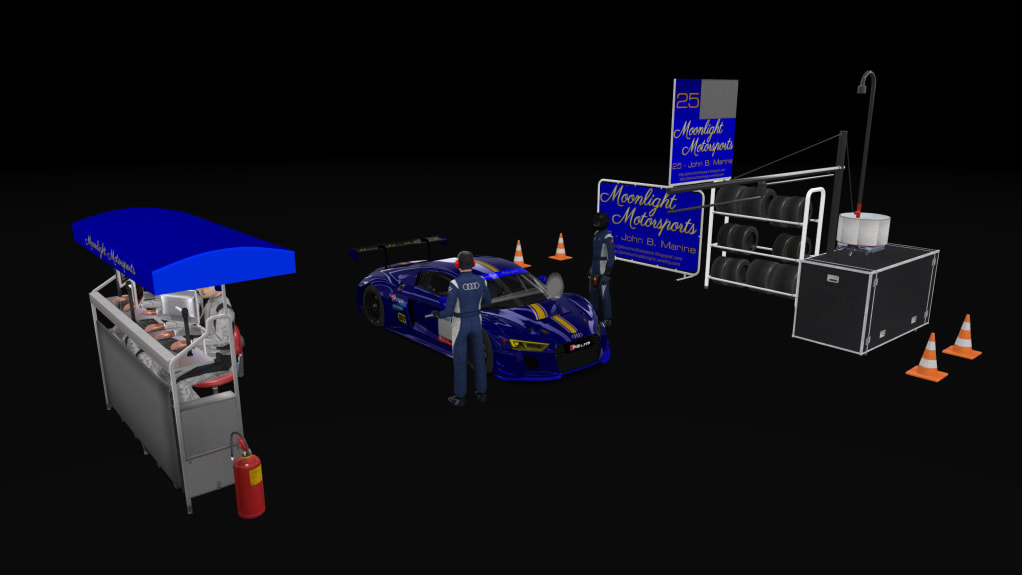
I practiced looking at making a car livery along with making a team and driver set to make a complete team. This was my first practice:

Assetto Corsa team
This was practice on making a team. What isn't visible are the headphones on the teams underneath the tent.

There is an ac_crew.dds file to each skin in Assetto Corsa. The elements of that file determine the image details expressed by the team. Assetto Corsa offers a good array of default racing gear to where you feel you lack enough quality suits, gloves, and helmets. You kind of have to play around with the options of already-available content, but you should be fine unless you want to make completely unique racing gear.


Now on to my team liveries. I will share with you three teams I created.


Team: Victoria's Secret Racing.

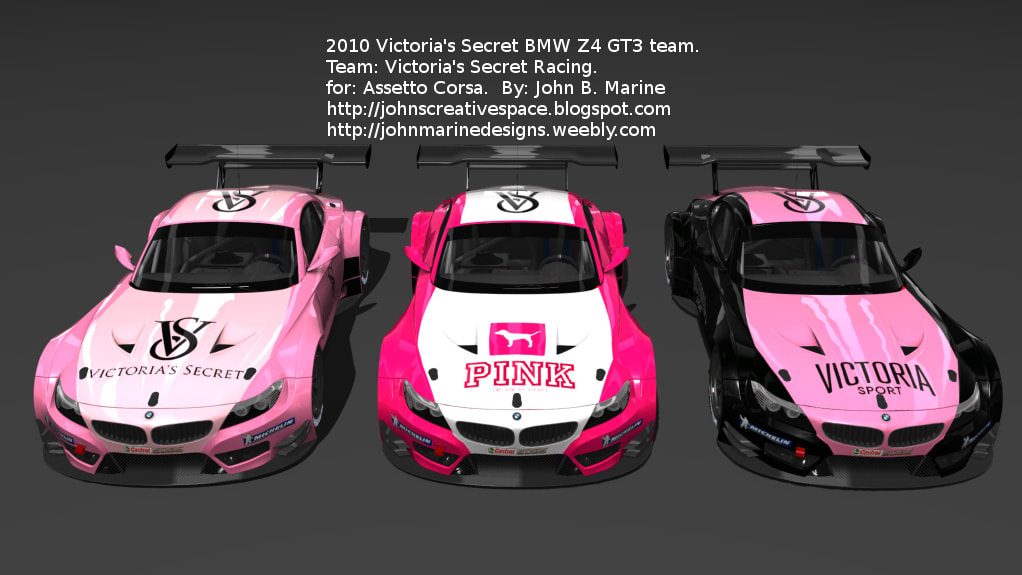
Victoria's Secret BMW Z4 GT3 Team Assetto Corsa
This is "Victoria's Secret Racing" with some very sexy BMW Z4 GT3s.

My first team I attempted to put together in a team picture is "Victoria's Secret Racing." This is a team of thee BMW Z4 GT3s. The premise was to make a sexy set of paintschemes for a sexy race car. I initially planned on all cars to be black with pink accents. Eventually, I chose to make only one of them black with pink accents. The other two were two shades of pink and pink with white. The cars represent three different lines from the Victoria's Secret line. The first one is Victoria's Secret itself, the second one is the Juniors-oriented Victoria's Secret PINK line, and the third one is the Victoria Sport (or VSX) line.


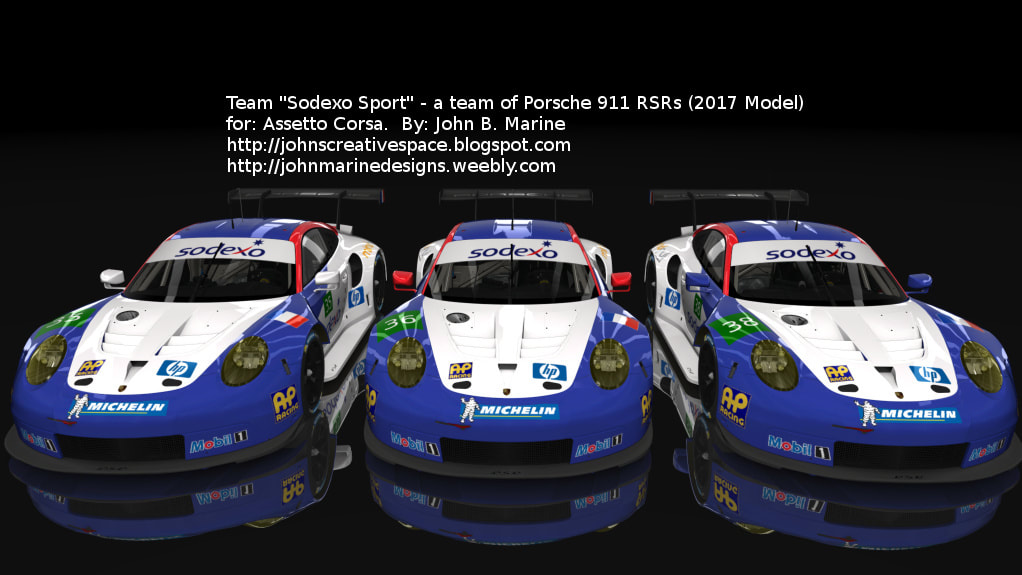
Team: Sodexo Sport.

Sodexo Sport Porsche team Assetto Corsa
Three Porsche 911 RSRs make up this French team of the French brand Sodexo.

Sodexo is a company that specializes in quality of life services. It is a French company I learned of when I was hospitalized last year. I mostly know them for providing good food to stay nourished. In making my Sodexo team, I had trouble wondering how to utilize the template for the car. So I did my best and came up with the scheme you see for this team in Assetto Corsa.


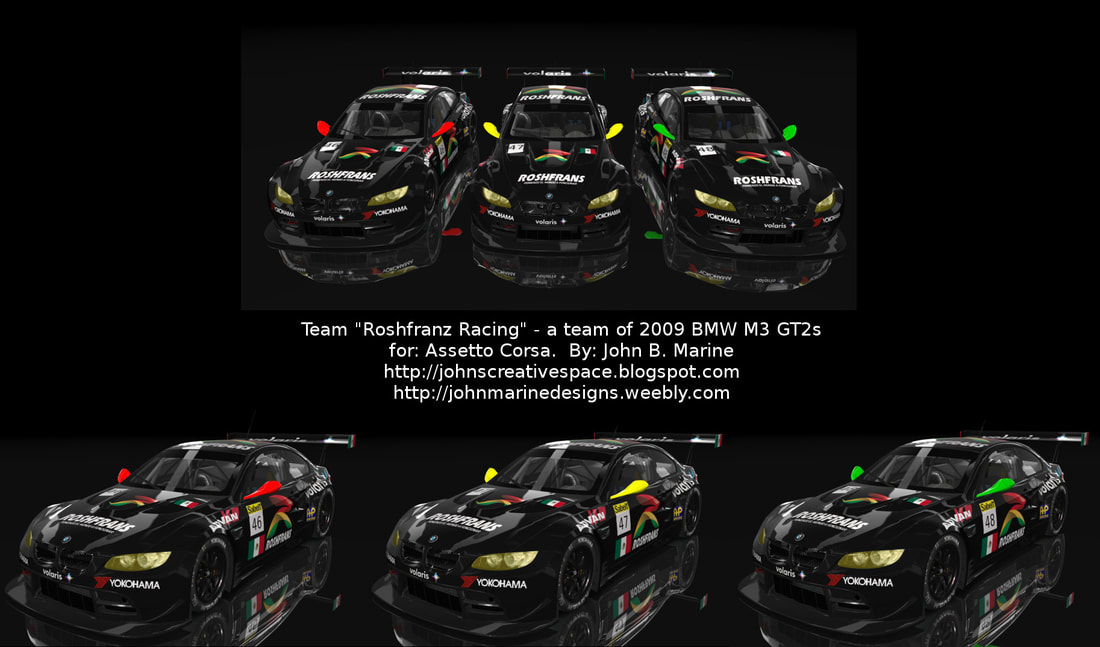
Team: Roshfrans Racing.

Roshfranz Racing BMW M3 GT2 team Assetto Corsa
Meet this Mexican team of BMW M3 GT2s.

Of the three teams I am featuring here in this post, "Roshfranz Racing" is the only team based on freely-available cars in Assetto Corsa. So this is not downloadable content for AC. Roshfranz is a Mexican company that produces car care products. I picked to paint the cars black, but each team car features the three different colors that make up Roshfrans. Also among the sponsors is Volaris. Volaris is a Mexican airline.


Now you know about the teams I created. For more plans with my work, visit the next section.


My Plans With These Assetto Corsa Teams


Thank you for looking at my teams! I want you to know something if these pictures have interested you, though. I am thinking of providing my skins and other work to sites like RaceDepartment or NoGripRacing. I hope I can generate enough interest to be able to offer my work to all of you. So if I somehow get a good amount of interest, I will provide my work online for you to enjoy. Just be sure to thank me, of course!

All of the teams do not have actual drivers assigned to them. I'll leave that up to you in case you want to set up team liveries and such. To see all of my work work for Assetto Corsa, please visit my Assetto Corsa portfolio on JMDesigns.


I hope you enjoy my work here. Glad you could drop by! Thank you for reading! Take care and be well.

Subscribe to My Blog(s), and/or Follow on Bloglovin!
Subscribe to John's Blog Space (JBS) Subscribe to John's Creative Space (JCS) Subscribe to John's Race Space (JRS) Subscribe to StyleSpace (SS) Subscribe to John's Life Space (JLS)
Support My Creative Works!
JMDesigns Patreon Soundcloud Bandcamp Twitch OpenGameArt TurboSquid
Get Social With Me!
Facebook (Friends) Facebook (Fans) Twitter YouTube Instagram Google+ LinkedIn (professionals only)
Questions or Comments? Contact Me (serious inquiries only)...
Contact Me via E-Mail


read more...
JohnMarineDesigns on TurboSquid

Would you like to donate to support my creative work? If so, please show your support using this PayPal item:
I am now on Patreon! Support my creative work on Patreon today at: www.patreon.com/johnbmarine!
 
Copyright © 2015 John's Creative Space • All Rights Reserved.
Template Design by BTDesigner • Powered by Blogger