Showing posts with label Game Development. Show all posts

Wednesday, July 3, 2024

Recent Vehicle Work

John B. Marine | 8:53 PM | | | | Be the first to comment!
I have been 3D modeling vehicles lately. Part of these are 3D re-imaginations of my voxel vehicles. Others are completely original 3D vehicles. Gaining experience in modeling vehicles made me embark on a new project. I am doing what I can to try to showcase my skill in 3D modeling. I want to share some of my work and my plans in this blog post. So if you are inclined, let me share my work with you all.


Recent Vehicle Work


This blog post discusses work I have done lately in developing vehicles. Before I can share more of my work, I have to share how I got to this point.


Building Blocks.

This movement towards making vehicles began with me trying to learn to develop a vehicle controller for Unity3D. I properly followed a tutorial from Unity, and it got me to wonder how to develop more vehicles. The tutorial package from Unity had a car that would spin out too easily. Like, the tutorial couldn't handle sudden avoidance turns. That was besides the point of this blog post.

I kept practicing making the same Blockbench truck in a tutorial. Rather than re-create it in Blender, I re-made it in Blender. Once I got down how to develop it, I wanted to animate it. So what I did was add on some wheels. As any vehicle to be animated in 3D, I separated the wheels from the vehicle chassis. The next challenge was to take the same vehicle scripts from the Unity tutorial but implement them to a custom vehicle. This was harder because I had to rely on being able to properly set up the custom vehicle. I had to do some editing because I didn't set the origin of each wheel to their geometry. Therefore, my early vehicle had wonky rotation with the tires. I then changed up 3D options in Blender and re-exported to Unity. The end result? This picture:
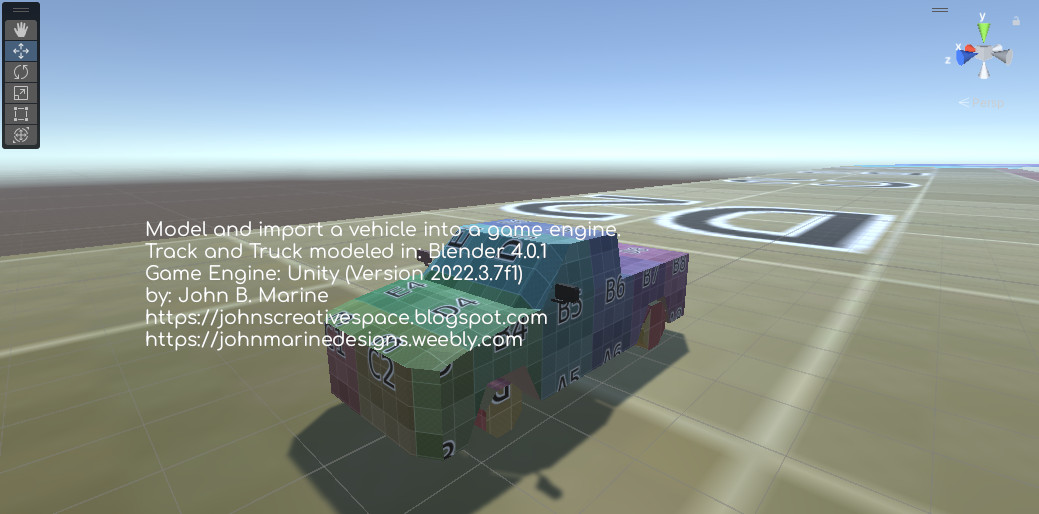
unity vehicle controller
^ from: (my X/Twitter) - I developed this pickup truck and this simple oval race track.

I was so happy to get in enough of a groove to develop an interest for 3D modeling vehicles. My interests only pertain to low-polygon work. More to come.


The Low Polygon, Low-Spec Style


Let's get something straight. Low polygon can be very subjective. It is only as low polygon as one perceives low-polygon. Granted I never developed anything of seriously high detail, I have done enough to warrant some kind of attention towards low-polygon modeling. The most realistic 3D model I ever made was a human foot from a tutorial on YouTube. I lack the confidence to make a fully real vehicle. It didn't mean, however, I could not give full effort towards trying to make believable vehicles. Let me share with you some of my work.


Low Polygon Challenge.

Previous attempts at making a low-polygon vehicle haven't been too good. I fear not making things as detailed as possible, though I do not specialize in hyper-realistic and hyper-detailed models. It wasn't until one time that I made a true vehicle that could be perceived as "low-polygon."

Previously, what was to be a low-polygon model ended up being something I further to being not low-polygon at all. One sports car model I developed in 2020 ended up with 2490 vertices, 1878 faces, and 4848 triangles. I made a low-polygon sport-utility vehicle (SUV) in 2021 that had 285 vertices, 221 faces, and 544 triangles. I surpassed both marks with a model I developed in June 2024. Here are the stats on my 2024 model: 183 vertices, 324 edges, 155 faces, and 340 triangles. The model I made in 2024 was a hatchback based on one of my old voxel vehicles. Here is a look at it:
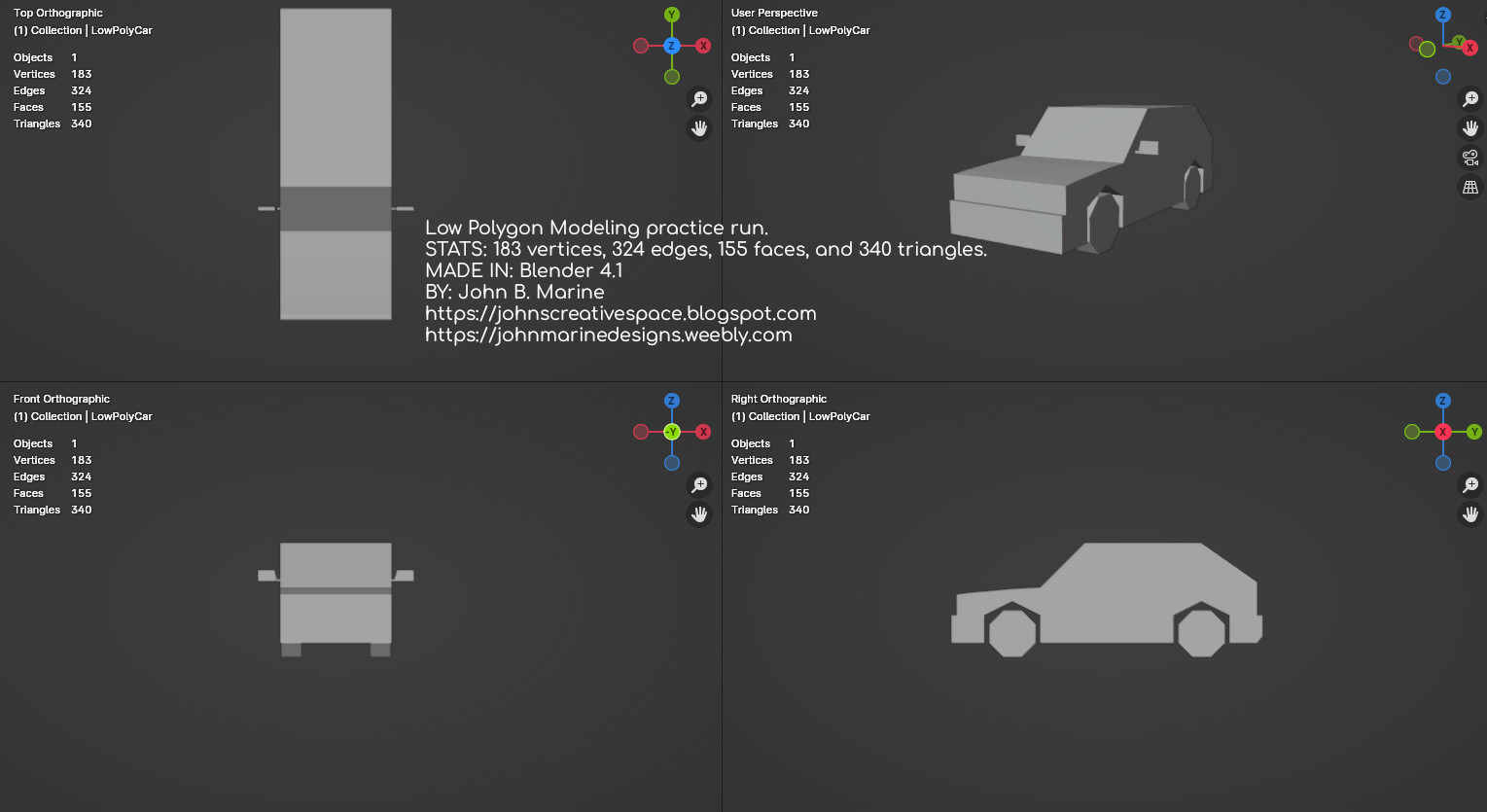
low polygon hatchback
^ from: (my X/Twitter) - This was one of my best low-polygon efforts to date.

Trying to come up with as few polygons as possible but with decent detail is its own challenge. I made it happen, though.

Low Polygon With Pixel Textures.

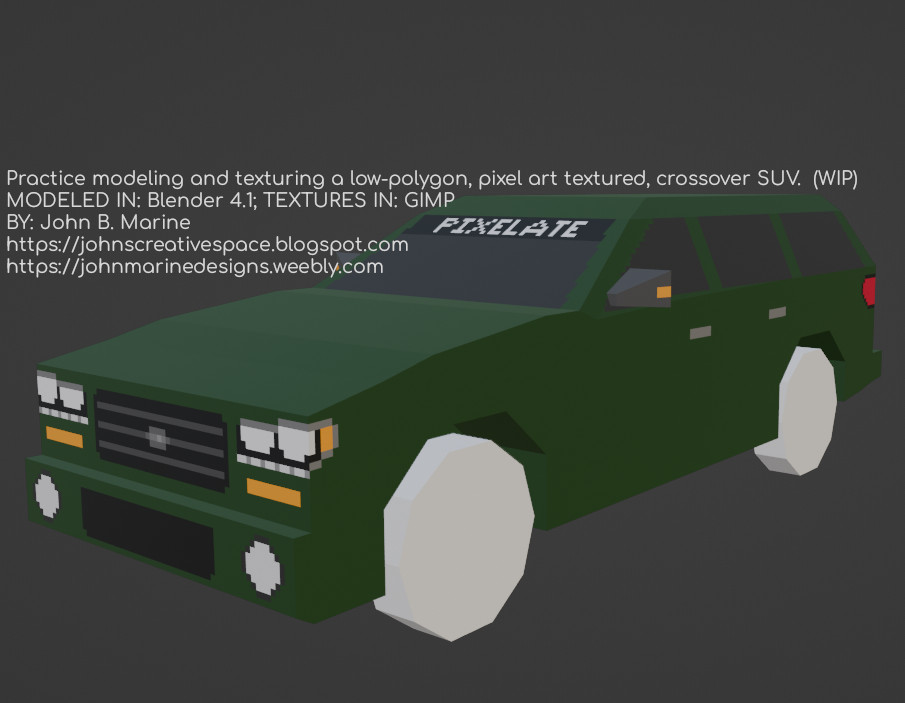
One of my best creations to date is another SUV I developed. The challenge was to make a vehicle and then it pixel art-style art. I still need to learn how to better detail things in pixel art. I actually thought of trying to learn how to bake lighting and shading into UV maps in Blender. I looked to old PlayStation 1 racing games for low-polygon insight. That is how I learned to make simple side-view mirrors. The work of about 3-6 hours to model and texture one vehicle led to this effort:

low polygon pixel textures
^ from: (my X/Twitter) - This was one of my best low-polygon efforts to date.

I had kind of a tough time thinking about how to texture this crossover SUV. I basically thought of it having a bold grill, lights with daytime running lights, and simple designs for the door handles and tail lights. I even had a bit of fun making a window banner saying "Pixelate." I used a blueprint of the 2006 Cadillac SRX in developing the side profile of it. Then, I used my imagination to make my own vehicle. This model is meant to be one of my 3D reimagined versions of one of my voxel vehicles.

My Latest Vehicle.

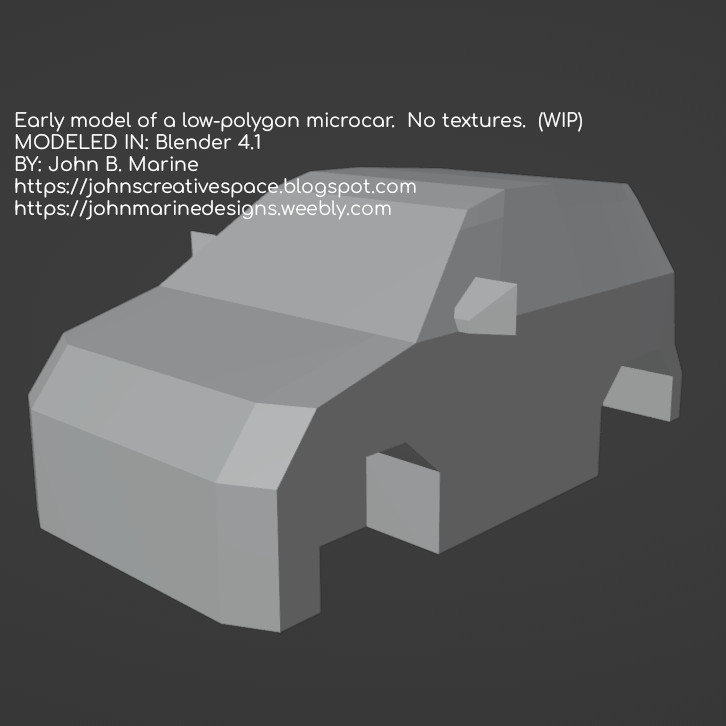
One vehicle I worked the past day or two (as of July 3, 2024) is this:

low polygon microcar
^ from: (my X/Twitter) - This microcar is one of my most recent works, and it is also one of my creations not based on any of my voxel vehicles.

This is a microcar I was working on. It is based on a blueprint of the 2015 smart fortwo. I did not complete a proper UV map for it, so that is why it has no texture to it.


Now that you have seen some of my latest vehicle work, I have to share what my plans are with these vehicles.


My Vehicle Plans


Originally, I developed these vehicles to be implemented into racing/driving games. I had the likes of GTR2, rFactor 1, and Assetto Corsa in mind. I may also just have them to be vehicles to use for nearly any game engine. The intent of these are to make vehicles that can be operated. However, I may develop some static vehicles that can be used as props.


TO DO.

I am slowly learning how to make better-quality 3D vehicle models. What I want to be able to do is develop vehicles with interiors as well as make vehicles with light housings. I have no plans to develop actual vehicles. My focus is on original, "generic" vehicles. Some generic vehicles of mine draw inspiration from actual vehicles while not being outright copies of them. Anyone who really knows vehicles may know what elements and machines my work spawns from.

Remember earlier I talked about making my custom vehicles for Unity car controllers? Well, one plan of mine was to take the Unity Skycar from their long deprecated Standard Assets Library and swap out the meshes to suit my vehicles. Doing this will allow me to tune the Unity Skycar code to fit any number of vehicles. It also means I get to be able to have engine sounds and braking sounds implemented. What I COULD do is learn to swap out meshes for Edy's Randomation Vehicle Physics, but I am not so sure that would work too well.


What I Want For My Supporters.

If you have ideas of having vehicles you can control for games or media projects, just know I have you covered as best as I can. I want to provide such products to the public-at-large. While I may not have complete material immediately, I will work over time to improve my skills and make better material for you all.


Wait, John... What About These "Blueprints" You Speak Of?

Oh, I downloaded a bunch of blueprints from a site called "The Blueprints." I have to do some adjusting to build them to a proper scale, but they have been a big help in modeling. Take a look at the blueprints offered in regular images and in vector images here: www.the-blueprints.com. Maybe you can create your own lovely vehicles with these blueprints! :)


That's all for this blog post. I hope you got some insight from me. Stay tuned to my creative works to see what all I have for you! Subscribe/Follow my blog(s) in any capacity if you love my work. Share my blog post(s) with others if you enjoy my work. Support me further by connecting with me on social media; and if you are inclined, feel free to donate to me (donations are voluntary but would be appreciated). Thank you for reading! Take care and be well.

Visit my JohnMarineDesigns Weebly site, subscribe to My Blog(s), and/or Follow on Bloglovin! Let's connect:
Contact Me via E-Mail Contact Me via Discord

(tips/donations are voluntary)
Visit and Subscribe to My Blogs...
Subscribe to John's Blog Space (JBS) Subscribe to John's Creative Space (JCS) Subscribe to John's Race Space (JRS) Subscribe to StyleSpace (SS) Subscribe to John's Life Space (JLS)
Get Social With Me!
Facebook (Friends) Facebook (Fans) Twitter YouTube
Pinterest LinkedIn (professionals only) Discord ???
Support My Creative Works!
JMDesigns John on Envato
Patreon Soundcloud Bandcamp
Twitch OpenGameArt TurboSquid
read more...

Wednesday, February 12, 2020

Does Blender Get the Respect it Deserves?

John B. Marine | 8:31 AM | | | | Be the first to comment!
(UPDATE: February 13, 2020)

#Blender3D is a free and open source program for 3D modeling. Everything from videos to intricate 3D models can be produced with Blender. Game developers even use Blender for assets and even complete games. However, Blender does get a bad rap from some people for a number of reasons. Even still, what you can accomplish in Blender goes far beyond what most other 3D modeling software can do. So I decided to blog about Blender and show some respect for it. Does Blender get the proper respect? I will explain why you should care (or maybe not) in this blog post here on "John's Creative Space!"


Before I Begin...

This is my first JCS blog post of 2020. Happy new year!


LATEST UPDATE(S)/REVISION(S):

FEB 13 2020 - added some extra details


Does Blender Get the Respect it Deserves?


Allow me to discuss Blender to you all.

Blender 3D logo
^ from: (Pinterest) - The Blender logo. Does Blender get the respect it deserves? I explain in this blog post.

Blender's history dates back to 1994, and its initial release dates back to 1998. What you can accomplish in Blender for development of media is astonishing. Many people look up to programs like 3D Studio Max as the gold standard of 3D modeling. It is a top-tier industry standard in regards to 3D modeling. Blender, however, is sometimes criticized for a number of reasons. People say the interface and UI are not very charming. Blender also has a seemingly steep learning curve. As someone who has not had much success making proper 3D models, even I am more comfortable using a program like Wings3D (which is also free) for 3D modeling. Maybe even another reason people discredit Blender is because it is free and open-source, usually meaning that free programs don't have the same level of quality compared to the top-level programs. When you finally learn and master Blender, you can do almost as much as you can with the more popular 3D programs like 3D Studio Max, Maya, Cinema 4D, and more. Blender makes you able to make impressive material without needing to stick to a payment schedule or subscription like most of today's 3D modeling powerhouse programs. You can use certain renders outside of Blender's own render engine to produce your images. These include the likes of the Cycles Renderer and the Eevee (not to be confused with the Pokémon Eevee) engine. While you can make 3D models, you can even do simple video editing as well as create entire videos and films with Blender. A popular example of a Blender film is the 2008-released film "Big Buck Bunny." Blender is free and always will be free unless someone buys Blender and cheapen the Blender experience entirely.

It took me over 20 years to make a 3D model I could be proud of when I made my first true Blender creation back circa 2016. My 3D skills are still subpar, but I have tried especially recently to learn Blender and utilize it. A handful of YouTube videos on Blender have helped me to develop my 3D modeling skills in Blender. I slowly tried to develop and practice using Blender techniques to produce 3D models. I still have a lot to learn, but I feel I can do a lot to try to master using this program.

One reason I have tried to learn Blender better is because I am offering my material for sale through sites like Turbosquid and Envato's 3D Ocean. Surely the latter is one of the different programs you can share as being the program you made models in. As of the time of this initial blog post (February 12, 2020), these are the accepted programs for which you share as being what 3D model was made in:

--- 3DOcean Accepted 3D Modeling Programs ---
• 3D Coat
• 3D Studio Max
• Autocad
• Blender
• Cinema 4D
• Lightwave
• Maya
• Moda
• SoftImage
• Vue
• ZBrush

You can still use whatever programs you like to 3D model in, but that is pretty much a list of top-level 3D modeling programs for you to sell your models on sites like 3DOcean. Blender even has a suite where people can sell their Blender 3D creations on called Blender Market.

One must also consider using Blender for more popular applications. For one, there is the crowd of using Blender for virtual reality and augmented reality. VR/AR has its own specifications and considerations when modeling. Blender can be a good enough program to use for VR or AR if you know what you're doing.


Blender for Gaming and Game Development.

Blender was made in C++ and Python. If you have skill in using Python, you can make simple games in Blender using Python code. Blender has had its Blender Game Engine (BGE) serve as the gaming base for those who develop games using Blender. Of late, however, Blender has dropped support of the Blender Game Engine. A program that maintains the appeal of the former BGE is a program called UPBGE. UPBGE stands for "Uchronia Project Blender Game Engine." Many of the features that made BGE an excellent suite for gaming and game development can be had with the UPBGE package.

While Blender could be used to develop games, some people ranging from hobbyists to various independent (indie) developers make assets in Blender to be used in programs like Unity3D and Unreal Engine. People who compete in game jams use programs like Blender for simple modeling of 3D models. Such people even do as great of a job with modeling 3D assets in Blender as almost anyone could with popular paid 3D modeling software.

Blender can also be used for programs like Armory3D. Armory3D is a 3D framework that integrates into Blender. So using a combination of Armory3D and Blender can work perfectly fine in the development of 3D games. So everything from a casual game project to a AAA-quality game could be made with a combination of Blender and Armory3D. You can use a number of other 3D frameworks and interfaces to use in game development with Blender, but Armory3D is a popular option.


Blender for Web Development.

Did you know you can build 3D websites with Blender? People use programs like Blender to build things such as 3D stores and various configurators of products. You could see 3D material with Blender with items ranging from fashion goods to even building your own car. I am mostly positive this suite for Blender mostly pertains to front end development and not much about front end and back end web development. There are people who model through Blender for website development to packages such as WebGL, Blend4Web, and Verge 3D.

Even I have thought of practicing making a 3D environment people can use to navigate for material I've created. Though, I haven't made anything cool enough to warrant any sort of attention. Stay tuned to "John's Creative Space" if I do develop some kind of 3D online environment for you to explore.


Blender for Video Production.

Let's face facts. Blender will NOT replace or substitute programs like After Effects, Premiere Pro, or Vegas. A lot of the videos and video effects you can make in most popular video programs can be done in Blender. If you were to try to upload your creations to video sites like Envato's Videohive, you can't say you created the video material in Blender. So you may need to find some other programs for which to produce videos with. I haven't had too much video experience with Blender, so I will leave my discussion there.


Since I mentioned Blender in a number of lights, does this program get the respect it deserves? Here are my final thoughts...


Does Blender Get the Respect it Deserves? - Final Thoughts


Just because something is free doesn't mean it lacks the quality of more established programs. Really, Blender has become its own established program throughout its development. Some people don't want to commit to a subscription service just to use a high-quality 3D modeling program. Those who don't want to do so have limited options for which to 3D model with. Therefore, Blender and its free nature is a boon to the 3D modeling community. Just because not many people look to Blender for quality 3D modeling doesn't mean there is no reason to use Blender. The interface may be tough, the learning curve may be steep; but once you master using Blender and learn many techniques to model with Blender, it becomes apparent this program is just as good... if not better... than most of the top-level, *industry standard* 3D modeling programs. You can always make Blender better if you develop scripts and add-ons to enhance the capabilities of Blender. Just because Blender is free doesn't mean it lacks the quality and polish of other top-level 3D modeling software. You can always make sacrifices if you feel Blender is somehow not good enough to meet your standards of 3D modeling.

So if you are on the fence about Blender, give it a chance and try to learn to use Blender. Try to master using Blender even if you are more comfortable using other 3D modeling software. Blender actually deserves more credit than most people give it. At least... to me.


For More Information...

Learn more about Blender by going to www.blender.org. Find more 3D resources I've curated by visiting my Creative Resources page.


Those are my own thoughts on Blender. Let me know what you think...

Do you think Blender gets the respect it deserves?

Be sure to Subscribe/Follow my blog(s) to keep up with my latest material. Visit my other blog posts to see more of my work and more of my thoughts on a variety of issues. Thank you for reading! Take care and be well.

Visit my official website at johnbmarine.com, subscribe to My Blog(s), and/or Follow on Bloglovin!
Subscribe to John's Blog Space (JBS) Subscribe to John's Creative Space (JCS) Subscribe to John's Race Space (JRS) Subscribe to StyleSpace (SS) Subscribe to John's Life Space (JLS)
Support My Creative Works!
JMDesigns Patreon Soundcloud Bandcamp Twitch OpenGameArt TurboSquid
Get Social With Me!
Facebook (Friends) Facebook (Fans) Twitter YouTube Instagram Pinterest LinkedIn (professionals only)
Questions or Comments? Contact Me (serious inquiries only)...
Contact Me via E-Mail


read more...

Monday, March 11, 2019

Project Heloise

John B. Marine | 5:16 PM | | | | Be the first to comment!
Project Heloise is my code name for a new interest I have grown in creative work. The emphasis behind Project Heloise is in 2D animation with drawn and vector characters. The intent is to create 2D characters in animation ranging from animations to material that could be used in games and various media projects. I will explain further about this project as this post goes along.


Project Heloise


Allow me to further explain Project Heloise and what I hope to accomplish from it.


Project Heloise: The Concept.

"Project Heloise" was created as I was researching about 2D character sheets. These are usually large images compiled in Adobe's PSD format. The images are on a transparent base and are layered. In addition to these layers, these character sheets may even have proper pivot points for animation purposes. A majority of these character images are mostly designed for games and other media purposes. A lot of these character packs are offered in Adobe formats, EPS, and transparent PNGs. The advantage to these layered character sheets usually allows for smooth animation through modular creation of characters.

These character sheets are put together by game developers and other media artists. Among the game developer types, programs such as Unity3D, Unreal Engine, Godot, Construct 2, and GameMaker Studio are among a few used in the game development of these 2D characters. A number of programs even offer support for gaming outside of proper game engines. Some of these programs in 2D animation include Adobe Illustrator (formerly Adobe Flash), Adobe After Effects, Spine, Spriter Pro, Synfig, and DragonBones Pro among others. Other such programs can utilize these character sheets for non-gaming purposes. If you are adept enough, you can even use the all-purpose media program Blender 3D for your 2D animation needs.

When it comes to vector graphics, this is mostly done using Adobe Photoshop, or a popular free alternative- Inkscape. The advantage of vector graphics is that vector graphics allow you to freely re-size any such images without losing quality. Vector graphics are all based on mathematical coordinates. So you can make vectors as small or as large as need be for any media with no loss in quality when scaling down or scaling up. This makes the creation of material easier for when you rasterize images to be used in various programs.

Media projects outside of gaming usually involve animated short films. Some of these works include basic films, promotional videos for companies, educational or eLearning programs, and more. A lot of people usually look to certain websites that offer or sell already-made assets for 2D animation for those who can't make their own material or want something from established creators. Many different vendors even offer free 2D assets to be used in different media projects, which can cut some costs along with trying to find decent voice talent. These media projects with these 2D assets can be used in media ranging from simple presentations (such as Powerpoint) to any popular video formats (such as MP4 or MOV).


Project Héloise: My Ideas.

So where I tie into this? Lately, I have been thinking about trying to create 2D characters for some media projects as well as offer certain characters for sale. This began with wanting to try creating 2D characters that are animated and have animations to them. There was an attempt I made with Blender a few years ago where I quickly pieced together a simple 2D image that had layered body parts. While it was nothing special, it did give me some practice in trying to develop a 2D character that could be animated.

One time for the PC fighting game engine M.U.G.E.N., I developed a character out of vectors in Inkscape. I then converted the vector creation through Fighter Factory and imported my creation into the game. Again- nothing special. Most of the character was just a funky array of quadrilaterals that barely resembled an average human.

In my continued evolution and learning, it has now come to a point where I want to try vector graphics again and also try to make characters again. I want to develop 2D characters that I hope can be utilized in many different applications. I want to base some of my creations on past characters I have created. Besides that, I even wanted to try to give some life to some of my own created series. As an example, think of Sonic the Hedgehog as the simple car accessory in the SEGA racing game, "Rad Mobile," before Sonic eventually got his own game and eventually become one of the most successful gaming franchises of all time. I may just create some 2D characters based on my own creations for the simple use in media projects and games before possibly making something more serious.

Some of the early project ideas may involve game development or even use for media projects. Some media projects of mine may involve creating characters to jazz up websites and be used as individual avatars. You may even see those characters in my "John's Creative Space" blog or even on JohnMarineDesigns!


Project Heloise: Character Making and Animation Techniques.

I have to learn a lot to improve basic techniques on creating characters. For one thing, I have to learn to create lip syncing animations. Creating real characters that can talk takes some skill to act out some of the individual sounds. Originally, I just thought of simple mouth movement with nothing real serious. On the other hand, I have always been one to at least consider details even if I do not intend on being overly detailed. So it goes both ways to make basic animations for speaking.

Equally as important to animation as mouth movements are facial expressions. I want to get down blinking eyes, eye movements, and things like that. These are also as detailed and important in the basic creation of characters. The only way this doesn't matter is if I create characters that don't have any animations for the eyes or if I give them opaque glasses or something.

Most of all in character creation is in making the bodies and limbs themselves. A lot of people generate their modular creation of characters through sketches. They then go into programs like Inkscape to develop basic vector shapes. These vectors can consist of many different individual vector shapes all grouped together to make one layer that can be used in 2D animation. The possibilities are endless if one knows how to create quality 2D vector creations. In getting back into Inkscape, I have a lot to learn or re-learn to develop quality 2D characters through vectors.

I don't have the finances for an Adobe subscription, so it is unlikely I will develop anything that can be used for Adobe Illustrator or Adobe After Effects. As of March 11, 2019; I am looking at either Spine or Spriter Pro for 2D characters for game development. I also have programs like OpenToonz and DragonBones Pro for 2D game development and some basic 2D animation in general. I have Godot Game Engine for implementing 2D characters into game development. And of course, I have Blender. This sounds like a lot, but I have a lot on my mind and a lot to my disposal in trying to make these dreams reality.


Project Heloise: What You Can Expect.

You can expect that I will try to offer various creations for your liking if you are into 2D media work. I will simply offer my name to the many other developers of such content by providing my own uniquely styled work to the masses. For a lot of my own original characters, I want to make things special. I can offer a creation of mine, but I may also add an eBook of some kind for each character just for authenticity's sake. I want to make it seem like you are downloading something of quality and want to provide as complete of an experience as I can. The eBook may probably be in PDF format or something.

Even as I offer such assets to the masses, I will try to improve my techniques in creating characters. I really want this to take off like a lot of my other work. Your encouragement and interest both mean a lot to me during this time.


Now you know about some of my future plans. If you have any suggestions in me trying to come up with these 2D characters and such, be sure to contact me with hints and tips so I can improve my techniques. Thank you for reading! Take care and be well.

Subscribe to My Blog(s), and/or Follow on Bloglovin!
Subscribe to John's Blog Space (JBS) Subscribe to John's Creative Space (JCS) Subscribe to John's Race Space (JRS) Subscribe to StyleSpace (SS) Subscribe to John's Life Space (JLS)
Support My Creative Works!
JMDesigns Patreon Soundcloud Bandcamp Twitch OpenGameArt TurboSquid
Get Social With Me!
Facebook (Friends) Facebook (Fans) Twitter YouTube Instagram Google+ LinkedIn (professionals only)
Questions or Comments? Contact Me (serious inquiries only)...
Contact Me via E-Mail


read more...

Wednesday, July 18, 2018

Project Rhiannon

John B. Marine | 12:39 AM | | | Be the first to comment!
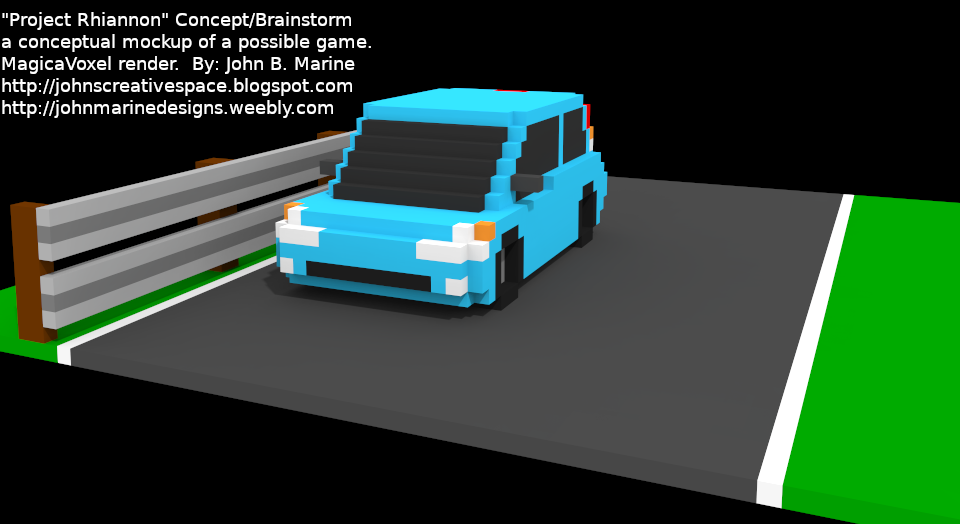
My first #GodotEngine 3D project is what I am calling "Project Rhiannon." Project Rhiannon is a racing game project inspired by the 2011 independent/indie game "3D Pixel Racing." I am inspired to "build a better mouse trap" with Project Rhihannon. There were faults that prevented 3D Pixel Racing from being better than what it could have been. To this point, I managed to try to learn using 3D in Godot Game Engine by coming up with my own racing game project.

I am using a lot of studying of "3D Pixel Racing" as well as the 3D Platformer template to help me conceptualize building a proper prototype from "Project Rhiannon." Important in the creation of Project Rhiannon is that of building a 3D world along with a proper vehicle setup. This project was to be a 2D-style racing game in the mold of several Mode 7 games on the Super Nintendo. I chose this method first because I wasn't comfortable with 3D and using 3D in Godot. Over time, I felt my project would be better served in a proper 3D space. Considering my love affair with voxels, I wanted to make a proper 3D racing game utilizing those voxel models.

While I have not come up with a proper prototype, I did take some of my past assets to build a conceptual idea for a racing game. I may plan to design exclusive vehicles and such just for this game should I develop it. I will keep you posted if I do come up with any interesting material for any racing project using voxels. Here is a picture of what I have conceptualized in the meanwhile:

Project Rhiannon
^ This is a concept of Project Rhiannon using one of my past voxel vehicles made in MagicaVoxel.

So now you know about Project Rhiannon! :) I'll keep you posted if I come up with something cool! To see my other Godot material and projects, visit my link on my Weebly site here: My Game Devlopment Portfolio.


Thank you for reading! Take care and be well.

Subscribe to My Blog(s), and/or Follow on Bloglovin!
Subscribe to John's Blog Space (JBS) Subscribe to John's Creative Space (JCS) Subscribe to John's Race Space (JRS) Subscribe to StyleSpace (SS) Subscribe to John's Life Space (JLS)
Support My Creative Works!
JMDesigns Patreon Soundcloud Bandcamp Twitch OpenGameArt TurboSquid
Get Social With Me!
Facebook (Friends) Facebook (Fans) Twitter YouTube Instagram Google+ LinkedIn (professionals only)
Questions or Comments? Contact Me (serious inquiries only)...
Contact Me via E-Mail


read more...

Wednesday, July 4, 2018

Project Veritas

John B. Marine | 5:55 PM | | Be the first to comment!
Project Veritas is a prototype for a 2D top-down game in Godot. I have a picture of my work as of the typing of this post, but nothing real interesting to share. It was formerly named "Project Missoni." My biggest problem is in the collision detection. I had to adjust a previous top-down project substantially because of a wonky collision model I had set for it. That is why I suspended trying to come up with a top-down game made in Godot. That is, unless I learn how to better apply collision details for tile maps for top-down games.


Any Top-Down Games in the Works?

There are a number of top-down game concepts I have in mind. These include:

• a Pac-Man style maze game.
• a top-down action game similar to Smash TV.
• (possible) a top-down action RPG similar to The Legend of Zelda.

I have another top-down game in mind, but it is a racing game, and I want that to fall into a completely different project.


Considerations for Beta Projects.

I am considering looking for certain sites to host any kind of games I come up with. I may use the popular itch.io basically for sharing demos. I will use my blog(s) and my Weebly site to promote any real games I come up with. My ultimate goal is to make a game of any kind and be able to release it. I am eyeing Windows, Google Play, and HTML5. With more resources, I may test offering games and apps for Apple and iOS among other platforms in addition to the main sources I am targeting.


Stay tuned to this blog for more updates! The best way to do so is to Subscribe/Follow my blog(s) in some capacity. Thank you for reading! Take care and be well.

Subscribe to My Blog(s), and/or Follow on Bloglovin!
Subscribe to John's Blog Space (JBS) Subscribe to John's Creative Space (JCS) Subscribe to John's Race Space (JRS) Subscribe to StyleSpace (SS) Subscribe to John's Life Space (JLS)
Support My Creative Works!
JMDesigns Patreon Soundcloud Bandcamp Twitch OpenGameArt TurboSquid
Get Social With Me!
Facebook (Friends) Facebook (Fans) Twitter YouTube Instagram Google+ LinkedIn (professionals only)
Questions or Comments? Contact Me (serious inquiries only)...
Contact Me via E-Mail


read more...

Tuesday, June 12, 2018

Project Antoinette

John B. Marine | 11:35 PM | | Be the first to comment!
In my #gamedev adventures using @GodotEngine, I have developed "Project Antoinette." Project Antoinette is my development base made in Godot Game Engine to make a 2D platformer and various assets for platformers. I plan on making characters also with different abilities. Project Antoinette is not meant to be a proper game. Elements from it, however, may trickle into individual game projects. For now, I am simply trying to slowly learn the ins and outs of game development while trying many different concepts.

As of the initial date of this blog post typing (June 11, 2018), I have mostly followed different YouTube tutorials and Godot Docs notes to build my character and design worlds. What I HAVEN'T been able to do yet was code for collectable items and taking on coding enemies. These are only a few different platformer elements I have not yet perfected or mastered.

Project Antoinette does not resemble a proper game I am working on. Project Antoinette is more like my sandbox for trying different elements of 2D platformer games. There may be child projects that may stem from the parent of "Project Antoinette." That is what I am at least hoping for with this project. For now, I have a somewhat better understanding of what I want to do with platformers and how I hope to pace everything.

I will not post any sort of pictures on Project Antoinette until I make something actually interesting. Though in future posts, I may fill you in on my learning of game development using Godot with Project Antoinette as my base.


I am pleased for you all to continue to check out my work. Let's keep that relationship going, shall we? Thank you for reading! Take care and be well.

Subscribe to My Blog(s), and/or Follow on Bloglovin!
Subscribe to John's Blog Space (JBS) Subscribe to John's Creative Space (JCS) Subscribe to John's Race Space (JRS) Subscribe to StyleSpace (SS) Subscribe to John's Life Space (JLS)
Support My Creative Works!
JMDesigns Patreon Soundcloud Bandcamp Twitch OpenGameArt TurboSquid
Get Social With Me!
Facebook (Friends) Facebook (Fans) Twitter YouTube Instagram Google+ LinkedIn (professionals only)
Questions or Comments? Contact Me (serious inquiries only)...
Contact Me via E-Mail


read more...

Tuesday, May 22, 2018

Godot Game Engine

John B. Marine | 8:59 PM | | | Be the first to comment!
I have never made any kind of game. Attempts at doing so have hit multiple snags, either trying to learn code or simply trying to build everything. The Godot game engine provides new hope for me. For most of this weekend, I learned from a tutorial series on how to make at least one kind of game. All that remains is to put my skills into practice and try to develop something special. This blog post is a look at the Godot game engine and what I hope to accomplish with it.


Godot Game Engine


Let's get to know Godot and get my thoughts on it.


A Brief Overview of Godot.

Godot is no Johnny-come-lately or overnight success. It was earlier in March 2018 when Godot version 3 was released. Godot is a completely free and open-source engine for making various games. I believe I read its programming language is a variation of C and C++. You can export games into various formats, including (but not limited to) Android, Blackberry, HTML5, and Windows Desktop among others. This game engine has come along very well as a free alternative to Unity. While game engines like Unity3D and the Unreal Development Kit are free to download, you won't have to pay anything for Godot or to use various resources.


Why Godot?

For most people, I would be asked about why I didn't create something with Unity. Unity is, after all, the most powerful program for making even basic games. One could even write a game using something like Visual Studio or Netbeans. To be honest, I haven't had the patience to learn Unity. Even with Godot's strengths and weaknesses, I seem fairly convinced that I can confidently make games using Godot. Godot just has a certain feel to it to where I felt more able to envision and create whatever it is I want to create for a game. I never felt confident *trying* to be patient with Unity.

Unity is more 3D based even with 2D games. Godot seems more pure 2D, though you can create 3D games with Godot. For those who do not have lots of money or skill, Godot is a true boon towards the game development realm. There is not too much a learning curve with Godot. Yet, at the same time, you don't feel entirely lost using Godot as opposed to Unity or any other game development kit. After seeing a few videos, I thought a good bit about how I can develop some kind of game. I felt as confident to make a game with Godot as I was in making 3D models using Wings3D. Anything to manifest and instill confidence is always a plus.


An Ambition Reborn... Again.

Every past attempt to try to make something has hit some kind of snag to where I eventually put it aside and almost never return to it. This time seems different with Godot. As I learn to better structure my visions, I feel better able to create something I can actually be proud of.

Let me share some back stories. It was back in 2012 or so when I bought an OUYA with the intent of making games. While the OUYA's success was mixed (some will say total failure), I saw potential in it to design games with. I do not own any kind of smartphone, and I rarely use my WiFi Android devices for gaming. I had a Google Nexus Player for possible Android TV game development. I did everything from buying new PC monitors and even an HDTV to simply try to get all of this to work. It was always a vision of mine to make a game. However, I was never on the mindset of it being a life goal to make a game.

With all of this said, Godot is not my last chance at making a game, but it is my best chance of making one. You can be assured that I will share my material across social media as well as here on "John's Creative Space" should I create something worth sharing.


For More Information...

So... do you want to try Godot for yourself? Please visit the following website to begin your game development journey with Godot: godotengine.org! You can visit this site for documents to help you with Godot Version 3: Godot Docs - 3.0 Branch.


I will keep you posted on all of my creative works. Until then, I'd like to thank you for taking time out of your day to visit my blog. Support is always special to me no matter how much it is. I am just glad you can provide your own support to help keep me relevant. Thank you for reading! Take care and be well.

Subscribe to My Blog(s), and/or Follow on Bloglovin!
Subscribe to John's Blog Space (JBS) Subscribe to John's Creative Space (JCS) Subscribe to John's Race Space (JRS) Subscribe to StyleSpace (SS) Subscribe to John's Life Space (JLS)
Support My Creative Works!
JMDesigns Patreon Soundcloud Bandcamp Twitch OpenGameArt TurboSquid
Get Social With Me!
Facebook (Friends) Facebook (Fans) Twitter YouTube Instagram Google+ LinkedIn (professionals only)
Questions or Comments? Contact Me (serious inquiries only)...
Contact Me via E-Mail


read more...

Wednesday, September 27, 2017

3D Track Modeling

John B. Marine | 8:17 PM | | | Be the first to comment!
(UPDATED: September 28, 2017)

As I returned to 3D modeling recently, I want to make cars and tracks. The latter is what I have mostly been doing lately in my return. This blog post shows practice runs of mine modeling tracks in Wings3D. It will give you an idea of what I hope to provide in the future for all of you.


LATEST UPDATE(S)/REVISION(S):

SEP 28 2017 - added another section, edits made


3D Track Modeling


When designing a race course, you have to consider designing a course in regards to making something that will be enjoyable and fun. Your ability to create a virtual space that serves as a quality race track is paramount to making something memorable. I tend to believe you need quality locations to challenge the limits of vehicles in games. Without fine venues, a car, nor its driver(s) will ever shine. So it pays to build some quality material in your own world and with your own level of craftsmanship and expertise.

A long time ago, I had envisioned making tracks for rFactor. Nothing ever materialized from my work then, and I lacked the skill and desire to make 3D models. It wasn't until recently that I decided to give 3D modeling another try. You may remember I discussed why I abandoned the 3D modeling scene some time ago. Now... I'm back!

I want to show a bit of my evolution in trying to re-learn Wings3D and Blender. I still use Wings3D for my modeling, but I am doing more of re-learning Blender to put everything together. The next section will show some practice modeling runs of mine.


Track Designs


None of my designs here will be part of any project, but I did practice designing courses. I have shown a few of my practice runs in pictures in my Facebook profile, but never truly worked on them much since. So what you are going to see are mostly practice runs with a slow evolution of my skill.

NOTE: I am now using Flickr to display some of my images.


Practice Run 1: Oval.

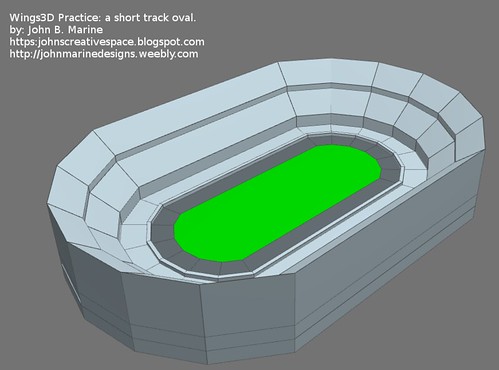
TestOval

A lot of racing fans would find oval racing boring. However, these are some of the most basic courses anyone can construct. Just think about it for a moment- you have some simple straights and a few corners. Completely simple to make. If you want to do more complicated ones, though, you'll have some extra work to do.


Practice Run 2: Oval With Objects.

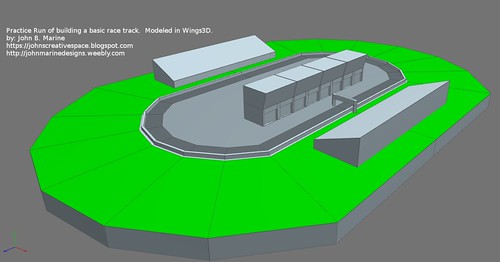
TestTrackModel

This practice run was about designing a race course with objects. The objects on this course include a gate at the Start/Finish line, grandstands, and a garage. Even the outside concrete wall is a separate object. The advantage to a design like this is that if the performance is low, certain track objects can be removed to help improve frame rate for games. I probably shouldn't have made the outside wall a separate object, but I did. Remember- this is practice. This probably will not likely going to materialize into a track.


Practice Run 3: Road Course.

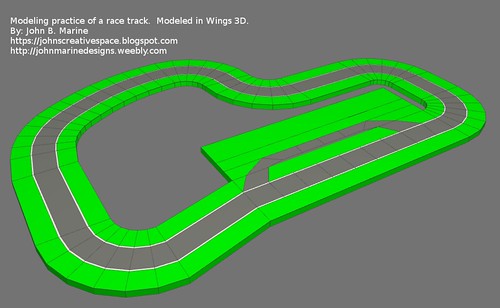
TestTrackRoad

One time, I learned a skill important in the design of race courses- the ability to bend geometry. I made a road course once that was mostly a bunch of rough cubes. Learning how to bend pieces allowed me to make smoother corners for tracks. As you can see in my test run for a road course, you can see the smooth corners.


Practice Run 4: Elevation Changes and Overpass.

TestTrackRoad2

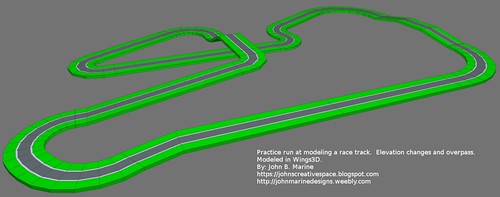
(ADDED: September 28, 2017) This unusual-looking track was created to practice making elevation changes and an overpass. Careful placement of vertices were key in making this possible. Selecting individual loops were key in preparing this model and making the different elevation changes. Elevation changes, when making a race track, are paramount on how you actually model them. Providing too steep an angle can almost make a vehicle seem like it is hitting a wall. So you need to be careful to not make the angle too steep for whatever vehicle(s) may maneuver around it.


Please note that in all of my pictures and in my test modeling runs before my 4th practice run, the track itself is flat. I have not yet gone to the level of making modeling runs of race tracks with elevation changes or overpasses. Perhaps I will share those runs in a future post. Stay tuned to my blog for more on that front! Meanwhile, check out the next section.


Explaining the Workflow


How did I create these in Wings3D, and how can you make your own work? Well, part of my workflow is to design the basic proportions of the course followed by drawing points through the center of the different edges. The center line drawn around the track is then beveled using the Bevel function. Three colors are used to mark the outer section (usually grass), the bounds of the course (usually the white lines marking the edges of a track, and the road itself (usually tarmac or non-tarmac). It is also possible to extrude the outer portions of the track to put up barriers to help keep the car in-bounds. Or in the case of temporary circuits, what could be used to define the boundaries of the road and the outer part can simply be used as the barriers as you see on most street course tracks.

You can build your courses any way you please, but this is how I've come to learn how to design courses.


An Interesting Observation...


I imported a model of one car from one game and did a little experiment on it. When you make a basic cube in Wings3D or Blender, you get a cube that is about 2x2x2 units. Each unit from the basic scale is one foot (or one meter for Metric measurements). A car with a measurement of two units wide and four units long will require about two cubes under it to properly fit it onto the ground. When you make a 3D model or a scene, you can always upscale it to your heart's content. So in the case of a 4x4x4 cube, a car of 2x4 dimensions would fit onto it but wouldn't look too good on such a small surface. So you would need to scale it up by twice or thrice as much for it to be used as a model to race on a track.

You can start small but then raise the scale to make it better able to be used in a game or in any animation. If you are making a track for a game, be mindful of performance limitations of whatever device(s) you are developing for.


Other than that... have fun modeling!


That's all for this post. If I do offer something fun, I'll share it with all of you. Meanwhile... thank you for reading! Take care and be well.

Subscribe to My Blog(s), and/or Follow on Bloglovin!
Subscribe to John's Blog Space (JBS) Subscribe to John's Creative Space (JCS) Subscribe to John's Race Space (JRS) Subscribe to StyleSpace (SS)
Support My Creative Works!
JMDesigns Patreon Soundcloud Bandcamp Twitch OpenGameArt TurboSquid
Get Social With Me!
Facebook (Friends) Facebook (Fans) Twitter YouTube Instagram Google+ LinkedIn (professionals only)
Questions or Comments? Contact Me (serious inquiries only)...
Contact Me via E-Mail


read more...

Wednesday, December 28, 2016

Game Making Struggle

John B. Marine | 1:28 AM | | Be the first to comment!
The game-making struggle is real, folks. Most of my creative energy recently has been spent making game prototypes and learning game programming. I've had the furthest progress using Lua and Löve2D. So that is what I am using to make games. The ultimate goal is to make my first true game I have nothing to share at this point with you all, but I will offer thoughts on my journey of making my first game of any kind.


The Game Making Struggle


Let me go into a bit more detail about my work.


Putting the Games Together.

I am using Notepad++ to put together code for my games. I am using Löve2D for coding, a game-focused Lua interface. When I get around to audio, I will be using Linux MultiMedia Studio (LMMS) mostly. Most of my art has been done with Paint.NET. To try to make material for games, I am taking inspiration from various games. Most of my concentration is on simply making some kind of game rather than the most spectacular material right away. You got to take baby steps before making big leaps.


Why Ask Why?

So...

Why Lua/Löve2D?
I am using Löve2D because it is the programming language I have most successfully been able to make prototypes of. I have no formal training in computer science or programming, so I am mostly relying on various online resources to program with. A lot of people use Löve2D for which to make games with. And while many others will fancy something like C++ or Java instead, you can quickly make progress using Löve2D.

I have been playing with Unity3D, Unreal Engine, and Godot. Since my concentration is on 2D games, it seems a good bit awkward using a 3D engine for making 2D games. I think I even looked at Blender to try to make a pixel-perfect 2D game. Programs like Construct2 and Game Maker are for easy making of games. For some reason, I feel it is better to work with proper programming languages for better porting of material to different platforms and more programming control.

Why Paint.NET?
While Photoshop is more powerful and has many more features, I am using Paint.NET mostly for comfort and for a lightweight solution for making art. You can do a lot more in Photoshop, but the Paint.NET usage is primarily for making some quality material without having some massive program.

Why LMMS?
It has been the best sort of program for making music. Most of all, like many of the other things featured in this post, it's free. It has been the program I slowly learned and enjoyed to make music with. You probably have heard some of my music in my YouTube videos and even on my Weebly site.


Admitting Problems.

One of the things that upsets me is when you have very few quality resources. And sometimes, the ones that are suggested best usually are not the very best. An example includes a video of something that ultimately is not very good because of poor quality expressing it. Or maybe you find some website or blog with a tutorial, and you end up not having the same results as what someone else put together. All of this leads to frustration.

Another weakness is in not being able to properly know how to put certain games together. I've been looking at all kinds of methods to try to build games and game levels. I have yet to make some kind of game I am proud of to share and to build. Part of the reason is because I am not as adept at programming. I don't have any comfort level to confidently build a game from scratch. Being so compelled by various programming languages, I often don't know what methods and functions I can apply to any programming language or know what programming speak is exclusive to one specific language.

I have also struggled trying to come up with a proper suite to parse levels. Methods have included trying to put together PNG images to even trying to make game level data based on an image. I have not been successful making a proper parsing system for which to design levels easier.

Not everyone is some kind of one-person studio. Despite my issues, I mostly want to try to do this alone. I think there is greater accomplishment in trying to get things done your way and on your own. Is it intense? You bet! However, I feel there is greater gratification in being solo. You are making something to how you perceive to be incredible.


Game Building Methods.

I mentioned methods of making games. Let me explain a bit further.

Let us take making game levels for instance. Some people design levels using a series of images- maybe a static background image, then have that image with various overlays of hand-drawn levels. Or in the case of game engines, a decent set of tiles to make a 2D type game. People have designed levels of 2D games using a bunch of PNG layers or even a Photoshop PSD file. Some games are even built upon CSV files, XML files, Inkscape SVG images, even Excel spreadsheets. There are methods in designing levels in layers from the artistic aspects to the collision layer. I have yet to actually perfect any aspect of this.

As for game mechanics, I am playing games that I see either as good or bad. Sometimes learning from bad games (as you see them) can sometimes be the easiest to learn from since they aren't all that good. It is sometimes the worst titles where you feel you could most make something better. There is that feeling where you have a chance you can make something better than what some other developer made. With some titles I've played, I either want to make something as fun as a good game or make a not-very-good game better. You learn to take concepts from other titles and try to make your own quality content.

The game mechanics themselves can boil down to learning how to make certain titles and how to take certain dynamics to apply into your own work. For example, you can examine the code of a player in a platformer game to apply and modify in your own work. This is certainly something I am looking into as I am trying to develop my own kind of game and/or game prototype. I don't have as many quality resources to look at and try to utilize into my own work. I certainly don't want to completely copy somebody else's work as my own (plagiarism).

I haven't given it much thought, but I have also considered the user interface (UI) as part of my game design adventures. It is something I haven't given much thought to since I am more focused on trying to build the game first and foremost before thinking of making a certain interface.


Having said all of this, the struggle to try to make something of quality is real. You all know I will share my work with you all when I come up with something I think you all will like. I am not sure how I would distribute my content. To test the waters of making and distributing games, I may look to resources like Newgrounds, Kongregate, and even itch.io as sources. I may also set up a Google Site exclusive towards featuring some of my games.


Would I Consider Game Jams? (Bonus Section!)


To me, no. I am too much of a perfectionist to try to make a game from start to finish in only two days or shorter. I am not as keen to make a mistake-ridden game that I can ultimately learn from to design future games with. I am a casual person who has a professional mindset on certain things. I feel things must be of acceptable quality as I deem acceptable. Also, I am not too good at trying to work with themes.

The appeal of doing a game jam will help people to try to manage their time and realize what all is important when building games. I am not ready for that kind of stuff yet.


All you have to know from this blog post is that the struggle to make games is real. This is why I have mostly seemed idle in making content. You do, though, at least know that I have been trying to develop content as best as I can. This concludes another post of my creative works blog- "John's Creative Space." Thank you for reading! Take care and be well.

"Like" me on Facebook, Follow JCS, visit my Weebly site, and/or Contact Me via E-Mail!
Subscribe to John's Blog Space (JBS) Subscribe to John's Creative Space (JCS) Subscribe to John's Race Space (JRS) Subscribe to StyleSpace (SS)
read more...

Wednesday, November 30, 2016

Voxel Character Starter Pack

John B. Marine | 10:51 PM | | | | Be the first to comment!
My voxel characters made in MagicaVoxel are now offered as a Starter Pack! This one features nine of my first voxel characters. All of them are static models in their raw VOX format. I decided to offer this package online to give people some voxel characters to use for games and other projects. I also want to showcase my voxel art talent to the world by offering this package.

Here is a look at the characters:

Voxel Character Starter Pack
^ from: (my Facebook Fan Page) - The original nine characters I made with my first character pack are now available for download. Get it now!

* base model - wears a white tank top, blue jeans, and black shoes.
* a teenage girl with a bright scarf, black top, and indigo jeans tucked into brown boots.
* a middle-aged woman in a sweater over a blouse, skirt, and pumps.
* a man in an open shirt with a T-shirt underneath and jeans tucked into dark brown boots.
* a young adult lady in a yellow dress and hot pink pumps.
* a Black male in a football jersey, dark blue jeans, and orange lug boots.
* a man in overalls and wears a baseball cap.
* a teenage boy in a varsity jacket, a T-shirt, blue jeans, and brown shoes.
* a college-age girl in a sporty tank top, and yoga legging pants tucked into sheepskin boots.

I am looking to rework my regular models and offer some more advanced options for those looking to animate my models. I will keep you posted here on "John's Creative Space" and elsewhere in media. All I want you to know here is that you will now be able to use my original models. If you think you can make better-looking models using my base model, the original VOX models are all concluded as they were from MagicaVoxel.


For More Information...

Want to download this package? Choose to support me on OpenGameArt, Voxel Art Store, or both! Links:

Voxel Character Starter Pack on OpenGameArt
Voxel Character Starter Pack on Voxel Art Store

Please also support me on Patreon. Visit www.patreon.com/johnbmarine and make a pledge. Your support can help me to provide more content and even gain funding towards performing other projects. Other than that, enjoy! :)


That concludes this blog post. Thank you for reading! Take care and be well.

"Like" me on Facebook, Follow JCS, visit my Weebly site, and/or Contact Me via E-Mail!
Subscribe to John's Blog Space (JBS) Subscribe to John's Creative Space (JCS) Subscribe to John's Race Space (JRS) Subscribe to StyleSpace (SS)
read more...

Tuesday, November 29, 2016

Block Breaking Block Pack

John B. Marine | 10:22 PM | | Be the first to comment!
UPDATED: December 6, 2016)

Recently on @opengameart, I offered my first #gamedev asset. This asset offered is for block breaking fans. Think Breakout or Arkanoid here. I devised a set of blocks that can be used for block breaking games the likes of Breakout or Arkanoid. There are 12 blocks in 25 different color combinations. Each block is pure pixel art- no vectoring, no pre-rendered graphics... just a four-color scheme with dark outlining on the bottom and right sides of each block. Here is a preview of my block breaking game asset:

block breaking Breakout Arkanoid
^ from: (my Facebook fan page) - 25 colors, 12 block packs, one great pack of block breaking game assets.

Here is a look at each of the color combinations (and some rules if you want to use the blocks):

01: red
02: orange
03: yellow
04: green
05: blue
06: violet/purple
07: pink
08: teal
09: aqua blue
10: crimson
11: sky blue
12: lavender
13: white
14: cyan
15: turquoise
16: forest green
17: Game Boy© Green
18: Virtual Boy© Red
19: brown
20: bronze*
21: silver*
22: gold**
23: sunset
24: alpha map
25: onyx***

* = takes two hits to destroy
** = takes three hits to destroy
*** = can not be destroyed

This package is offered in three different varieties. I am offering them separately. Click on the links below to find this asset in the different variations:

Block Breaking Block Pack (SD Version)
This is the basic block back. Each block is 16 pixels wide and 8 pixels tall.

Block Breaking Block Pack (HD Version)
This is the same pack as the Standard model, only upscaled and retouched. Each block is 32 pixels wide and 16 pixels tall.

Block Breaking Block Pack (HD2 Version)
(December 5, 2016 Update)
This is the enhanced HD pack at double the scale of the HD version. Each block is 64 pixels wide and 32 pixels tall.


Get the Block Breaking Block Pack Bundle!
This package features all three block breaking block packs, but it also includes six extra block types exclusively for the HD2 set! It is also my first pixel art submission to Voxel Art Store.


To keep up with all of my OpenGameArt work, please visit my OpenGameArt profile.


You have read a post on "John's Creative Space"- the creative works blog of mine! I hope you enjoyed your time here. Please Subscribe and Follow this blog (and my others) if you enjoy my content. Thank you for reading! Take care and be well.

"Like" me on Facebook, Follow JCS, visit my Weebly site, and/or Contact Me via E-Mail!
Subscribe to John's Blog Space (JBS) Subscribe to John's Creative Space (JCS) Subscribe to John's Race Space (JRS) Subscribe to StyleSpace (SS)
read more...
JohnMarineDesigns on TurboSquid

Would you like to donate to support my creative work? If so, please show your support using this PayPal item:
I am now on Patreon! Support my creative work on Patreon today at: www.patreon.com/johnbmarine!
 
Copyright © 2015 John's Creative Space • All Rights Reserved.
Template Design by BTDesigner • Powered by Blogger