Saturday, February 29, 2020

3D Modeling Detail

John B. Marine | 8:45 PM | | Be the first to comment!
A tactic of 3D modeling is to focus on how much to model for whatever application(s) in mind. Some go with high-polygon modeling and then dumb it down for low-polygon modeling. Some begin with low-polygon modeling and then increase the details. Which method is better? Well, it depends on how detailed you want your work to be and for what application(s) you plan on distributing your 3D models to. Through my modeling work, I have mostly focused on low-polygon modeling. I don't have the patience to try to flesh out low-polygon modeling. Some people do an amazing job taking basic rough shapes and then turning them into amazing 3D models. The different methods used to develop detailed models varies from different modelers.

I haven't yet designed anything spectacular, but I do hope to build 3D models from rough shapes to detailed modeling masterpieces.


This was a very brief post but with sufficient detail. Here is my discussion question for you:

What is your method of 3D modeling as far as detail is concerned?

Thank you for reading! Take care and be well.

Visit my official website at johnbmarine.com, subscribe to My Blog(s), and/or Follow on Bloglovin!
Subscribe to John's Blog Space (JBS) Subscribe to John's Creative Space (JCS) Subscribe to John's Race Space (JRS) Subscribe to StyleSpace (SS) Subscribe to John's Life Space (JLS)
Support My Creative Works!
JMDesigns Patreon Soundcloud Bandcamp Twitch OpenGameArt TurboSquid
Get Social With Me!
Facebook (Friends) Facebook (Fans) Twitter YouTube Instagram Pinterest LinkedIn (professionals only)
Questions or Comments? Contact Me (serious inquiries only)...
Contact Me via E-Mail


read more...

Wednesday, February 12, 2020

Does Blender Get the Respect it Deserves?

John B. Marine | 8:31 AM | | | | Be the first to comment!
(UPDATE: February 13, 2020)

#Blender3D is a free and open source program for 3D modeling. Everything from videos to intricate 3D models can be produced with Blender. Game developers even use Blender for assets and even complete games. However, Blender does get a bad rap from some people for a number of reasons. Even still, what you can accomplish in Blender goes far beyond what most other 3D modeling software can do. So I decided to blog about Blender and show some respect for it. Does Blender get the proper respect? I will explain why you should care (or maybe not) in this blog post here on "John's Creative Space!"


Before I Begin...

This is my first JCS blog post of 2020. Happy new year!


LATEST UPDATE(S)/REVISION(S):

FEB 13 2020 - added some extra details


Does Blender Get the Respect it Deserves?


Allow me to discuss Blender to you all.

Blender 3D logo
^ from: (Pinterest) - The Blender logo. Does Blender get the respect it deserves? I explain in this blog post.

Blender's history dates back to 1994, and its initial release dates back to 1998. What you can accomplish in Blender for development of media is astonishing. Many people look up to programs like 3D Studio Max as the gold standard of 3D modeling. It is a top-tier industry standard in regards to 3D modeling. Blender, however, is sometimes criticized for a number of reasons. People say the interface and UI are not very charming. Blender also has a seemingly steep learning curve. As someone who has not had much success making proper 3D models, even I am more comfortable using a program like Wings3D (which is also free) for 3D modeling. Maybe even another reason people discredit Blender is because it is free and open-source, usually meaning that free programs don't have the same level of quality compared to the top-level programs. When you finally learn and master Blender, you can do almost as much as you can with the more popular 3D programs like 3D Studio Max, Maya, Cinema 4D, and more. Blender makes you able to make impressive material without needing to stick to a payment schedule or subscription like most of today's 3D modeling powerhouse programs. You can use certain renders outside of Blender's own render engine to produce your images. These include the likes of the Cycles Renderer and the Eevee (not to be confused with the Pokémon Eevee) engine. While you can make 3D models, you can even do simple video editing as well as create entire videos and films with Blender. A popular example of a Blender film is the 2008-released film "Big Buck Bunny." Blender is free and always will be free unless someone buys Blender and cheapen the Blender experience entirely.

It took me over 20 years to make a 3D model I could be proud of when I made my first true Blender creation back circa 2016. My 3D skills are still subpar, but I have tried especially recently to learn Blender and utilize it. A handful of YouTube videos on Blender have helped me to develop my 3D modeling skills in Blender. I slowly tried to develop and practice using Blender techniques to produce 3D models. I still have a lot to learn, but I feel I can do a lot to try to master using this program.

One reason I have tried to learn Blender better is because I am offering my material for sale through sites like Turbosquid and Envato's 3D Ocean. Surely the latter is one of the different programs you can share as being the program you made models in. As of the time of this initial blog post (February 12, 2020), these are the accepted programs for which you share as being what 3D model was made in:

--- 3DOcean Accepted 3D Modeling Programs ---
• 3D Coat
• 3D Studio Max
• Autocad
• Blender
• Cinema 4D
• Lightwave
• Maya
• Moda
• SoftImage
• Vue
• ZBrush

You can still use whatever programs you like to 3D model in, but that is pretty much a list of top-level 3D modeling programs for you to sell your models on sites like 3DOcean. Blender even has a suite where people can sell their Blender 3D creations on called Blender Market.

One must also consider using Blender for more popular applications. For one, there is the crowd of using Blender for virtual reality and augmented reality. VR/AR has its own specifications and considerations when modeling. Blender can be a good enough program to use for VR or AR if you know what you're doing.


Blender for Gaming and Game Development.

Blender was made in C++ and Python. If you have skill in using Python, you can make simple games in Blender using Python code. Blender has had its Blender Game Engine (BGE) serve as the gaming base for those who develop games using Blender. Of late, however, Blender has dropped support of the Blender Game Engine. A program that maintains the appeal of the former BGE is a program called UPBGE. UPBGE stands for "Uchronia Project Blender Game Engine." Many of the features that made BGE an excellent suite for gaming and game development can be had with the UPBGE package.

While Blender could be used to develop games, some people ranging from hobbyists to various independent (indie) developers make assets in Blender to be used in programs like Unity3D and Unreal Engine. People who compete in game jams use programs like Blender for simple modeling of 3D models. Such people even do as great of a job with modeling 3D assets in Blender as almost anyone could with popular paid 3D modeling software.

Blender can also be used for programs like Armory3D. Armory3D is a 3D framework that integrates into Blender. So using a combination of Armory3D and Blender can work perfectly fine in the development of 3D games. So everything from a casual game project to a AAA-quality game could be made with a combination of Blender and Armory3D. You can use a number of other 3D frameworks and interfaces to use in game development with Blender, but Armory3D is a popular option.


Blender for Web Development.

Did you know you can build 3D websites with Blender? People use programs like Blender to build things such as 3D stores and various configurators of products. You could see 3D material with Blender with items ranging from fashion goods to even building your own car. I am mostly positive this suite for Blender mostly pertains to front end development and not much about front end and back end web development. There are people who model through Blender for website development to packages such as WebGL, Blend4Web, and Verge 3D.

Even I have thought of practicing making a 3D environment people can use to navigate for material I've created. Though, I haven't made anything cool enough to warrant any sort of attention. Stay tuned to "John's Creative Space" if I do develop some kind of 3D online environment for you to explore.


Blender for Video Production.

Let's face facts. Blender will NOT replace or substitute programs like After Effects, Premiere Pro, or Vegas. A lot of the videos and video effects you can make in most popular video programs can be done in Blender. If you were to try to upload your creations to video sites like Envato's Videohive, you can't say you created the video material in Blender. So you may need to find some other programs for which to produce videos with. I haven't had too much video experience with Blender, so I will leave my discussion there.


Since I mentioned Blender in a number of lights, does this program get the respect it deserves? Here are my final thoughts...


Does Blender Get the Respect it Deserves? - Final Thoughts


Just because something is free doesn't mean it lacks the quality of more established programs. Really, Blender has become its own established program throughout its development. Some people don't want to commit to a subscription service just to use a high-quality 3D modeling program. Those who don't want to do so have limited options for which to 3D model with. Therefore, Blender and its free nature is a boon to the 3D modeling community. Just because not many people look to Blender for quality 3D modeling doesn't mean there is no reason to use Blender. The interface may be tough, the learning curve may be steep; but once you master using Blender and learn many techniques to model with Blender, it becomes apparent this program is just as good... if not better... than most of the top-level, *industry standard* 3D modeling programs. You can always make Blender better if you develop scripts and add-ons to enhance the capabilities of Blender. Just because Blender is free doesn't mean it lacks the quality and polish of other top-level 3D modeling software. You can always make sacrifices if you feel Blender is somehow not good enough to meet your standards of 3D modeling.

So if you are on the fence about Blender, give it a chance and try to learn to use Blender. Try to master using Blender even if you are more comfortable using other 3D modeling software. Blender actually deserves more credit than most people give it. At least... to me.


For More Information...

Learn more about Blender by going to www.blender.org. Find more 3D resources I've curated by visiting my Creative Resources page.


Those are my own thoughts on Blender. Let me know what you think...

Do you think Blender gets the respect it deserves?

Be sure to Subscribe/Follow my blog(s) to keep up with my latest material. Visit my other blog posts to see more of my work and more of my thoughts on a variety of issues. Thank you for reading! Take care and be well.

Visit my official website at johnbmarine.com, subscribe to My Blog(s), and/or Follow on Bloglovin!
Subscribe to John's Blog Space (JBS) Subscribe to John's Creative Space (JCS) Subscribe to John's Race Space (JRS) Subscribe to StyleSpace (SS) Subscribe to John's Life Space (JLS)
Support My Creative Works!
JMDesigns Patreon Soundcloud Bandcamp Twitch OpenGameArt TurboSquid
Get Social With Me!
Facebook (Friends) Facebook (Fans) Twitter YouTube Instagram Pinterest LinkedIn (professionals only)
Questions or Comments? Contact Me (serious inquiries only)...
Contact Me via E-Mail


read more...

Thursday, October 10, 2019

Basic Voxel Vehicle Pack

John B. Marine | 6:58 AM | | | | | Be the first to comment!
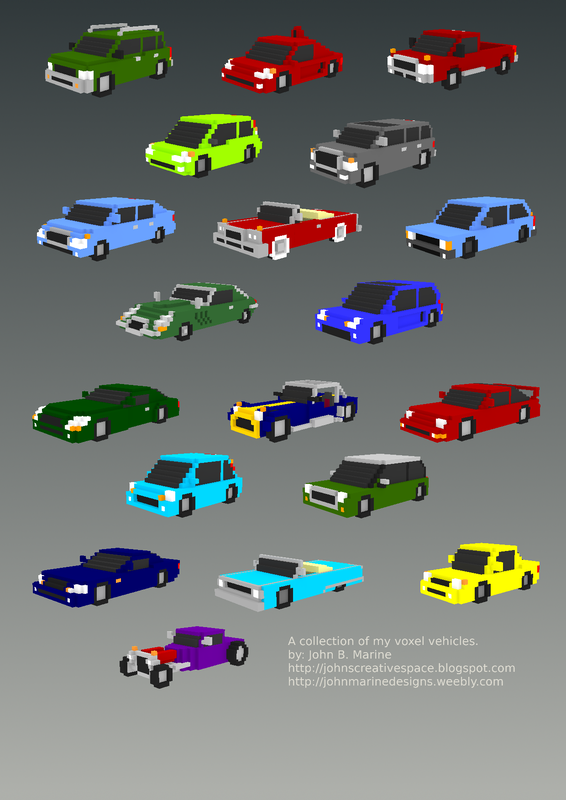
After several years putting it off and in not deciding what to do, I recently have FINALLY offered my voxel vehicles to the Internet public! This blog post describes what all I have done with these voxel vehicles I created. You will be able to purchase my voxel vehicles towards the end of this post. So stick around for more information!


My Basic Voxel Vehicle Pack


This is an opportunity for me to share with you my voxel vehicles. More information is included in this post, so read on if you are interested in my voxel vehicles.


What You Should Know.

My voxel vehicle creations were as of 2014 producing them with MagicaVoxel. I shared my voxel models across social media showcasing my work. I long planned to use my voxel models to develop a racing game. That game, however, never materialized. So the models I created have basically remained on my PC to never be available to the public. Despite a good amount of demand by some people who reached out to me, I was never fully ready to share my voxel models. That is until I finally decided in September 2019 to consider joing Envato. On October 1, I joined Envato. My first upload to any Envato product was made on October 7. My package was approved to 3DOcean for my voxel vehicle pack. Therefore, I am pleased to announce that my voxel vehicle pack is LIVE!

In my original upload to 3DOcean, I decided to keep the vehicles as static models. I had planned for some time to make the voxel models ready for animation. That will probably come in either an update or as a separate package. To keep polygon counts low, I filled up the invisible portions of the voxel models with voxels. Most of my models originally came with visible interiors if you remove the glass windshields and doors. Everything is low-polygon for the sake of game development. That was the original intent of my models.

The reworked voxel vehicles can be imported into programs like Blender or in game engines like Godot Game Engine. If you want to further use models for various applications, you are on your own to take my models and import them into other programs. So you will need to use a program like Blender to export my models into Unity3D if you want to use Unity with my voxel vehicle models. The Basic Voxel Vehicle Pack is available in three different formats: COLLADA DAE, OBJ, and the native MagicaVoxel VOX. Use the native VOX to freely edit the voxel models in their raw form.


Want to Get My Voxel Vehicles?

My voxel vehicle pack is available on Envato's 3DOcean. Purchase the Regular License if you want to feature my voxel vehicles in a free game or in certain media projects. Purchase an Extended License if you plan on using my voxel vehicle models in a paid game. Click on the image or link below to get started:

basic voxel vehicle pack
^ Click on the image or click on the following link to buy my voxel vehicle pack: Basic Voxel Vehicle Pack (Envato, 3DOcean)!

If you use my voxel vehicles in any project (personal or commercial), please let me know! I want to see how you plan on utilizing my voxel models. Please help support me and my work any way you can. Purchasing this package is one such way of showing your support... if you don't mind. I would appreciate your support.


That is all for this post! I hope you found it interesting. Thank you for reading! Take care and be well.

Visit my official website at johnbmarine.com, subscribe to My Blog(s), and/or Follow on Bloglovin!
Subscribe to John's Blog Space (JBS) Subscribe to John's Creative Space (JCS) Subscribe to John's Race Space (JRS) Subscribe to StyleSpace (SS) Subscribe to John's Life Space (JLS)
Support My Creative Works!
JMDesigns Patreon Soundcloud Bandcamp Twitch OpenGameArt TurboSquid
Get Social With Me!
Facebook (Friends) Facebook (Fans) Twitter YouTube Instagram Pinterest LinkedIn (professionals only)
Questions or Comments? Contact Me (serious inquiries only)...
Contact Me via E-Mail


read more...

Friday, October 4, 2019

John Joins Envato!

John B. Marine | 12:35 AM | | Be the first to comment!
On October 1, 2019; I joined @Envato! I feel a lot like #Envato has a lot of material I could contribute to. It may also be my best outlet for building a portfolio outside of my JohnMarineDesigns Weebly site. So I will use this time to discuss joining Envato and why I am doing so. I also have a little announcement to share in this blog post, so stay tuned for that!


Before I Begin...

WHOA! I haven't updated "John's Creative Space" in almost four months? Sorry to keep you fans of this blog this blog rarely updated!


John Joins Envato!


Allow me to talk about Envato and why I joined this service.


What is Envato?

Envato is an Australian company where people buy and sell digital goods. Such goods include music, graphic designs, videos, 3D models, coding/programming, and more. This company was founded in 2006 and is based in Melborne, Victoria, Australia. As of the time of this post, Envato Market has had over 55M items sold and has earned over $760M USD in earnings. So Envato is a highly successful marketplace for all sorts of digital goods. Some people sell their creative digital goods on Envato but may also sell elsewhere. Some others, though, market exclusively through Envato. So while you may see some creative work work promoted on other websites, their marketing medium is usually Envato.

If you want extra insight on Envato, take a look at this video:


^ The Envato Story | Inside Envato


[Some of] Envato's Services.

Just like Google, one account on Envato opens you to all of their services. I say there are various services I feel I can contribute to. Here are some of the many...

• AudioJungle - AudioJungle is the service where people provide stock music. Usually, a lot of the music is corporate stock music used in applications ranging from business videos to YouTube videos. Some online video have AudioJungle songs used as background music. The easiest way to tell a song from AudioJungle is used is when you hear the "AudioJungle" watermark during the course of songs or videos. All AudioJungle material are all royalty-free stock music. If you want an example of a song on AudioJungle with the watermark playing at times, here is a sample song from one video I saw once:


^ Pinkzebra "Larger Than Life" feat. Benji Jackson - Upbeat Song for Videos

• GraphicRiver - GraphicRiver is used in the distribution of graphic designs. These range from logos to presentation slides to gaming assets. This site covers lots of ground.

• 3DOcean - The 3D model marketplace on Envato is 3DOcean. Various 3D models are offered here.

These are among some of the many products offered by Envato.


Why I Joined Envato.

I joined Envato after doing some research. I felt most of what I want to create mostly is along the lines of what Envato has to offer. I felt the desire to financially profit from my work and offer quality work to the world. A lot of you probably know I find great importance in offering creative content as a means of escape. Along with that, I am hopeful I can offer creative material to profit with. I found Envato to be a fairly interesting ecosystem to be a part of. All that was left for me, then, was to take that plunge and motivate myself to make content that I'm sure can benefit any number of individuals.

I also took the inspiration to join Envato when I saw that a number of game developers and game asset providers sell their content on Envato. While sites themselves may market their material on their websites, they sell a lot of their material mostly on sites like Envato. That was extra motivation for me to join this service. I'm too cheap to set up a proper store, so I decided to join Envato to sell my creative content.


Having said this, I'd like to share something. Check it...


Special Announcement!


I would like to announce that as I join Envato, I am planning to finally release my voxel model cars among various other assets I've created. I feel so much like Envato is an environment for which I can get the most exposure and perhaps profit best. I haven't earned ANYTHING for my paid Turbosquid content. So therefore, I feel my work on Envato can help me not only get some exposure, but also finally profit from my work and offer some quality.

Another announcement I want to share is that I will also consider uploading my voxel characters. I might re-work my voxel characters or leave them static. I haven't decided what I want to do there just yet. Of course, I will let you know my final decision on my voxel characters in the future.

Through the Envato ecosystem, these voxel assets would fall under the 3DOcean service.


For More Information...


To learn more about Envato and its services, visit envato.com. I also wanted to include a link to my profile on Envato, but I am unable to. I guess you have specific profiles showcasing all of your content you have uploaded to Envato on different services. If I find some other method to this, I will update this blog post with extra links.


Hopefully this will get me in the mood to design material and profit from it. I will keep you posted, as always. Thank you for reading! Take care and be well.

Subscribe to My Blog(s), and/or Follow on Bloglovin!
Subscribe to John's Blog Space (JBS) Subscribe to John's Creative Space (JCS) Subscribe to John's Race Space (JRS) Subscribe to StyleSpace (SS) Subscribe to John's Life Space (JLS)
Support My Creative Works!
JMDesigns Patreon Soundcloud Bandcamp Twitch OpenGameArt TurboSquid
Get Social With Me!
Facebook (Friends) Facebook (Fans) Twitter YouTube Instagram Google+ LinkedIn (professionals only)
Questions or Comments? Contact Me (serious inquiries only)...
Contact Me via E-Mail


read more...

Wednesday, June 5, 2019

Inkscape vs. Gravit Designer vs. Affinity Designer

John B. Marine | 9:30 PM | | Be the first to comment!
Many vector artists look to Adobe Illustrator or CorelDRAW for their vector art. Others, meanwhile, use free programs like Inkscape. This blog post features three vector art programs I have used to create vector art. Those include the following: Inkscape, Gravit Designer, and Affinity Designer. My thoughts on each will be shared in this blog post. If you are looking to creat your own vector art, this post may be beneficial to you in helping make your decision on each.

Before I Begin...

All of the material and commentary regards these programs in the versions as current as the ones in the original date of this post (June 5, 2019).


Vector Art Roundup


Vector art offers the advantage of being freely scalable to suit any number of resolutions and applications. Accomplishing this is done with any number of different vector graphics programs. What is seen as the popular standard is Adobe Illustrator (AI). Most people, unfortunately, either (1) don't want to pay a subscription to use the Adobe Creative Cloud or (2) do not like Adobe Illustrator at all. Your options may therefore be limited... or ARE they?

In trying to develop vector artwork, you do have a few options at your disposal outside of Adobe Illustrator or even CorelDRAW. I used three programs to try to learn vector art. The program I have used for the longest is the free InkScape. Recent times, though, I have tried to accustom myself to Gravit Designer and Affinity Designer. I felt the need to try to use these other programs to try to develop quality vector art. In no way am I an expert at this matter. Despite this, I want to educate others on these programs.

Usually, vector programs usually format to formats such as AI, EPS, and SVG. These are the most common formats for exporting vector art. There are also transparent PNG and PDF for vector graphics. Prior to export, though, take advantage of these vector formats before using them in any number of programs.


Other Vector Art Programs


This part of the post relates to the three programs I have used (or tried) for vector art. If you want insight on each program I am to feature, this is your part of this post. Click on the headings to visit the official sites of each program.


Inkscape.

Inkscape has been around the longest as a vector art designer. With a lot of patience and skill, you can produce any number of quality vector art. You can also make things like calendars, greeting cards, booklets, web sites, and more.


Gravit Designer.

Gravit Designer is not only a free program, but it is also a program that can be used on mobile devices and also in a desktop browser. So no doubt this is a versatile browser to use at your disposal. It is also fairly simple to build vector art. Other kinds of print media and digital media can be created with Gravit Designer. For versatility's sake, Gravit Designer is a great option for vector art. It is capable of a whole lot. However, its biggest flaw to me is the lack of various export formats. You can even sign up for Gravit Designer Pro and have features like cloud storage for your work.


Affinity Designer.

Affinity Designer is the only program in this blog post that is not free. The program does, however, come with a 10-day trial. It was developed by a British company called Serif. Affinity Designer can be thought of as the anti-Illustrator in the sense that you get a powerful vector art program that you get to keep and not have to pay for a subscription plan to keep the program. Affinity Designer has the unique ability of drawing with vectors or with pixels. So basically, Affinity Designer is for those of you who want quality vector artwork while not wanting to pay for Adobe's services. What convinced me to buy Affinity Designer was the many more popular formats for exporting vector art with. As of the time of this blog post, Affinity Designer sells for about $59.99 USD. You can even purchase packs to enhance the experience of Affinity Designer as well as gain some extra functionality.


Now that I have talked about these three programs, which would I recommend? The next section tells all...


Inkscape vs. Gravit Designer vs. Affinity Designer


Which is the best vector program to use (granted you don't like Adobe Illustrator)? My inclination is to tell you that Inkscape will serve you well because it's free (as is Gravit Designer). However, just because something is free doesn't mean it is the best. I found Gravit Designer to be easier to use despite the fact it doesn't have as many export formats to export to like Inkscape. I also found Gravit Designer to be a bit weird to try to name groups with. I had to keep on clicking just to be able to rename something into a group. Even though Affinity Designer is the only featured vector art program that is not free, I found it a little more useful and powerful than both Gravit Designer and Inkscape.

I am more inclined to go with Gravit Designer over Inkscape. Gravit Designer is also a good choice if you prefer a solid vector art program that can be used across multiple platforms. For a more premium experience and having a quality program, give Affinity Designer some love. There is absolutely nothing wrong with Inkscape; just that Gravit Designer and Affinity Designer offer a lot more in terms of usability and exporting.

You can make a lot with all three of these programs. If I had to choose one of these three, I am afraid to say it doesn't hurt to pay the full price for Affinity Designer for the best overall experience in vector art. Second favorite is Gravit Designer, which is easier to use and more functional than Inkscape. You don't really need the Gravit Designer Pro unless you are okay with spending extra money with the experience. Inkscape is still the go-to vector art program for those who want a completely free experience. All in all, I just think the best vectoring experience can be had with Affinity Designer... unless you are okay with paying a subscription for Adobe Illustrator as part of the Adobe Creative Cloud.


Those are my thoughts, anyways. Maybe my thoughts helped sway your interest some. Thank you for reading! Take care and be well.
Subscribe to My Blog(s), and/or Follow on Bloglovin!
Subscribe to John's Blog Space (JBS) Subscribe to John's Creative Space (JCS) Subscribe to John's Race Space (JRS) Subscribe to StyleSpace (SS) Subscribe to John's Life Space (JLS)
Support My Creative Works!
JMDesigns Patreon Soundcloud Bandcamp Twitch OpenGameArt TurboSquid
Get Social With Me!
Facebook (Friends) Facebook (Fans) Twitter YouTube Instagram Google+ LinkedIn (professionals only)
Questions or Comments? Contact Me (serious inquiries only)...
Contact Me via E-Mail


read more...

Wednesday, March 27, 2019

Project Griselda

John B. Marine | 9:47 AM | | Be the first to comment!
"Project Griselda" is the development code name for my recent interest in web development. Having been a long-time blogger, I feel intrigued to develop my own websites. I even thought of general development of UX and UI. For the uninitiated, UX stands for "user experience," and UI stands for "user interface." This blog post simply announces my plans of website-related work under the code name "Project Griselda."


Project Griselda: Basic Thoughts.

I have been blogging for more than 10 years, and I have noticed at times how certain websites are structured. Some of these elements came to fruition as I examined the source of web pages. Never before have I actually thought about how simple making a basic website could be. That is until I recently have had interest in website design. After making some simple HTML files through self-teaching with W3schools, I found out it could be possible I could create my own websites if I really dedicated myself to creating quality material. So in an effort to try to master website design, I needed to put up another development project. And in so... welcome to "Project Griselda!"


Project Griselda: What Does This Mean For You?

I can not guarantee I can come up with websites and designs of impeccable quality, but I can do my best in making enticing material I am sure people will pick up on and lovingly use. I also need to learn to develop sites that can be viewed properly on mobile devices. Various websites these days offer responsive websites. Responsive templates allow for sites to be viewed properly across computers and mobile devices alike. I will need to test out things more on my tablet PC and my smartphone.

I could use a combination of programs for which to develop designs for websites. Most of what I have are free programs. I use GIMP as my basic photo editor. I use Inkscape for not only vector graphics but also certain intricate designs. There is Notepad++ I have used for developing HTML pages, but someone online directed me to a program called Bluefish Editor. I may therefore use a combination of Notepad++ and Bluefish Editor.


Project Griselda: What Does the Future Hold?

Here is where I may make some interesting announcements.

I love my Weebly site, but I am having thoughts about making my own custom website. It is possible I may create my own website to link to my blogs as well as developing a proper site for which to sell my digital offerings. So I may use Project Griselda to develop my own website. I don't want to abandon or retire from Weebly just yet, but it is possible I COULD abandon my Weebly site and just operate from a custom website. After years using Blogger/Blogspot, I have thought a little bit about starting my first site (not blog) under Wordpress. On the hosting front, I have considered the popular option of BlueHost. Another popular option is HostGator (which I didn't know is headquartered here in Houston!).

--- A Special Note... ---
If I do create my own website and launch it, I will need your financial help to keep it active because I don't make much money through my online work. Having monthly hosting fees and such will drain my online funds. So I will have to ask you donate to me if you enjoy my work. Or, I may have some of those costs offset if I make proper sales of any creative works. That would mean I have to produce more digital content for sale to better be able to reap in financial benefits. How long I can make this ride work depends on my determination and your dedication. Let's work together to make magic happen!


Now you know about "Project Griselda" and what it entails! By the way... if you want to learn how to build your own websites (or even learn HTML for your blog), I recommend w3schools. You can learn more about HTML by visiting www.w3schools.com. This may sound like an advertisement, but I am not sponsored by them. I am just speaking on personal experience.


I have shared my mind, and you came along to gauge my thoughts. I am pleased for you to come here and check out my latest post. Thank you for reading! Take care and be well.
Subscribe to My Blog(s), and/or Follow on Bloglovin!
Subscribe to John's Blog Space (JBS) Subscribe to John's Creative Space (JCS) Subscribe to John's Race Space (JRS) Subscribe to StyleSpace (SS) Subscribe to John's Life Space (JLS)
Support My Creative Works!
JMDesigns Patreon Soundcloud Bandcamp Twitch OpenGameArt TurboSquid
Get Social With Me!
Facebook (Friends) Facebook (Fans) Twitter YouTube Instagram Google+ LinkedIn (professionals only)
Questions or Comments? Contact Me (serious inquiries only)...
Contact Me via E-Mail


read more...

Thursday, March 21, 2019

5 Years of John's Creative Space!

John B. Marine | 7:57 AM | | Be the first to comment!
This post marks five years of "John's Creative Space!" My creative works blog has seen a lot in its five years of existence. I created "John's Creative Space" to showcase my creative work amd thoughts on creativity. While I feel I can do a lot more to keep this blog active, I think I have done just enough to keep it at least relevant. What has really held me back is trying to develop more content for the world to enjoy. I am always learning and practicing in regards to creative content. I publish my material here in this blog as well as on my "JohnMarineDesigns" site.

So what does the future hold for my work? Earlier this year, I purchased a mixed media drawing tablet. I hope to use it to sketch out designs. Of late, I have been practicing making vector people with Inkscape. I don't have the finances to use programs like Abobe After Effects. So I am looking for other methods to try to enhance my appeal with doing vector graphic characters and such. I want to also make more material available for download and/or sale. I not only want to share content, but I also want to profit from it. And you know my voxel material I have made through MagicaVoxel? Yeah- I still can release that material though I have mostly have been unable to provide those assets years since sharing them. There is a lot I can actually offer that hasn't really had their time in the spotlight. It is something I hope I can change in the future.

Whether this is your first time here or if you are a returning visitor, thank you so much for checking out my content! It means a lot to provide so much to all of you. I will need to try to gain some momentum that eventually will lead to making more content available more often. Be sure to look around on "John's Creative Space" to see all available work. If there is something of mine you like and wish to download or buy, and if it isn't currently available to share; please contact me, and I may make arrangements to offer my material for download and/or share. If you generally enjoy my work and want to offer support, feel free to do so by making donations to me through PayPal. The "Donate" button in my posts and pages actually work! So offer your support that way if you so incline.

Just to say one last time, thank you for even caring about my work. I don't know what I would really do with my life if I didn't choose to offer creative work to the masses. I have blogged for a long time. While I have not truly achieved greatness, I have done just enough to at least be relevant. I can do a lot more, though, to grow and maintain success. At least I know I have a world of individuals who support me and my work regardless. And for that, I am forever grateful. Believe me- I am FAR from done. My creativity and spirit are too strong to call it quits any time soon.


Thank you for reading "John's Creative Space" for now five years! Take care and be well.

Subscribe to My Blog(s), and/or Follow on Bloglovin!
Subscribe to John's Blog Space (JBS) Subscribe to John's Creative Space (JCS) Subscribe to John's Race Space (JRS) Subscribe to StyleSpace (SS) Subscribe to John's Life Space (JLS)
Support My Creative Works!
JMDesigns Patreon Soundcloud Bandcamp Twitch OpenGameArt TurboSquid
Get Social With Me!
Facebook (Friends) Facebook (Fans) Twitter YouTube Instagram Google+ LinkedIn (professionals only)
Questions or Comments? Contact Me (serious inquiries only)...
Contact Me via E-Mail


read more...

Monday, March 11, 2019

Project Heloise

John B. Marine | 5:16 PM | | | | Be the first to comment!
Project Heloise is my code name for a new interest I have grown in creative work. The emphasis behind Project Heloise is in 2D animation with drawn and vector characters. The intent is to create 2D characters in animation ranging from animations to material that could be used in games and various media projects. I will explain further about this project as this post goes along.


Project Heloise


Allow me to further explain Project Heloise and what I hope to accomplish from it.


Project Heloise: The Concept.

"Project Heloise" was created as I was researching about 2D character sheets. These are usually large images compiled in Adobe's PSD format. The images are on a transparent base and are layered. In addition to these layers, these character sheets may even have proper pivot points for animation purposes. A majority of these character images are mostly designed for games and other media purposes. A lot of these character packs are offered in Adobe formats, EPS, and transparent PNGs. The advantage to these layered character sheets usually allows for smooth animation through modular creation of characters.

These character sheets are put together by game developers and other media artists. Among the game developer types, programs such as Unity3D, Unreal Engine, Godot, Construct 2, and GameMaker Studio are among a few used in the game development of these 2D characters. A number of programs even offer support for gaming outside of proper game engines. Some of these programs in 2D animation include Adobe Illustrator (formerly Adobe Flash), Adobe After Effects, Spine, Spriter Pro, Synfig, and DragonBones Pro among others. Other such programs can utilize these character sheets for non-gaming purposes. If you are adept enough, you can even use the all-purpose media program Blender 3D for your 2D animation needs.

When it comes to vector graphics, this is mostly done using Adobe Photoshop, or a popular free alternative- Inkscape. The advantage of vector graphics is that vector graphics allow you to freely re-size any such images without losing quality. Vector graphics are all based on mathematical coordinates. So you can make vectors as small or as large as need be for any media with no loss in quality when scaling down or scaling up. This makes the creation of material easier for when you rasterize images to be used in various programs.

Media projects outside of gaming usually involve animated short films. Some of these works include basic films, promotional videos for companies, educational or eLearning programs, and more. A lot of people usually look to certain websites that offer or sell already-made assets for 2D animation for those who can't make their own material or want something from established creators. Many different vendors even offer free 2D assets to be used in different media projects, which can cut some costs along with trying to find decent voice talent. These media projects with these 2D assets can be used in media ranging from simple presentations (such as Powerpoint) to any popular video formats (such as MP4 or MOV).


Project Héloise: My Ideas.

So where I tie into this? Lately, I have been thinking about trying to create 2D characters for some media projects as well as offer certain characters for sale. This began with wanting to try creating 2D characters that are animated and have animations to them. There was an attempt I made with Blender a few years ago where I quickly pieced together a simple 2D image that had layered body parts. While it was nothing special, it did give me some practice in trying to develop a 2D character that could be animated.

One time for the PC fighting game engine M.U.G.E.N., I developed a character out of vectors in Inkscape. I then converted the vector creation through Fighter Factory and imported my creation into the game. Again- nothing special. Most of the character was just a funky array of quadrilaterals that barely resembled an average human.

In my continued evolution and learning, it has now come to a point where I want to try vector graphics again and also try to make characters again. I want to develop 2D characters that I hope can be utilized in many different applications. I want to base some of my creations on past characters I have created. Besides that, I even wanted to try to give some life to some of my own created series. As an example, think of Sonic the Hedgehog as the simple car accessory in the SEGA racing game, "Rad Mobile," before Sonic eventually got his own game and eventually become one of the most successful gaming franchises of all time. I may just create some 2D characters based on my own creations for the simple use in media projects and games before possibly making something more serious.

Some of the early project ideas may involve game development or even use for media projects. Some media projects of mine may involve creating characters to jazz up websites and be used as individual avatars. You may even see those characters in my "John's Creative Space" blog or even on JohnMarineDesigns!


Project Heloise: Character Making and Animation Techniques.

I have to learn a lot to improve basic techniques on creating characters. For one thing, I have to learn to create lip syncing animations. Creating real characters that can talk takes some skill to act out some of the individual sounds. Originally, I just thought of simple mouth movement with nothing real serious. On the other hand, I have always been one to at least consider details even if I do not intend on being overly detailed. So it goes both ways to make basic animations for speaking.

Equally as important to animation as mouth movements are facial expressions. I want to get down blinking eyes, eye movements, and things like that. These are also as detailed and important in the basic creation of characters. The only way this doesn't matter is if I create characters that don't have any animations for the eyes or if I give them opaque glasses or something.

Most of all in character creation is in making the bodies and limbs themselves. A lot of people generate their modular creation of characters through sketches. They then go into programs like Inkscape to develop basic vector shapes. These vectors can consist of many different individual vector shapes all grouped together to make one layer that can be used in 2D animation. The possibilities are endless if one knows how to create quality 2D vector creations. In getting back into Inkscape, I have a lot to learn or re-learn to develop quality 2D characters through vectors.

I don't have the finances for an Adobe subscription, so it is unlikely I will develop anything that can be used for Adobe Illustrator or Adobe After Effects. As of March 11, 2019; I am looking at either Spine or Spriter Pro for 2D characters for game development. I also have programs like OpenToonz and DragonBones Pro for 2D game development and some basic 2D animation in general. I have Godot Game Engine for implementing 2D characters into game development. And of course, I have Blender. This sounds like a lot, but I have a lot on my mind and a lot to my disposal in trying to make these dreams reality.


Project Heloise: What You Can Expect.

You can expect that I will try to offer various creations for your liking if you are into 2D media work. I will simply offer my name to the many other developers of such content by providing my own uniquely styled work to the masses. For a lot of my own original characters, I want to make things special. I can offer a creation of mine, but I may also add an eBook of some kind for each character just for authenticity's sake. I want to make it seem like you are downloading something of quality and want to provide as complete of an experience as I can. The eBook may probably be in PDF format or something.

Even as I offer such assets to the masses, I will try to improve my techniques in creating characters. I really want this to take off like a lot of my other work. Your encouragement and interest both mean a lot to me during this time.


Now you know about some of my future plans. If you have any suggestions in me trying to come up with these 2D characters and such, be sure to contact me with hints and tips so I can improve my techniques. Thank you for reading! Take care and be well.
Subscribe to My Blog(s), and/or Follow on Bloglovin!
Subscribe to John's Blog Space (JBS) Subscribe to John's Creative Space (JCS) Subscribe to John's Race Space (JRS) Subscribe to StyleSpace (SS) Subscribe to John's Life Space (JLS)
Support My Creative Works!
JMDesigns Patreon Soundcloud Bandcamp Twitch OpenGameArt TurboSquid
Get Social With Me!
Facebook (Friends) Facebook (Fans) Twitter YouTube Instagram Google+ LinkedIn (professionals only)
Questions or Comments? Contact Me (serious inquiries only)...
Contact Me via E-Mail


read more...

Tuesday, February 12, 2019

Embracing Writing

John B. Marine | 6:10 PM | | | Be the first to comment!
Reading and writing were never one of my strongest talents. Despite this, I have made everything digitally from replies on websites to blogging for more than 15 years. I am more into art and music creatively. You don't have to enjoy something to be good at it. Like, I am not going to share with you my favorite writers or my all-time favorite books because I have never considered myself a good book reader or any fanatic of literature. Having said all of this, though, I do still have a remote interest in writing. I normally don't like using the term "writing" when my work is nearly 100% digital. Like, you only "write" when you use a pencil or pen and paper. You're typing when you are doing digital writing like I am with this blog post.

The reason why I haven't really gotten into doing literature more is because I don't enjoy literature as much as I do art or music. I also want to produce more art leading towards providing any literary content eventually to compliment it. Or maybe I have been more of a blogger than an author. Either way, I feel I should probably better utilize something I don't truly consider a talent of mine. I do think I have had a bit more fun utilizing certain literature techniques. For one, I admit I've taken on more in regards to poetic techniques and even alliteration. I have produced eBooks before, and a lot of times, I want to make more. I just never had the energy to make more. Maybe that will change in the future should I adopt and embrace doing more writing.


eBook Announcement...

I have come to the decision to suspend sale of my "Proof Posi+ve" eBook on Amazon. I instead have included more platforms for which to get my "Proof Posi+ive" books through Draft2Digital. The reason why I have suspended my Amazon sales of my eBook is because I haven't found a proper medium for which to receive payments on Amazon.

I now have been able to offer my eBooks on some new services- namely 24 Symbols for now. I am also trying to get my eBooks to be sold on Tolino and Playster. Find my eBooks either by looking at the eBook section of my sidebars, or you can visit my eBook Store on JMDesigns.


Thank all of you for supporting my work and interacting with my work!


Should I make more content available for purchase/download in regards to literature, I will fill you in proper. Thank you for reading! Take care and be well.
Subscribe to My Blog(s), and/or Follow on Bloglovin!
Subscribe to John's Blog Space (JBS) Subscribe to John's Creative Space (JCS) Subscribe to John's Race Space (JRS) Subscribe to StyleSpace (SS) Subscribe to John's Life Space (JLS)
Support My Creative Works!
JMDesigns Patreon Soundcloud Bandcamp Twitch OpenGameArt TurboSquid
Get Social With Me!
Facebook (Friends) Facebook (Fans) Twitter YouTube Instagram Google+ LinkedIn (professionals only)
Questions or Comments? Contact Me (serious inquiries only)...
Contact Me via E-Mail


read more...

Tuesday, February 5, 2019

RaceDepartment Lately

John B. Marine | 10:18 AM | | Be the first to comment!
I have developed skins for #AssettoCorsa and #Automobilista . However, never have I released my work shown on my Weebly site to the public until lately on @RaceDepartment . So this blog post is about the work I have posted on that site. I plan on releasing as many of my skins as possible. I am also hopeful you get to enjoy my work as best as you can.


RaceDepartment Lately


To the uninitiated, RaceDepartment is one of the most popular websites for downloading custom content for popular PC racing games. It features a handful of mods and skins for various racing games as well as various other resources. RD even has its own Twitch channel and YouTube channel for which it showcases a number of their online racing events. This is truly a real community style site for racing game fans worldwide.

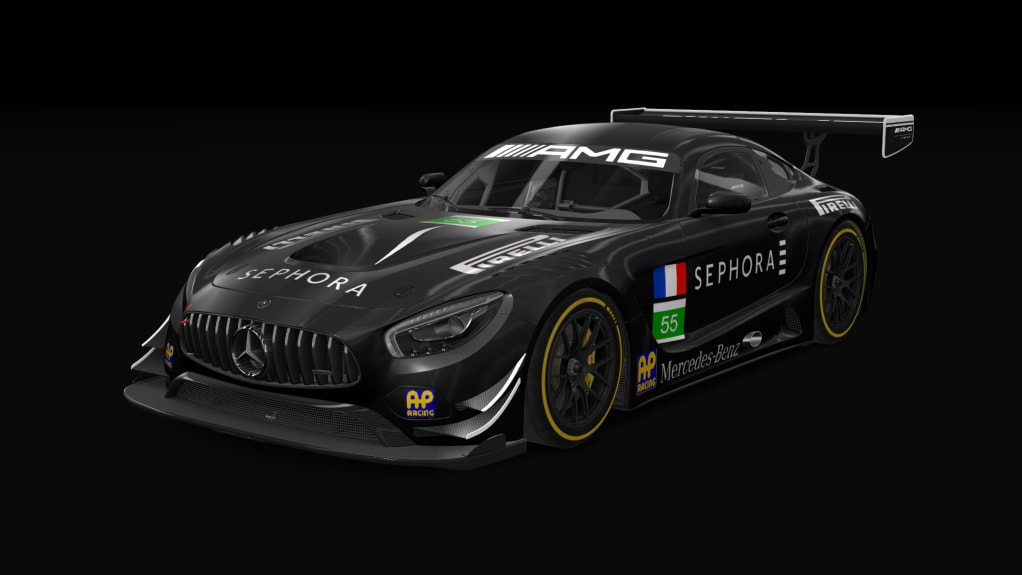
I have mostly started my own set of downloadable material for RaceDepartment since this past weekend. There were times in the past where people liked my work to where they wanted to know how they could download my work. I unfortunately didn't have any real place to consider uploading my work to. One individual visited my JMDesigns site, and this person wondered where my Sephora Mercedes-Benz AMG GT3 could be downloaded. After giving it some thought, I decided it would be now that I decided to post my work online. I made my uploading debut on RaceDepartment by featuring my Sephora Mercedes-Benz AMG GT3 for download. This then made me want to think about what other cars I should feature on RD. Even during Super Bowl LIII, I was working on one of my skin designs. I figure more people will want to see some quality skin work. So while many of the skins are basically just lying on my PC, I felt I need to update my skins to reflect newer art techniques and make them a bit more presentable. Or for those that I think are pretty fine as is, I basically will just release them cold turkey to RaceDepartment.

To anyone who has visited my JMDesigns site, there are portfolios of mine showcasing my work. Even the JMDesigns Store features links to my material online. I will work to provide more material in the future.


My Work So Far...

Let me share with you pictures of my work so far listed on RaceDepartment. Click on the images below the pictures to see my material in better detail and to download. Only items I have posted recently on RaceDepartment will be featured here. For more of my work, click on the link at the end of this section to see my most recent work published to RaceDepartment.

I am also posting these pictures in their original size. I have not tested out how these pictures all look, but I will do this as an experimental basis.

NOTE: You must set up an account on RaceDepartment to be able to download and review material posted there.


Assetto Corsa Sephora Mercedes-Benz AMG GT3

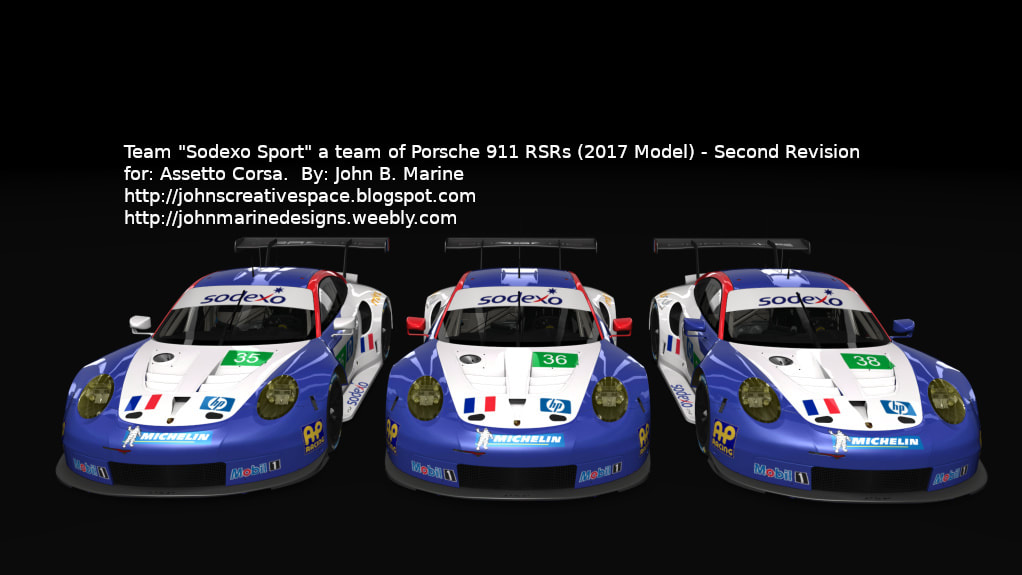
Assetto Corsa Sodexo Porsche Team

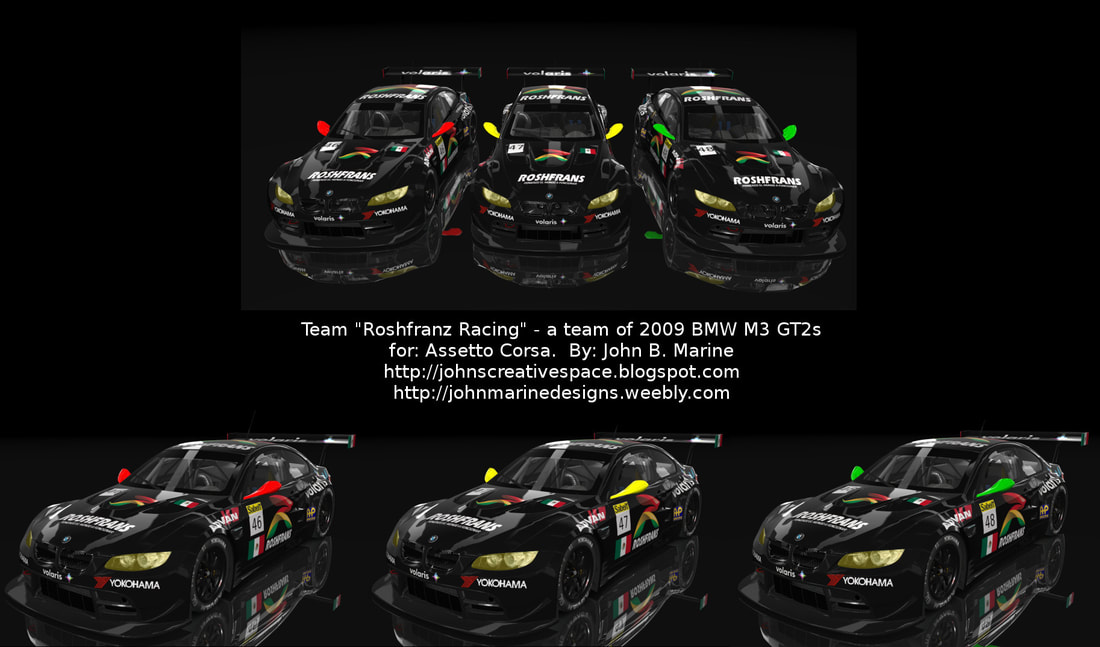
Assetto Corsa Roshfrans BMW M3 GT2 Team


All of the links provided are as accurate as the initial date of this blog post (February 5, 2019). To see all of my work on RaceDepartment, please visit this link:

JMDesigns


Special Request! Donations...

If you enjoy my work, please consider donating. I don't make my own money outside of my online work, and I would like to financially profit from my work in any way possible. So I suggest you offer a legitimate donation to me in any amount. I recommend a minimum donation of at least $2 USD donations through PayPal. Please support me any way you can. At least give me peace of mind knowing my work means something to others.

If you want to donate to me right now, then please use this item below:


Thank you for your cooperation. While donations are voluntary, I at least will appreciate any kind of monetary support I can receive.


It is hard to believe, but "John's Creative Space" is nearing its fifth anniversary! I want to thank all of you for helping support me and my work all this time so far. I also hope to continue this fine voyage for as long as I can. Until next time, thank you for reading! Take care and be well.

Subscribe to My Blog(s), and/or Follow on Bloglovin!
Subscribe to John's Blog Space (JBS) Subscribe to John's Creative Space (JCS) Subscribe to John's Race Space (JRS) Subscribe to StyleSpace (SS) Subscribe to John's Life Space (JLS)
Support My Creative Works!
JMDesigns Patreon Soundcloud Bandcamp Twitch OpenGameArt TurboSquid
Get Social With Me!
Facebook (Friends) Facebook (Fans) Twitter YouTube Instagram Google+ LinkedIn (professionals only)
Questions or Comments? Contact Me (serious inquiries only)...
Contact Me via E-Mail


read more...
JohnMarineDesigns on TurboSquid

Would you like to donate to support my creative work? If so, please show your support using this PayPal item:
I am now on Patreon! Support my creative work on Patreon today at: www.patreon.com/johnbmarine!
 
Copyright © 2015 John's Creative Space • All Rights Reserved.
Template Design by BTDesigner • Powered by Blogger
